

Avis sur ChMeetings : Avantages, inconve9nients, fonctionnalite9s et tarifs
ChMeetings se distingue par ses fonctionnalite9s comple8tes et sa conception conviviale, offrant aux e9glises un syste8me de gestion de9die9 efficace pour ge9rer leurs ope9rations.

Nous évaluons les outils de façon indépendante, et les commissions aident à financer nos tests. Consultez notre politique de transparence, notre méthodologie, ou suggérez un outil.
Church administration can become difficult to manage when member records, giving, events, volunteer schedules, and communications are spread across different tools. As ministries grow, keeping those moving parts organized without adding more manual work becomes increasingly important.
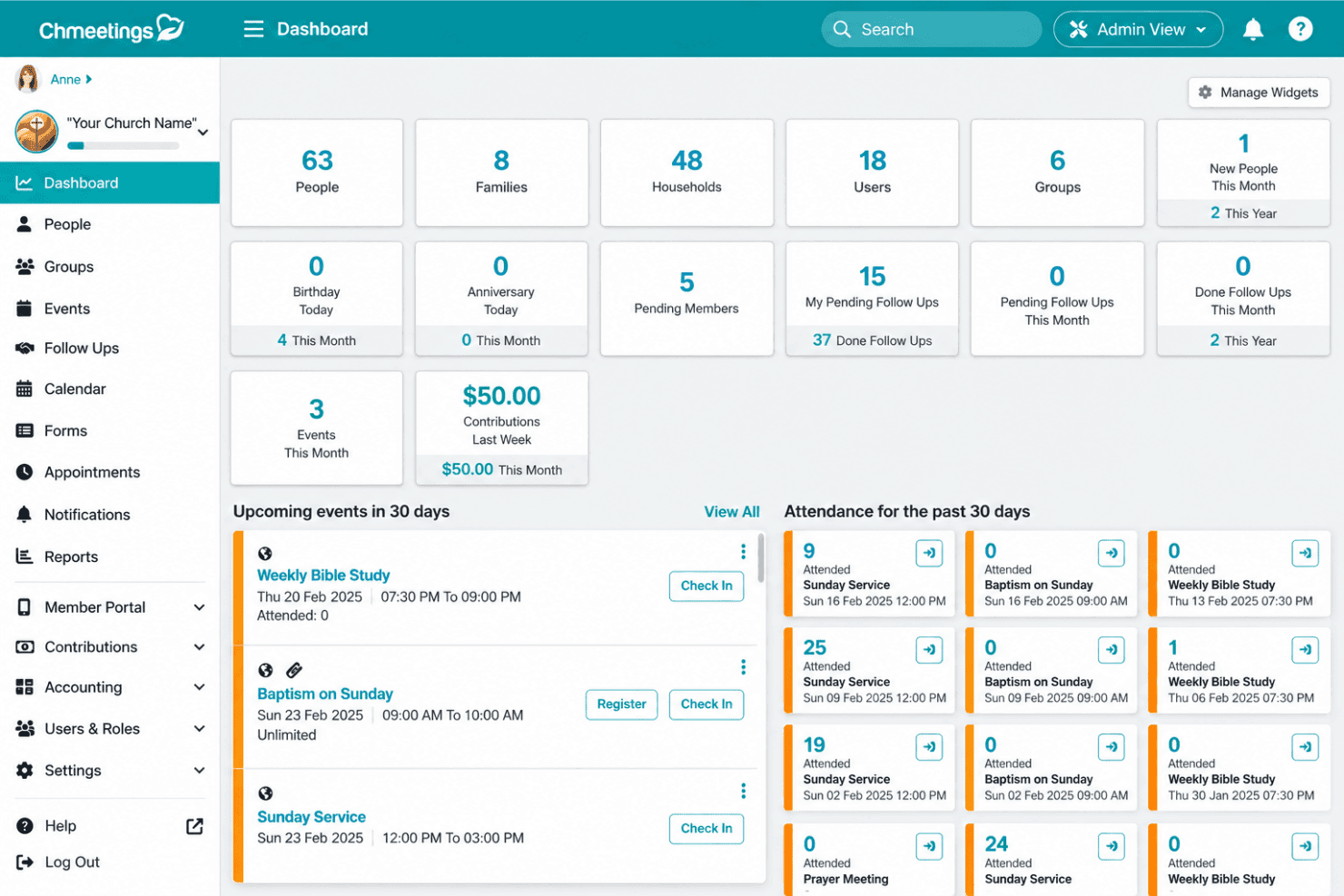
ChMeetings is an all-in-one church management software designed to help churches manage members, giving, events, volunteers, worship planning, communications, and other day-to-day operations from a central system. It also offers church accounting, member-facing tools, automation, and AI features for organizations ranging from small congregations to multi-campus churches and dioceses.
In this review, I’ll help you assess whether ChMeetings is the right fit for your church.
ChMeetings Evaluation Summary
4.9/5
- From $12/month
- Free plan available + 30-day free trial
Pourquoi faire confiance à nos recommandations de logiciels
6,700+
Reviews
20
Industry experts
16+
Evaluation factors
14
Years
Notre équipe teste et évalue des logiciels depuis 2012. En tant que dirigeants d’église nous-mêmes, nous savons à quel point il est difficile — et important — de choisir le bon logiciel.
Pour ce guide, nous avons évalué les outils grâce à des tests pratiques et une recherche indépendante, en notant les outils selon nos critères de sélection.
Nos avis reflètent notre jugement éditorial humain, et non un argumentaire de vente.
ChMeetings Overview
In my opinion, ChMeetings stands out for the breadth of church administration it brings into one system, covering member management, giving, events, volunteer scheduling, worship planning, communications, and fund accounting. Its member portal, mobile app, AI-assisted tools, and support for multi-church and diocesan structures add useful depth beyond basic membership tracking. The main trade-offs are US-only data residency, some important features being limited to higher plans, and extra costs for certain add-ons and messaging services.
Pros
- Combines member management, giving, events, volunteers, worship planning, communications, and fund accounting in one church-focused system.
- Member portal and mobile app let congregants update profiles, register for events, give online, and receive church communications directly.
- Built-in AI supports tasks such as people searches, form creation, and email drafting, while read-only AI connections can query church data without changing records.
Cons
- Customer data is hosted only in the United States, with no option to choose another hosting region.
- Some capabilities, including accounting and appointments, require higher paid plans.
- SMS and voice messaging require additional credits, adding usage-based costs beyond the subscription price.
Is ChMeetings Right For Your Needs?
Who Would be a Good Fit for ChMeetings?
ChMeetings is a good fit for churches and faith-based organizations that want to manage people, giving, events, volunteers, communications, worship planning, and finances in the same system. It can support everything from small congregations to multi-campus churches and dioceses, with features that become more useful as administrative needs grow.
- Small and Growing ChurchesSmaller churches can start with core member, giving, event, and communication tools, then expand into more advanced features as their needs grow.
- Mid-Sized and Large ChurchesLarger congregations can manage membership, attendance, giving, volunteers, worship planning, accounting, forms, and follow-ups without splitting those workflows across several systems.
- Multi-Campus ChurchesMulti-location churches can organize people, ministries, groups, events, and permissions across locations while maintaining centralized administration.
- Dioceses and Church NetworksDioceses can oversee multiple independent churches, manage shared members and reporting, and run elections while allowing each church to manage its own operations.
- Churches Consolidating Multiple ToolsChurches using separate systems for membership, giving, worship planning, communications, and accounting can bring more of those workflows into ChMeetings.
- Faith-Based Nonprofits and MinistriesChristian nonprofits and ministries with similar needs around membership, donations, events, groups, and fund accounting may also be a good fit.
Who Would be a Bad Fit for ChMeetings?
ChMeetings is less suitable when an organization’s main requirements fall outside church or faith-based administration. It can also be a poor fit when data residency, specialist integrations, or free-only usage are non-negotiable.
- General BusinessesBusinesses focused on sales pipelines, inventory, retail operations, or other commercial workflows will usually be better served by purpose-built business software.
- Organizations Requiring Regional Data HostingOrganizations that require customer data to be hosted outside the United States are not a good fit because ChMeetings does not currently offer regional hosting options.
- Free-Only Organizations With Larger DatabasesChurches that need to stay entirely on a free plan but exceed its people or feature limits will need another option.
- Organizations With Mandatory Specialist IntegrationsOrganizations that depend on a specific specialist system should verify compatibility first, as unsupported integrations could rule ChMeetings out.
- Organizations Outside Faith-Based or Membership WorkflowsOrganizations whose operations do not center on members, donations, groups, events, or fund accounting may get more value from software built for their sector.
Comment nous testons et évaluons les outils
Nous avons passé des années à construire, affiner et améliorer notre système de test et d’évaluation de logiciels. Notre grille a été conçue pour saisir les nuances de la sélection de logiciels et ce qui rend un outil efficace, en mettant l’accent sur les aspects critiques du processus de prise de décision. Vous trouverez ci-dessous exactement comment notre système d’évaluation fonctionne selon sept critères. Cela nous permet de fournir une évaluation impartiale du logiciel basée sur les fonctionnalités de base, les caractéristiques remarquables, la facilité d’utilisation, l’intégration, l’assistance client, les intégrations, les avis clients et le rapport qualité/prix.
Fonctionnalités de base (25 % de la note finale)
Le point de départ de notre évaluation est toujours la fonctionnalité de base de l’outil. Dispose-t-il des fonctionnalités et options fondamentales qu’un utilisateur s’attendrait à trouver ? Certaines de ces fonctionnalités essentielles sont-elles réservées à des forfaits plus chers ? Nous attendons d’un outil qu’il soutienne efficacement la comparaison avec les capacités minimales de ses concurrents.
Fonctionnalités remarquables (25 % de la note finale)
Ensuite, nous évaluons les fonctionnalités remarquables ou uniques qui dépassent la simple fonctionnalité de base habituellement proposée dans ce type d’outils. Un score élevé reflète des caractéristiques spécialisées ou atypiques qui rendent le produit plus rapide, plus efficace, ou offrent une valeur ajoutée à l’utilisateur. Nous évaluons aussi la facilité d’intégration à d’autres outils généralement présents dans la pile technologique pour élargir la fonctionnalité et l’utilité du logiciel. Les outils offrant de nombreuses intégrations natives, des connexions tierces et un accès à une API pour créer des intégrations personnalisées obtiennent les meilleurs scores.
Facilité d’utilisation (10 % de la note finale)
Nous considérons la rapidité et la simplicité avec laquelle il est possible d’effectuer les tâches relevant des fonctions de base grâce à l’outil. Les logiciels les mieux notés sont bien conçus, intuitifs, proposent des applications mobiles, offrent des modèles prêts à l’emploi et simplifient des tâches relativement complexes.
Intégration et prise en main (10 % de la note finale)
Nous savons à quel point il est important d’assurer une adoption rapide de la plateforme par les équipes. Nous évaluons donc la simplicité d’apprentissage et d’utilisation d’un outil avec très peu de formation. Nous vérifions à quelle vitesse un membre de l’équipe peut s’installer et commencer à utiliser l’outil sans expérience préalable. Les solutions les mieux notées nécessitent peu ou pas du tout de support.
Support client (10 % de la note finale)
Nous vérifions la rapidité et la facilité avec lesquelles il est possible de sortir une impasse et d’obtenir de l’aide par téléphone, chat en direct ou base de connaissance. Les outils/entreprises qui offrent un support en temps réel obtiennent la meilleure note, tandis que les chatbots obtiennent la moins bonne.
Avis clients (10 % de la note finale)
Au-delà de notre propre test et évaluation, nous tenons compte du score net de recommandation des clients actuels et passés. Nous examinons leur probabilité, à l’avenir, de choisir à nouveau cet outil pour la fonctionnalité de base. Un logiciel très bien noté reflète un score de recommandation élevé de la part de ses utilisateurs actuels ou anciens.
Rapport qualité/prix (10 % de la note finale)
Enfin, en tenant compte de tous les autres critères, nous examinons le prix moyen des offres d’entrée de gamme au regard des fonctionnalités essentielles et la valeur offerte selon les autres critères d’évaluation. Les logiciels qui offrent plus, pour moins cher, obtiennent une meilleure note.
Core Features
People and Group Management
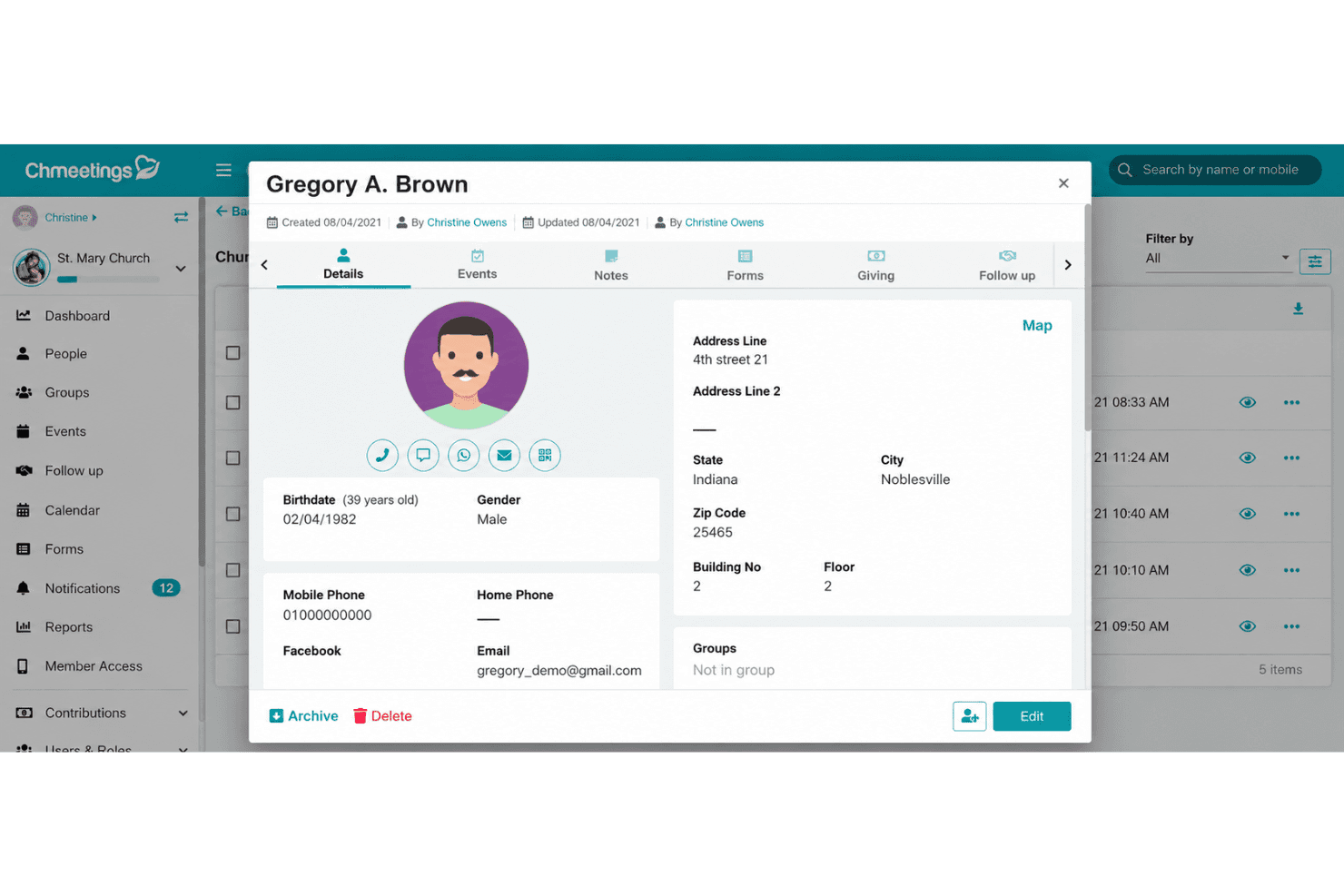
Maintain member and household profiles, ministry involvement, custom fields, and group assignments in a central directory. Leaders can update records in bulk, merge duplicates, create filtered groups, and assign access based on staff or volunteer roles.
Giving and Church Accounting
Track online and offline contributions, pledges, funds, budgets, bank transactions, and financial reports within the same system. Connecting giving records with fund accounting helps churches keep donor activity and financial records more closely aligned.
Events, Check-In and Volunteer Scheduling
Create free or paid events, manage registrations, schedule volunteers, and track attendance from desktop or mobile devices. ChMeetings also supports QR-code check-in and child check-in with family tracking and name-tag printing.
Worship Planning
Build service plans with songs, prayers, sermons, announcements, and other service elements in order. Teams can maintain a song library, assign worship and technical roles, and coordinate responsibilities for upcoming services.
Communications, Forms and Follow-Ups
Send email, SMS, voice messages, and push notifications to members or groups, while follow-up tools help teams manage outreach to visitors and congregants. Custom forms can collect information, update member profiles, accept payments, and track responses.
Member Portal and Mobile App
Members can use ChMeetings on web and mobile to update profiles, access groups, register for events, give online, and receive church communications. Churches can also add the optional Custom Branded Church App with their own name, logo, colors, and member-facing features such as group chat, prayer requests, sermon media, volunteering, events, giving, and push notifications.
Standout Features
AI-Assisted Church Administration
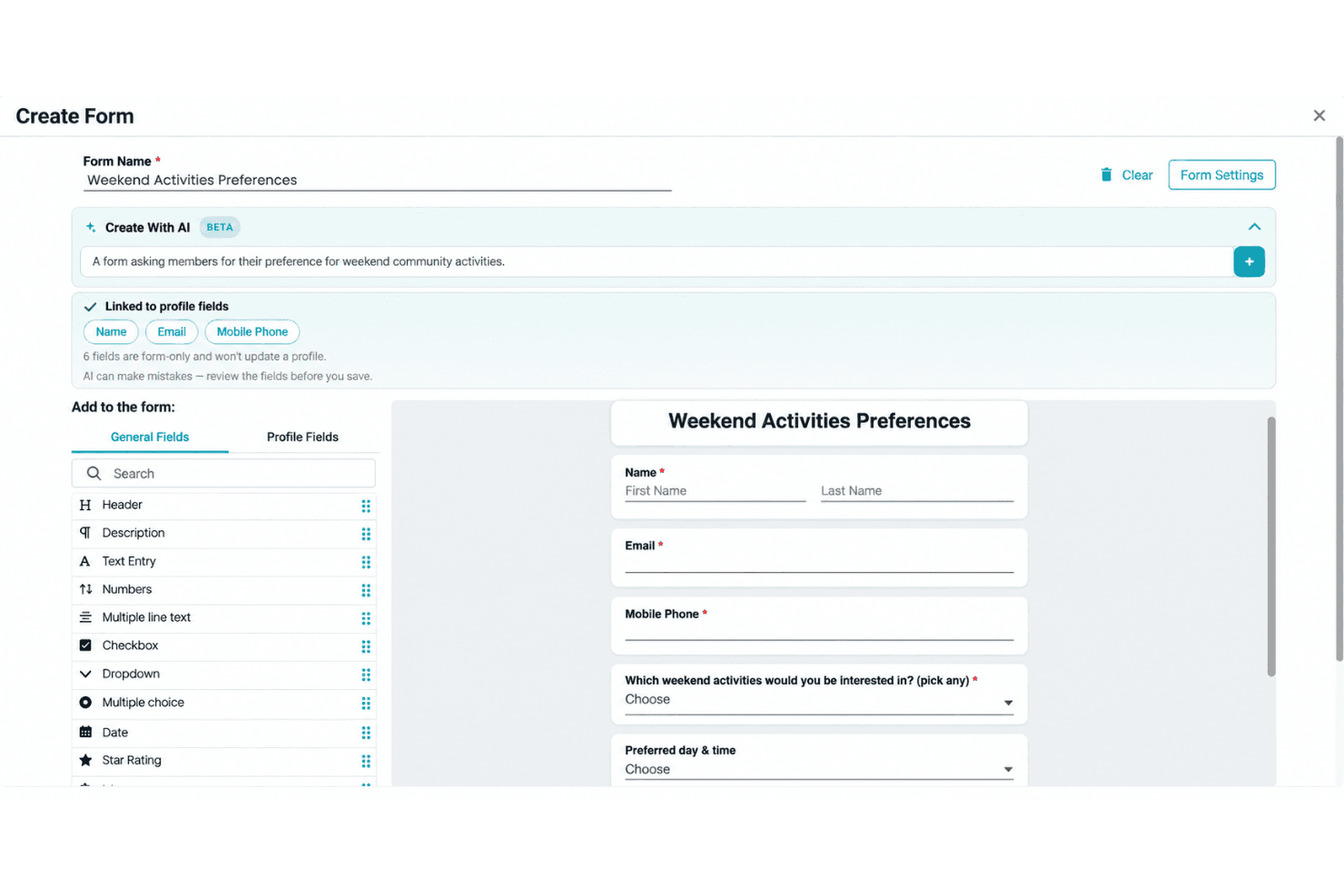
ChMeetings uses AI for everyday administrative tasks, including turning natural-language people searches into reviewable filters, creating forms, and drafting emails. Churches can also connect compatible external AI tools to their data through a read-only connection, allowing teams to ask questions about church records without giving the AI permission to modify them.
Diocese and Multi-Church Management
ChMeetings supports dioceses and larger organizations that need centralized oversight across multiple independent churches. Each church can manage its own operations while the parent organization oversees reporting and administration, with support for shared members and diocesan elections from nominations through voting and results.
Ease of Use
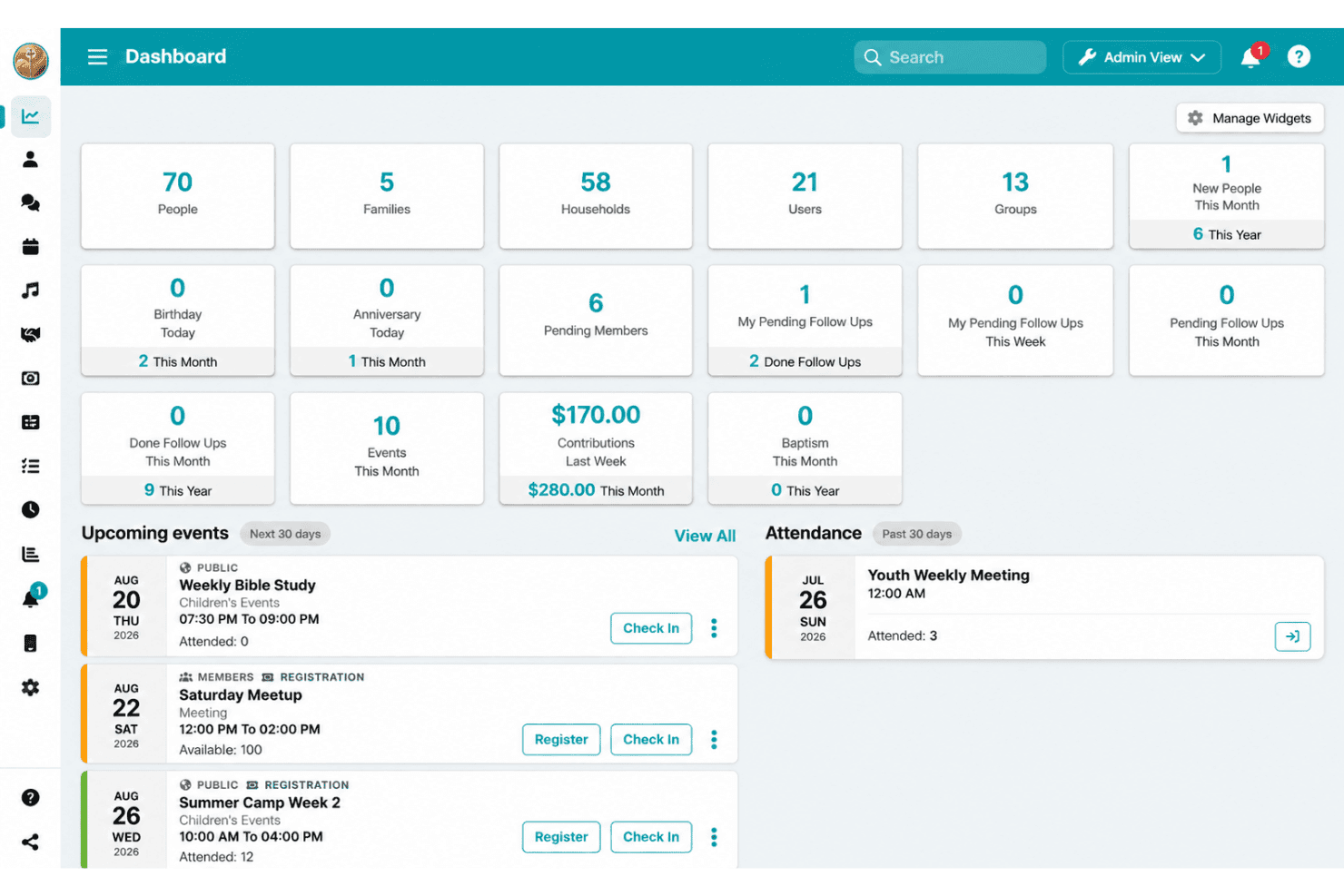
ChMeetings packs a lot into the interface, so I wouldn’t call it minimalist. You’re moving between member records, groups, giving, events, worship planning, accounting, and follow-ups, which naturally takes some getting used to. The upside is that most day-to-day tasks stay inside the same system, so churches willing to spend a little time learning the layout can avoid juggling several separate tools.
Onboarding
Getting started can be self-serve, but ChMeetings also offers a free guided onboarding session if you want someone to walk you through setup. The bigger advantage is migration: every paid plan includes free data transfer, including accounting records, handled by a dedicated migration team. They import and validate the data before the church reviews it, and most migrations take around 3–10 business days depending on the size and complexity of the source data.
Customer Support
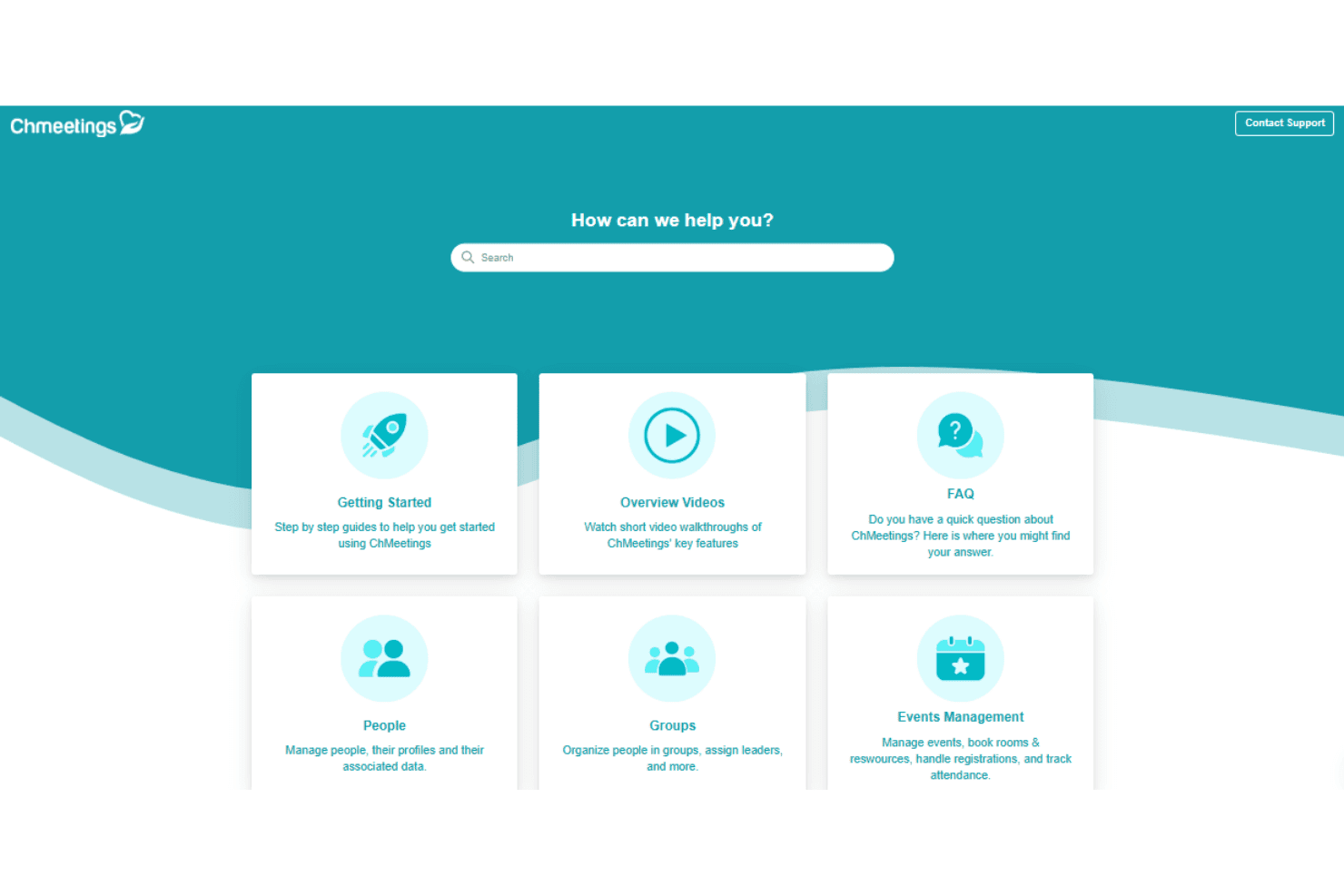
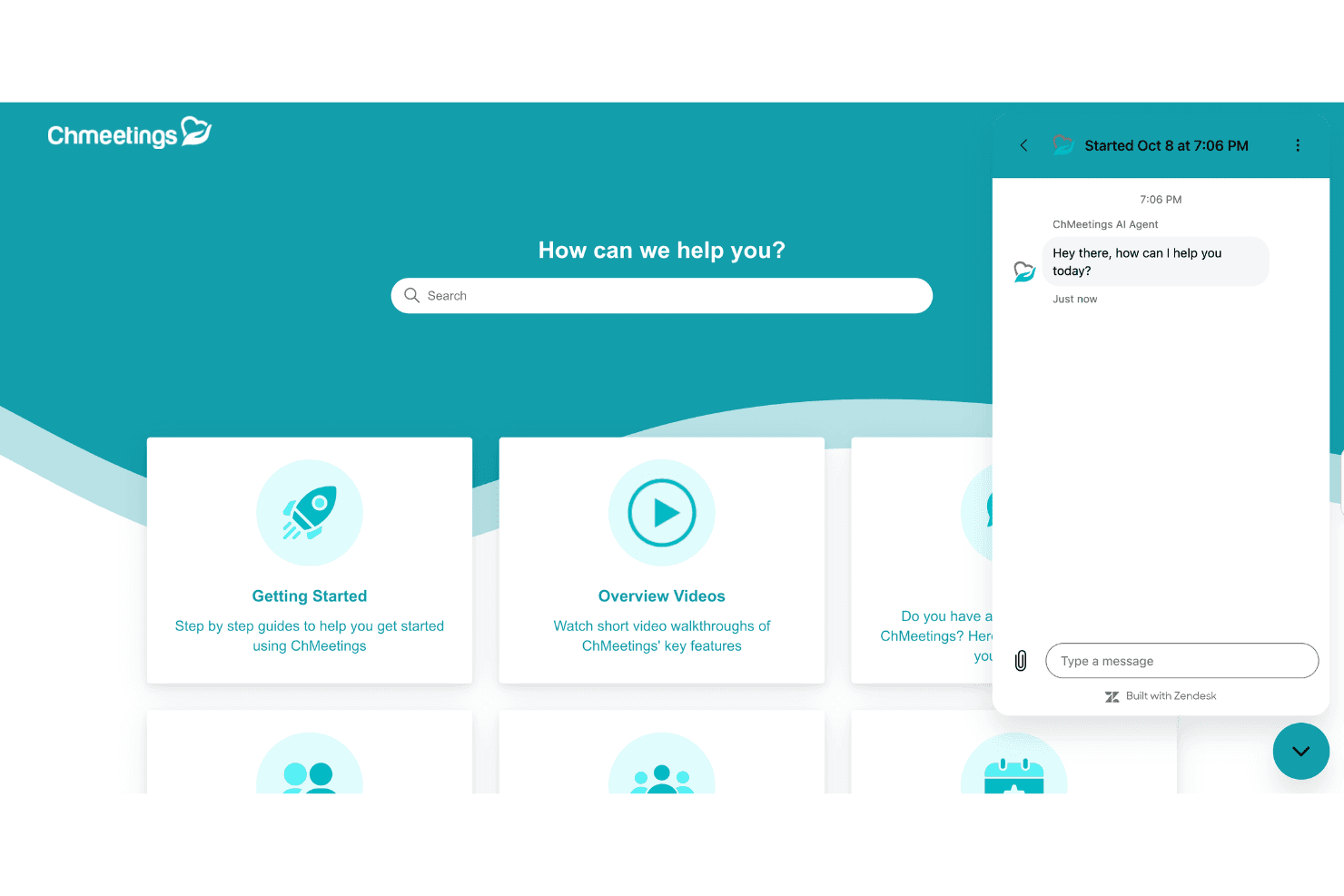
Support is one of the areas where ChMeetings feels more hands-on. Church admins can use phone, live chat, Zoom, help articles, and video walkthroughs rather than relying on documentation alone. That matters with a system this broad, especially when the person managing it may be a pastor, volunteer, or church administrator rather than someone with a technical background.
Integrations
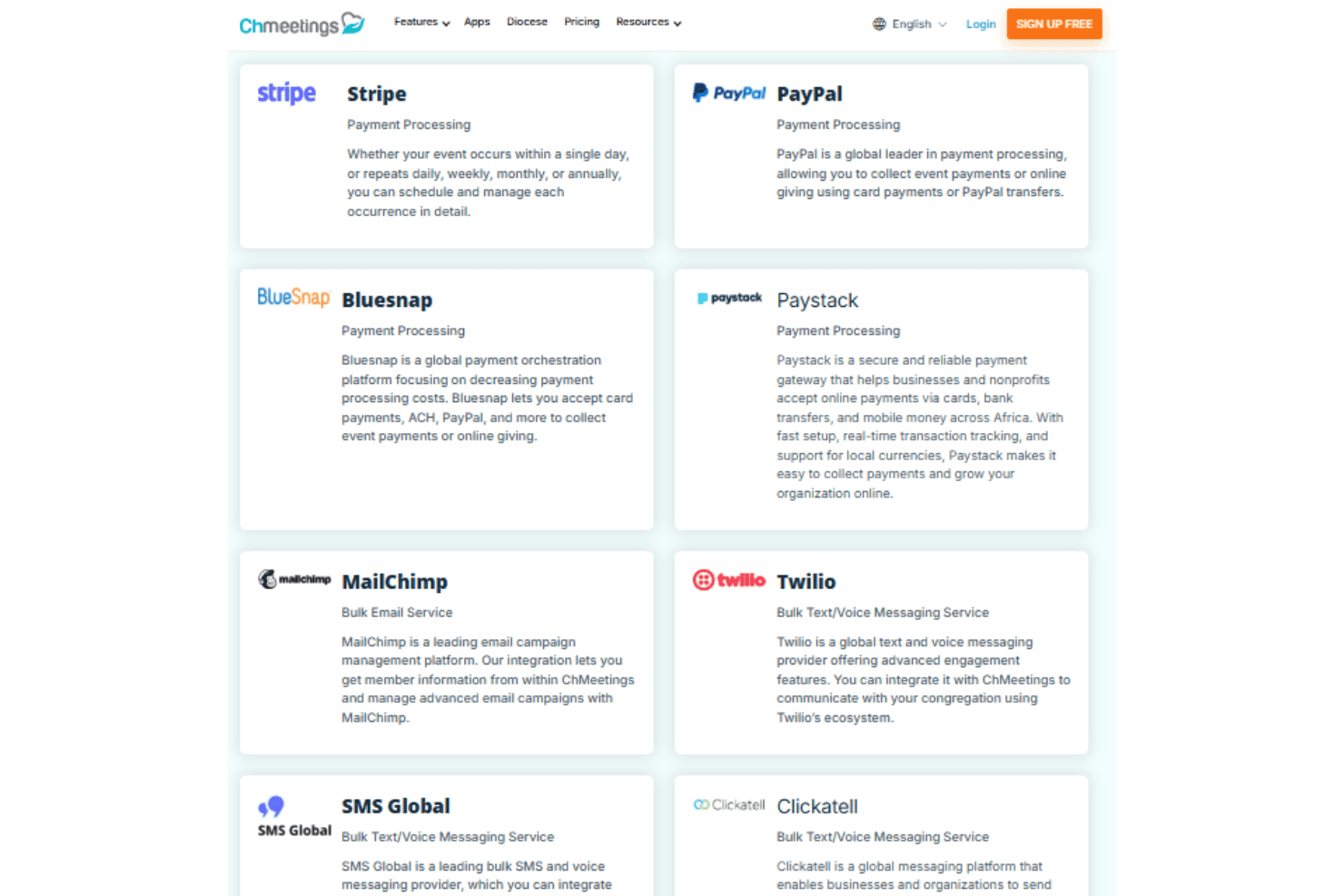
ChMeetings integrates with Stripe, PayPal, Paystack, MailChimp, Twilio, SMSGlobal, Clickatell, EazismsPro, Bulk SMS Nigeria, and Telstra Whispir, among others.
It also supports a developer API and webhooks for custom integrations, while Zapier can connect ChMeetings with third-party tools such as Zeffy.
Value for Money
ChMeetings offers a broad set of church management tools for the cost, with pricing based on active people rather than admin seats. Archived and deleted records do not count toward plan limits, and there is no cap on administrators, so churches do not have to pay more simply to give additional staff or volunteers access. ChMeetings also does not charge its own transaction fee on donations, although payment processor fees still apply. Paid plans include free data migration, while the custom branded app and certain third-party services come at an additional cost.
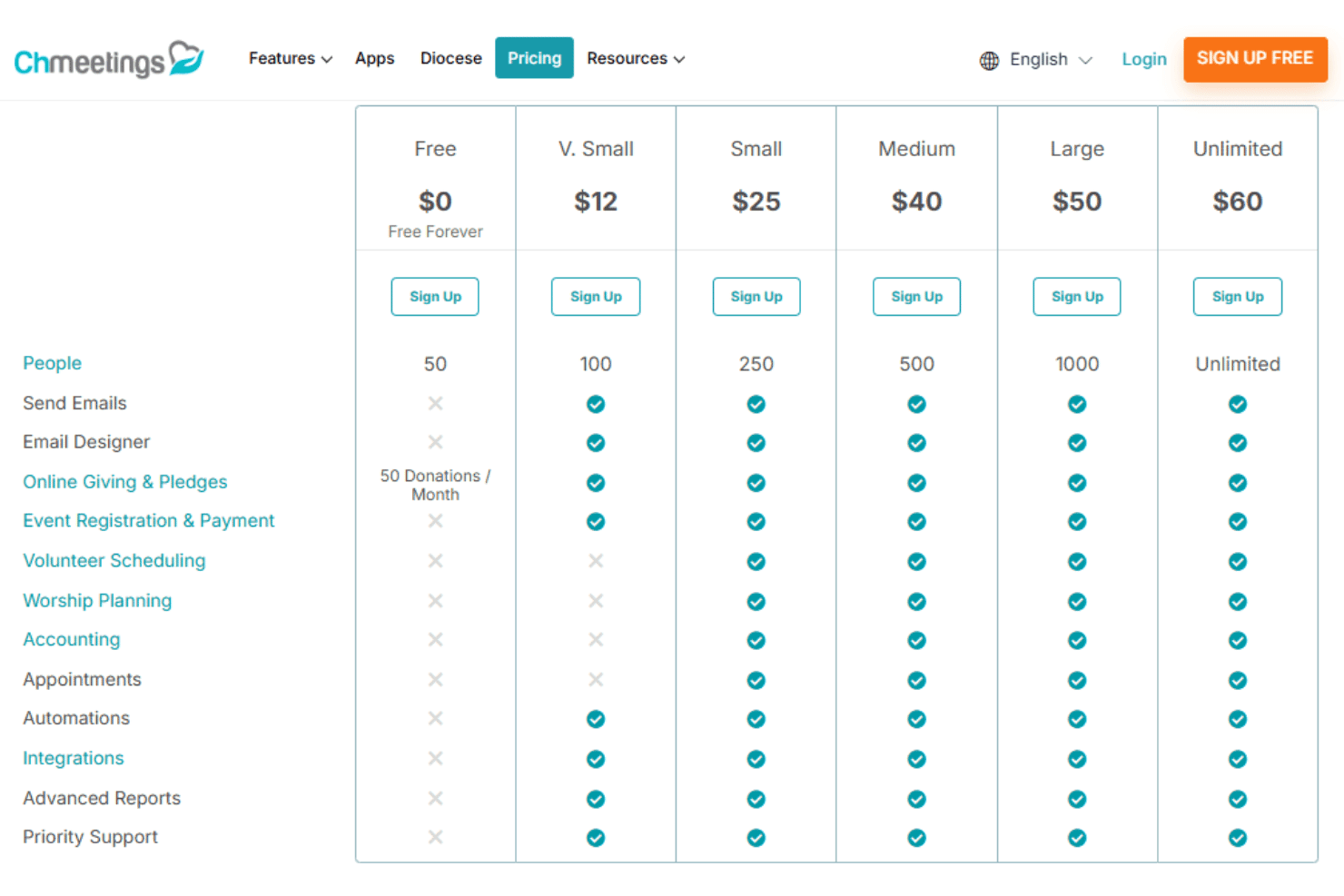
- Free: Includes people and group management, contribution tracking and pledges, basic event registration and check-in, forms, follow-ups, the member portal, mobile app access, and general reporting. Online giving is limited to 50 donations per month, and features such as email, automation, accounting, and volunteer scheduling are excluded.
- V. Small: Adds email, paid and guest event registration, automated tasks, expanded member portal and form capabilities, free data migration, and priority support. It does not include accounting, appointments, volunteer scheduling, or worship planning.
- Small: Adds volunteer scheduling, worship planning, appointments, and church accounting, making this the first tier with ChMeetings’ broader operational and financial toolset.
- Medium: Includes the same major feature set as Small while increasing the number of active people the church can manage.
- Large: Retains the same major feature set with a higher active-person allowance for larger congregations.
- Unlimited: Removes the active-person limit and adds elections management, including nominations, candidate confirmation, voting, and results.
New Product Updates from ChMeetings
 Opens new window
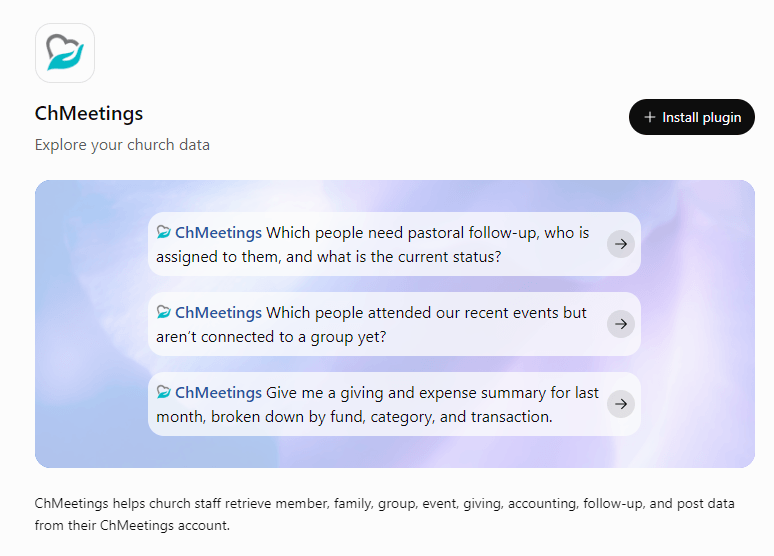
ChMeetings Adds ChatGPT Store Integration
ChMeetings is now available in the ChatGPT Store, allowing users to connect their church account and query key information using natural language. This helps leaders quickly retrieve insights from existing records without manual reporting, while keeping the integration read-only. Highlights include:
- ChatGPT Store Integration: Connect a ChMeetings account to ChatGPT using an API key.
- Plain-Language Queries: Ask questions about people, groups, giving, and attendance without building reports manually.
- Follow-Up Questions: Continue exploring retrieved data with additional questions in the same conversation.
- Read-Only Access: Retrieve and summarize records without adding, editing, or deleting church data.
- Admin-Controlled Connection: Require an Owner or Administrator account to generate the API key.
Visit ChMeetings’ official site for more details.
 Opens new window
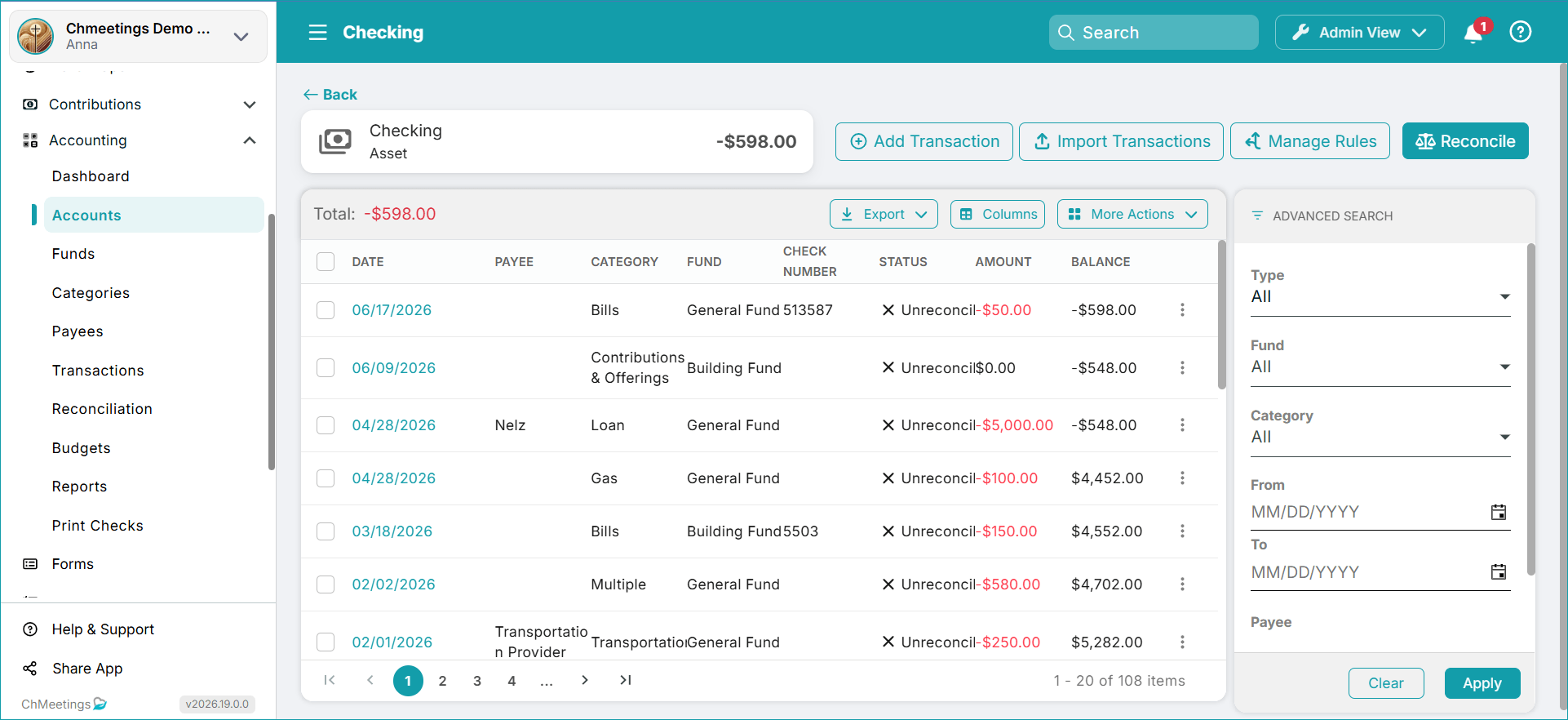
ChMeetings Improves Reconciliation and Adds Fund By Month Report
ChMeetings adds faster access to reconciliation, preserved statement details and selected transactions, and a new Fund By Month report. These updates reduce repeated setup work and make fund balances easier to review over time. Highlights include:
- Reconcile Button: Start reconciliation directly from the Account page.
- Save-for-Later Support: Keep statement details and selected transactions when pausing reconciliation.
- Fund By Month Report: Review available fund amounts month by month for a selected period.
- First Reconciliation Guidance: Get added support when reconciling without a beginning balance.
Visit ChMeetings’ official site for more details.
 Opens new window
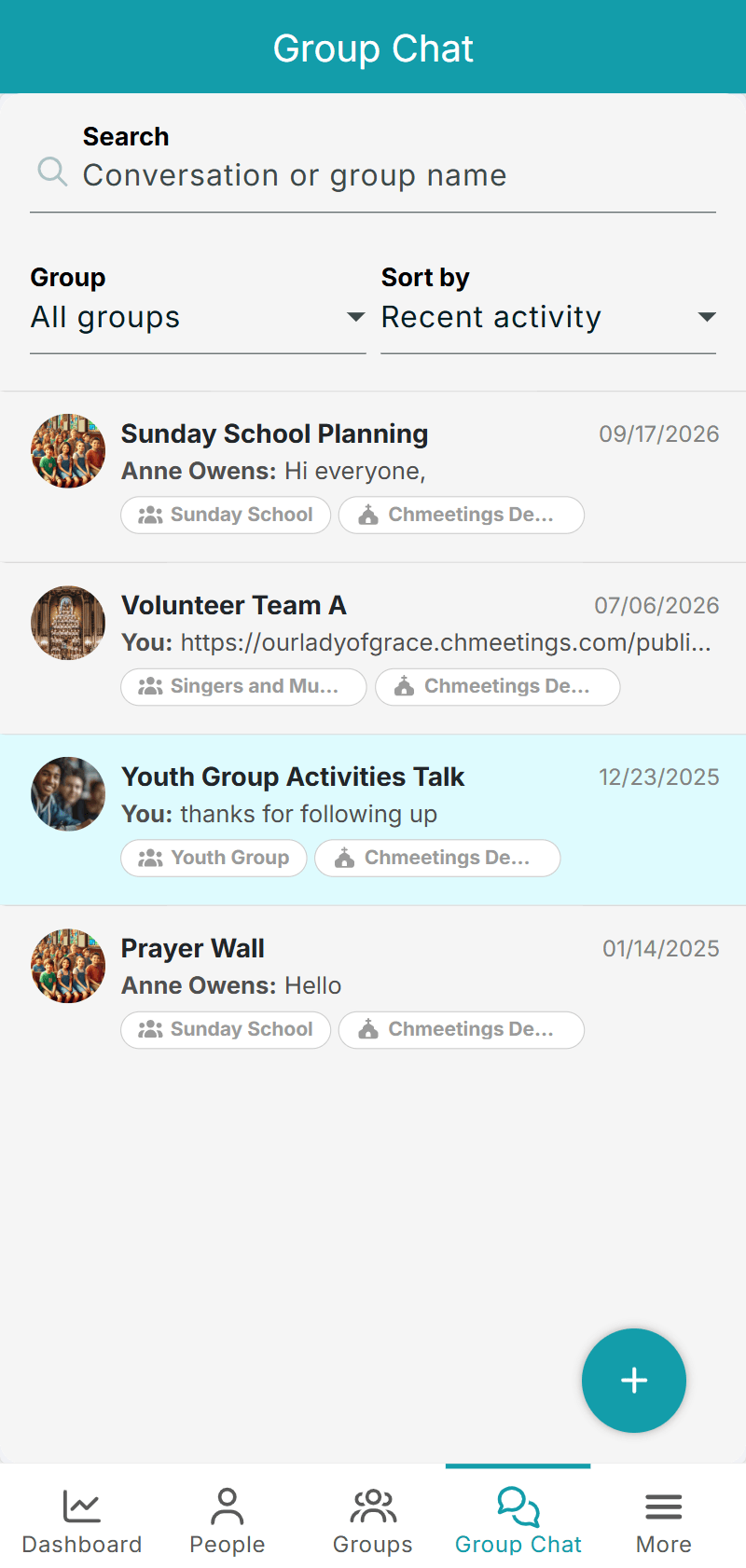
ChMeetings Adds Group Chat Search, Filters, and Sharing
ChMeetings adds search, group filters, sorting options, external sharing, and duplicate-name warnings to Group Chat. These updates make conversations easier to manage and reduce the chance of creating duplicate threads. Highlights include:
- Conversation Search: Find existing Group Chat conversations more quickly.
- Filtering and Sorting: Filter by group and sort conversations by activity, name, or group.
- Message Sharing: Share messages and photos from Group Chat to other apps.
- Duplicate Warnings: Get notified when a conversation with the same name already exists in the selected group.
Visit ChMeetings’ official site for more details.
 Opens new window
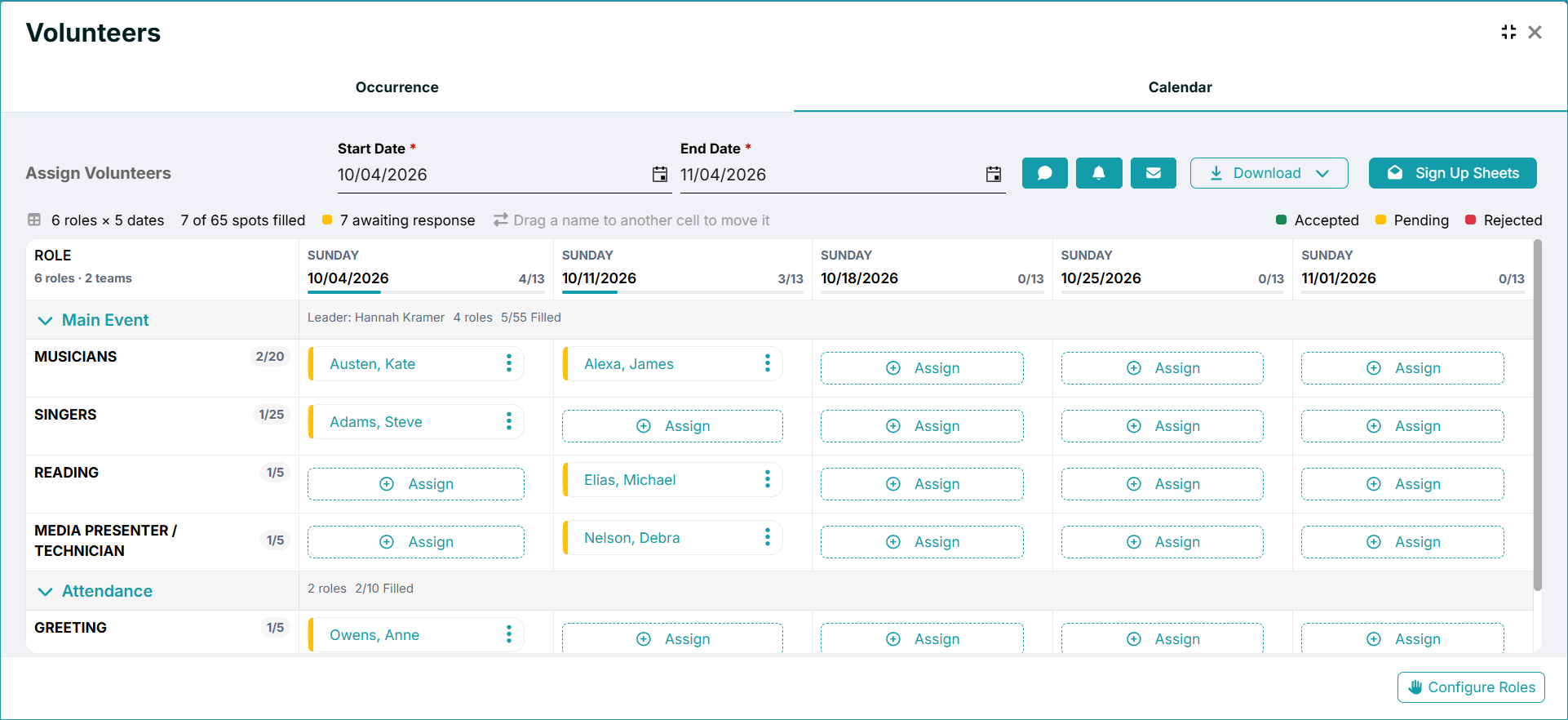
ChMeetings Adds Room Booking and Volunteer Scheduling Updates
ChMeetings adds room and resource reservations for one-time and recurring events, along with a redesigned Volunteer Calendar with clearer role and date views, response indicators, and direct volunteer management. These updates make event planning and volunteer scheduling easier to manage in one workflow. Highlights include:
- Rooms and Resources: Reserve rooms and event resources for one-time or recurring events.
- Conflict Warnings: Flag overlapping bookings or requests that exceed available quantities.
- Recurring Adjustments: Change reservations for individual dates within recurring events.
- Volunteer Calendar: View roles and dates through collapsible teams with clearer scheduling controls.
- Response Indicators: See whether volunteers have accepted, rejected, or not yet responded.
- Excel Export: Download volunteer schedules in calendar or list format.
Visit ChMeetings’ official site for more details.
 Opens new window
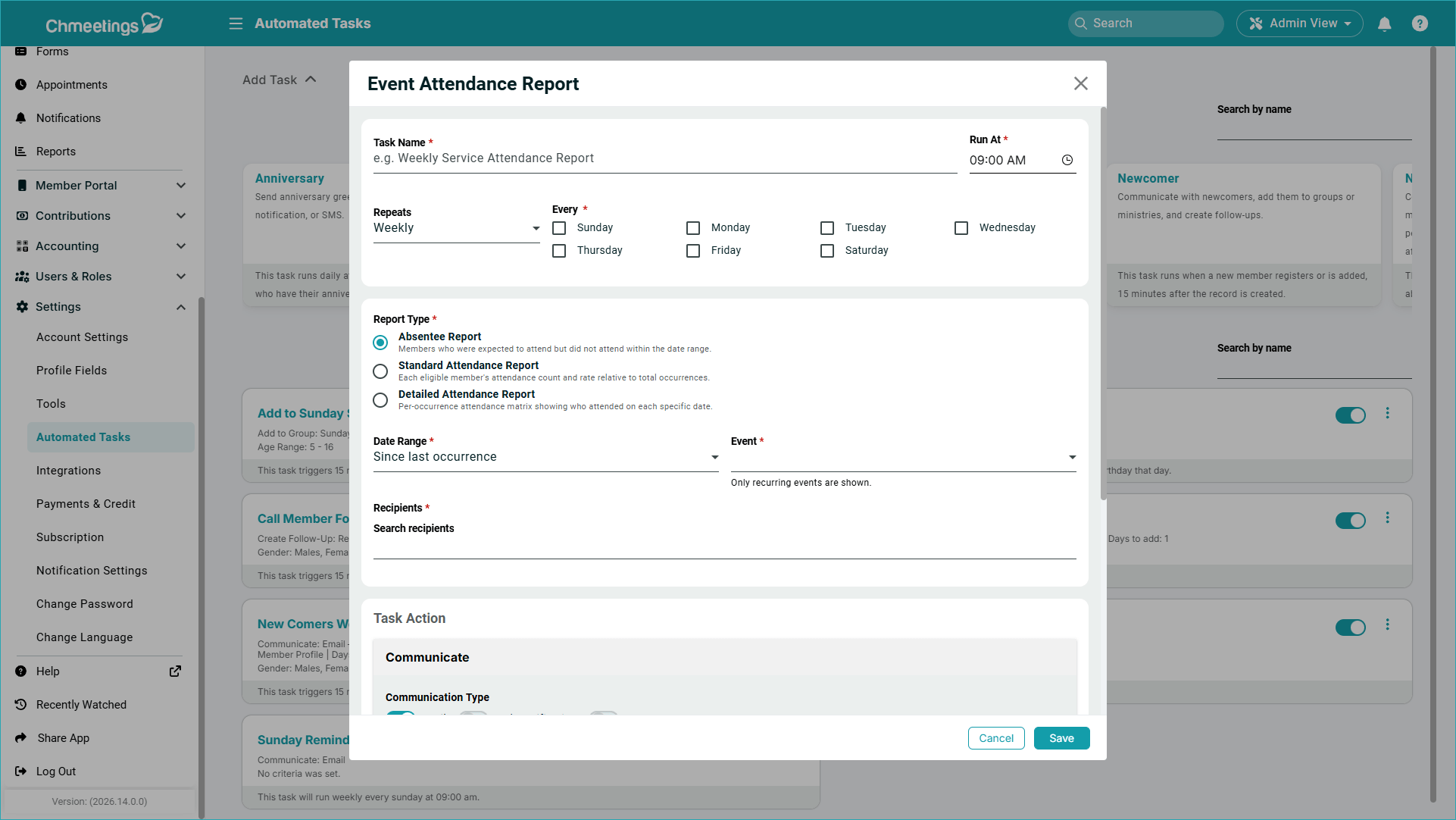
ChMeetings Adds Project Management and Attendance Automation
ChMeetings adds project and task management, automated attendance reporting, automatic profile field updates, and more date options for reminder tasks. These updates help teams manage projects, assign work, distribute attendance data, and automate recurring member administration more efficiently. Highlights include:
- Project and Task Management: Lets teams create projects and track tasks with statuses, assignees, checklists, notes, and member-linked assignments.
- Automated Attendance Reports: Sends absentee, standard, or detailed attendance reports for selected events and date ranges to chosen recipients.
- Profile Field Updates: Automatically updates member profile fields through supported automated task types.
- Expanded Date Reminders: Adds more trigger options, including birthdays, anniversaries, baptism dates, and custom date fields.
Visit ChMeetings’ official site for more details.
 Opens new window
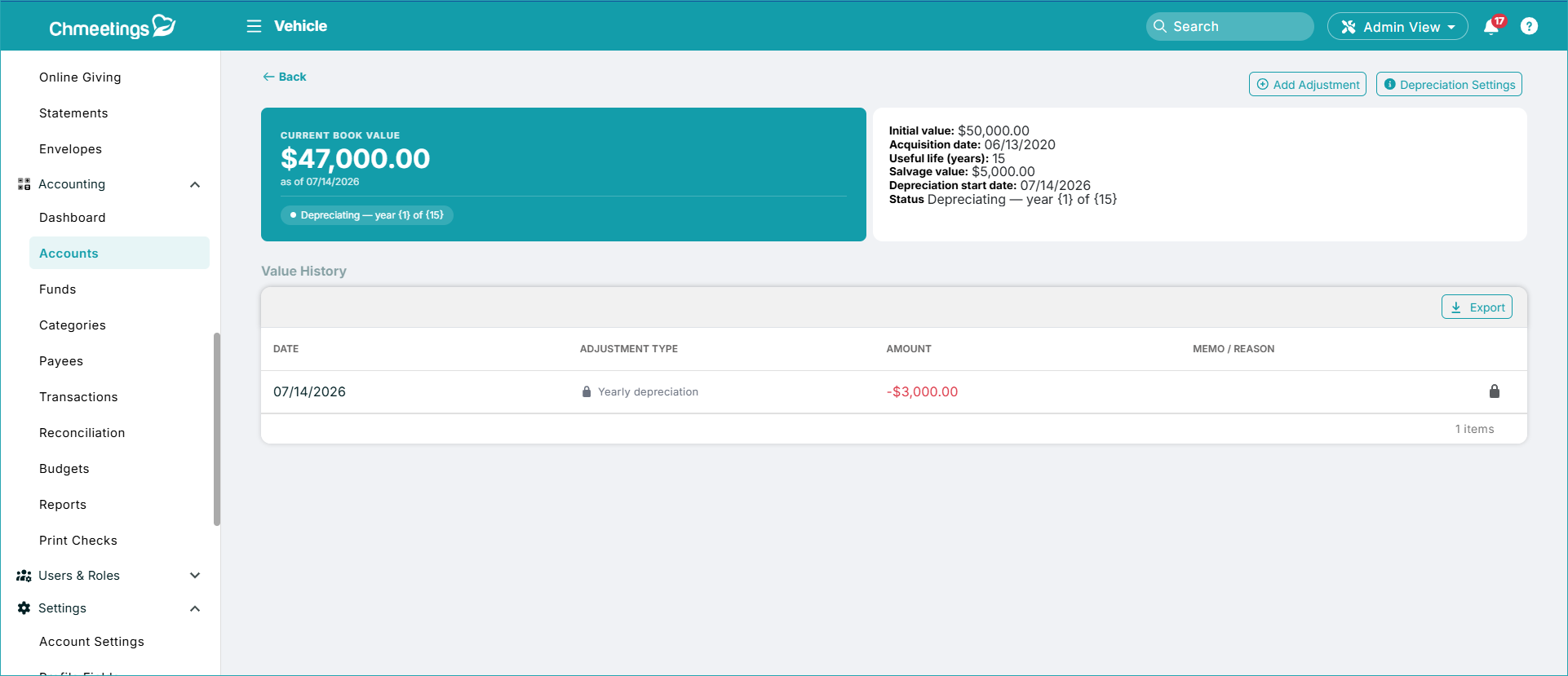
ChMeetings Adds Fixed Asset Management
ChMeetings adds Fixed Asset Management for recording long-term assets, tracking depreciation, and adjusting asset values when needed. The feature connects asset records with financial reporting so churches can reflect long-term property more accurately on the balance sheet. Highlights include:
- Asset Tracking: Records long-term assets such as buildings, vehicles, and equipment.
- Depreciation: Tracks depreciation over time for recorded assets.
- Value Adjustments: Lets users make manual adjustments to an asset’s recorded value.
- Balance-Sheet Reporting: Reflects fixed assets in financial reporting for clearer accounting records.
Visit ChMeetings’ official site for more details.
 Opens new window
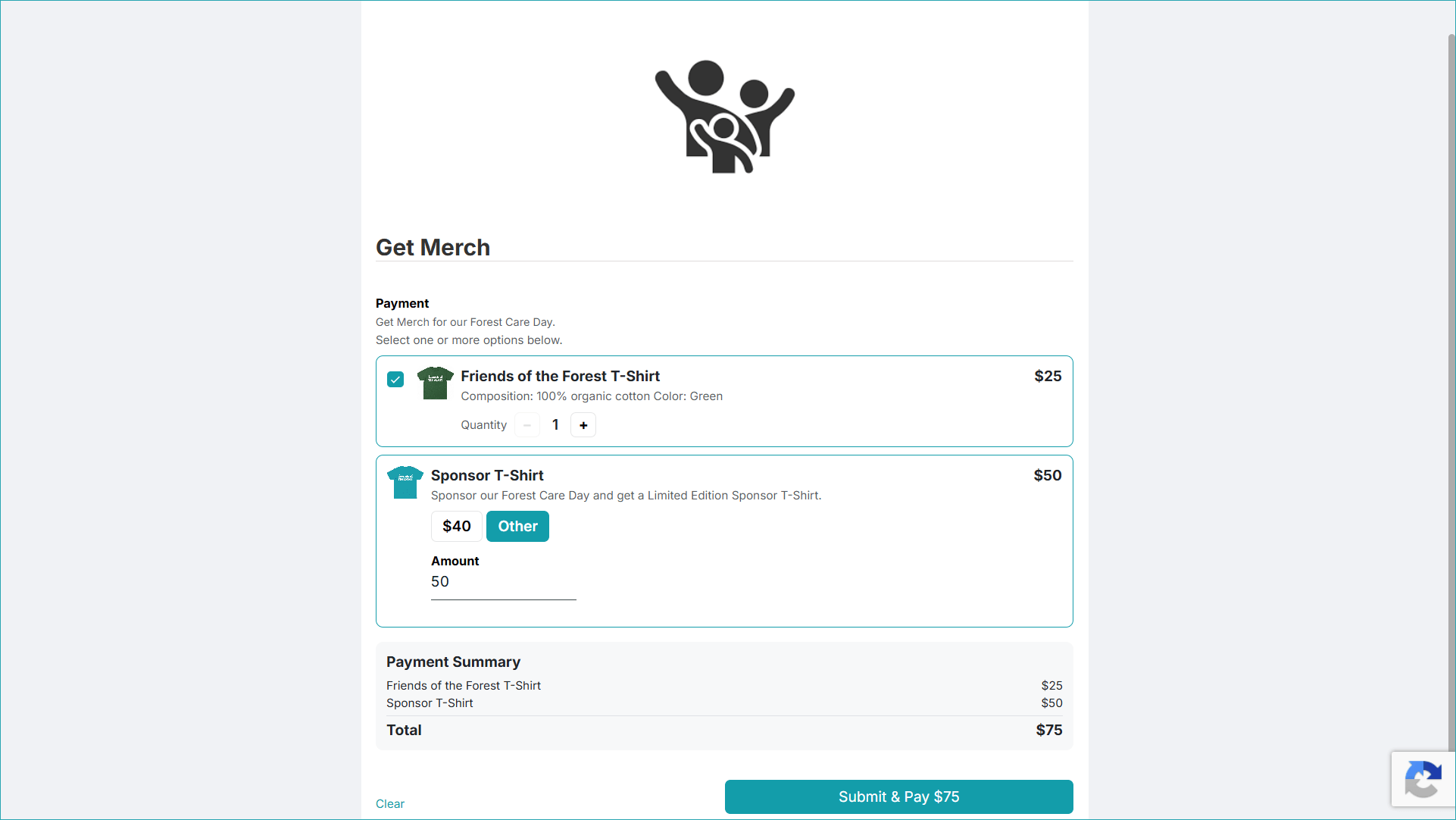
ChMeetings Adds Payments and Expanded Form Management
ChMeetings adds payment fields, form-level management permissions, and automatic profile creation for new form respondents. The updates expand forms beyond data collection by supporting payments and donations, delegated management, and member onboarding. Highlights include:
- Payments via Forms: Lets users pay fixed or custom amounts during submission, with support for sales, donations, contribution recording, and refunds.
- Form Managers: Lets organizations assign individual users as form managers or provide read-only access to specific forms.
- Automatic Profile Creation: Creates member profiles from qualifying form submissions and can automatically add new members to a group.
Visit ChMeetings’ official site for more details.
 Opens new window
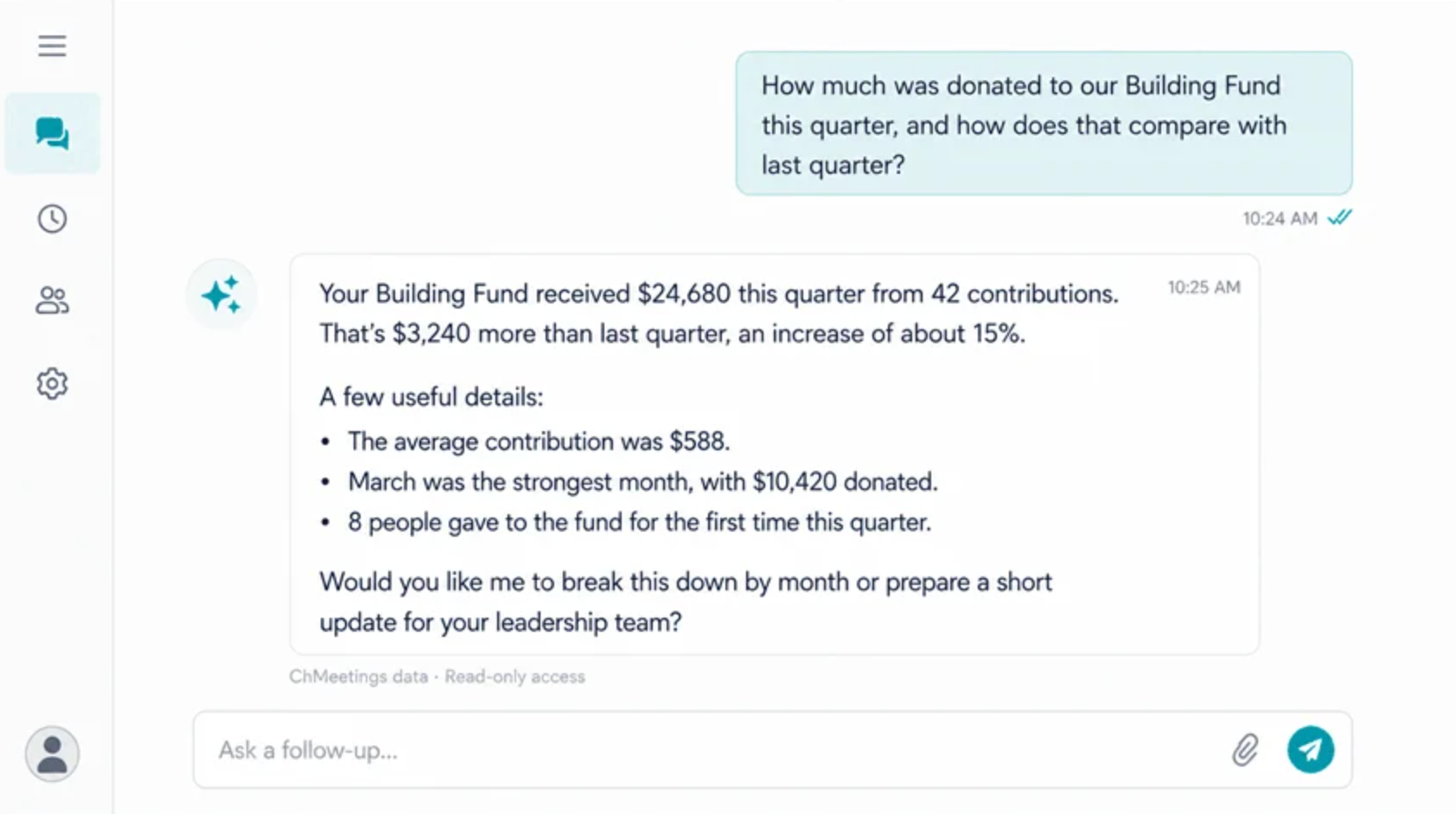
ChMeetings Adds MCP Connector for AI Assistants
ChMeetings adds a read-only MCP connector that lets users retrieve and summarize church data through ChatGPT, Claude, Gemini, and other compatible AI assistants. These updates make people, group, and giving information easier to access while preventing AI tools from changing account records. Highlights include:
- MCP Connector: Connect ChMeetings with ChatGPT, Claude, Gemini, and other MCP-compatible AI assistants.
- Natural-Language Data Questions: Ask questions about members, families, groups, giving, campaigns, and pledges in plain English.
- AI-Generated Summaries and Drafts: Summarize account data and prepare emails, newsletters, reports, or meeting materials.
- Read-Only Access: Allow AI assistants to retrieve authorized information without changing records or performing actions in ChMeetings.
Visit ChMeetings’ official site for more details.
 Opens new window
ChMeetings Adds Digital Giving, Messaging, and Accounting Updates
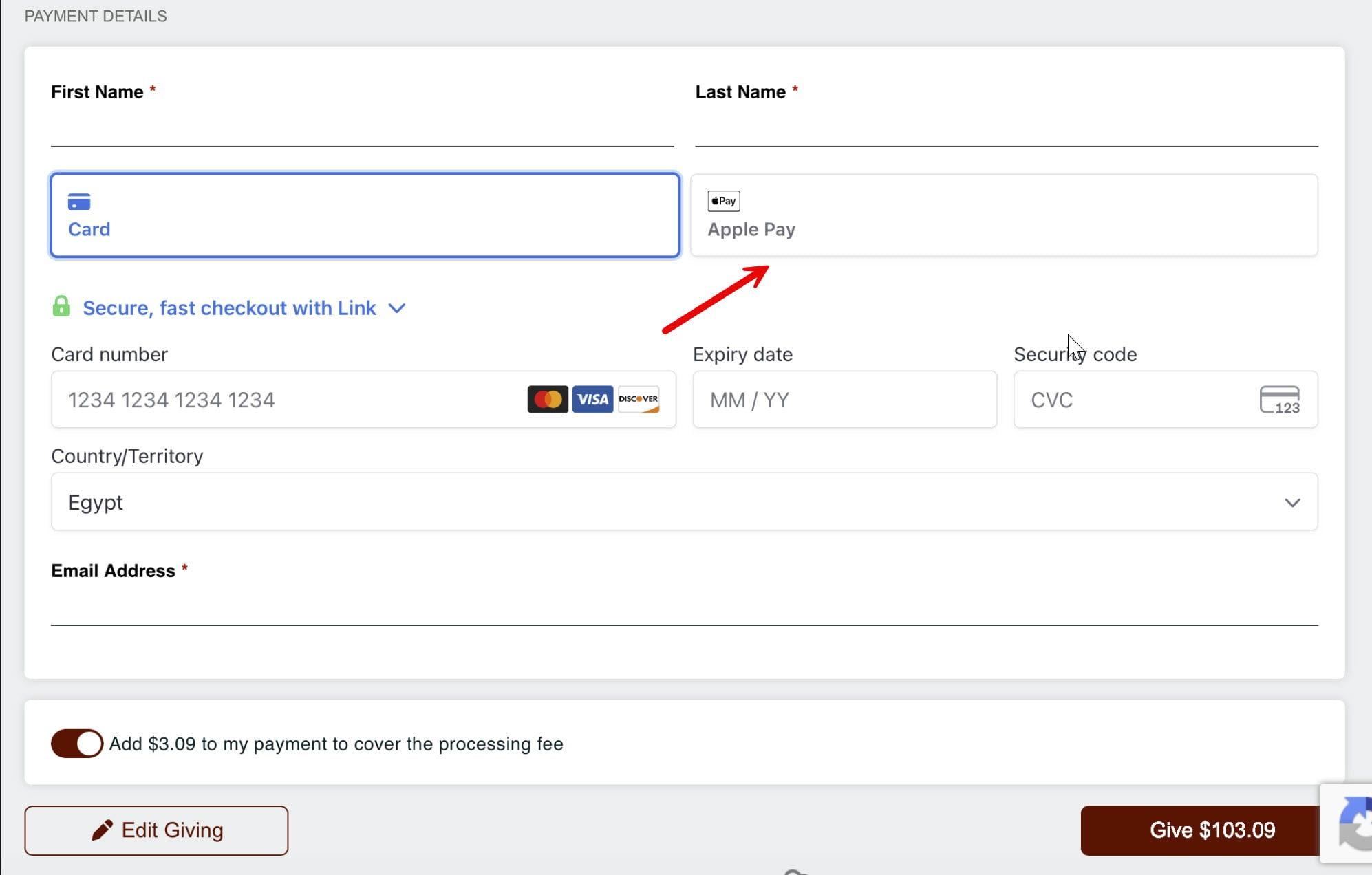
ChMeetings adds Apple Pay and Google Pay support, volunteer text messaging improvements, accounting enhancements, and new diocese admin controls to streamline church management workflows. These updates help organizations process giving, communicate with members, organize accounting records, and manage diocesan operations. Highlights include:
- Apple Pay and Google Pay Support: Accept online giving and event payments through new Stripe payment options.
- Volunteer Text Messaging: Send texts to event volunteers and edit scheduled messages before they are sent.
- Accounting Enhancements: Manage account numbers, transaction attachments, and contribution fund mapping for better record keeping.
- Diocese Admin Controls: Configure independent church accounts and manage home church editing permissions.
Visit ChMeetings’ official site for more details.
 Opens new window
ChMeetings Adds Scheduling and Management Workflow Updates
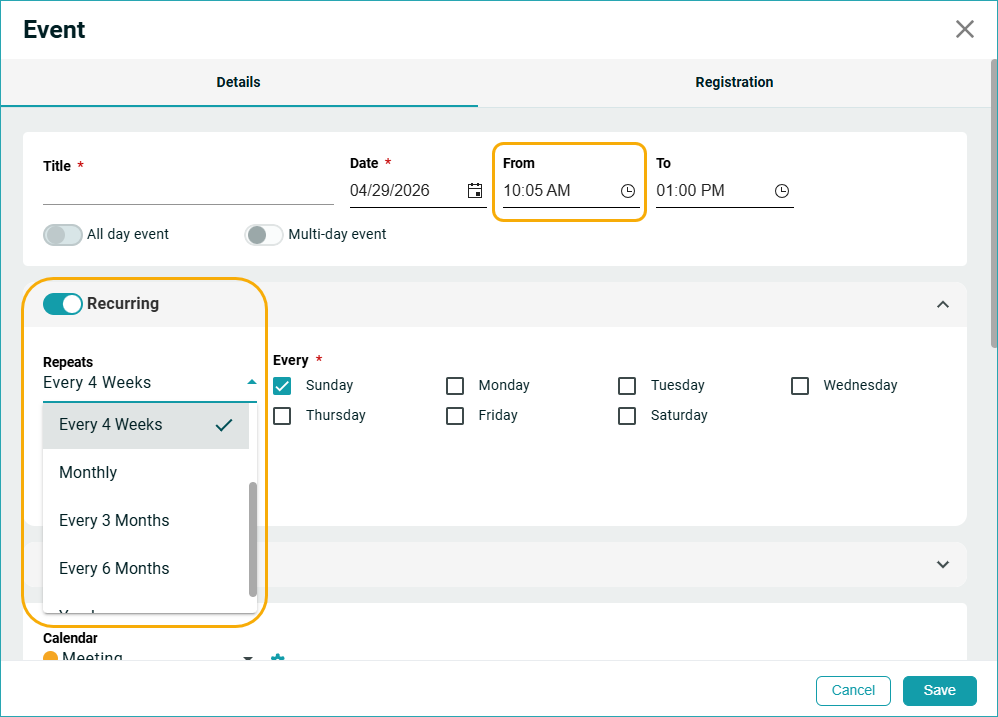
ChMeetings introduced updates across scheduling, giving, pledges, events, worship planning, and follow-up management workflows. These enhancements improve organization, simplify recurring tasks, and provide better visibility into community management activities. Highlights include:
- Flexible Scheduling Options: Adds 5-minute time slots and new recurring scheduling intervals for events and appointments.
- Giving Management Improvements: Introduces batch search filters, direct record navigation, and SecureGive import support.
- Enhanced Pledge Management: Allows pledge campaigns without required start or end dates and adds member search functionality.
- Event Payment Tracking: Displays payment statuses for paid events, including confirmed, pending, and cancelled transactions.
- Worship Planning Updates: Lets teams quickly reassign volunteers and manage song libraries more efficiently.
- Follow-Up Tracking Tools: Adds dashboard widgets and completion tracking for improved accountability and task visibility.
Visit ChMeetings' official site for more details.
ChMeetings Specs
- API: Yes
- Calendar Management: Yes
- Contact Management: Yes
- Dashboards: Yes
- Data Export: Yes
- Data Import: Yes
- Document Management: No
- External Integrations: Yes
- Multi-User: Yes
- Notifications: Yes
- Payment Gateway Integration: Yes
- Scheduling: Yes
- Workflow Management: Yes
ChMeetings FAQs
ChMeetings Company Overview & History
ChMeetings is a church management platform launched in 2018 by Jios Apps Inc., a U.S.-based software company with its head office in Wellington, Florida. The product grew out of the team’s own church involvement, with its founder and most developers serving in Youth Ministry, Couples’ Ministry, or Sunday School. Today, ChMeetings serves more than 8,000 churches, ministries, and dioceses worldwide.
ChMeetings Major Milestones
- 2018: Launched as a church management platform.
- 2026: Serves more than 8,000 churches, ministries, and dioceses worldwide.