

El software de gestión de juntas directivas para organizaciones sin ánimo de lucro es una plataforma digital que ayuda a su junta a organizar reuniones, compartir documentos y gestionar las tareas de gobernanza en un solo lugar. Si busca formas de mantener a su junta conectada, informada y centrada en su misión —especialmente con tiempo y recursos limitados—, encontrar el software adecuado es esencial.
Esta lista le ayudará a comparar las principales opciones, para que pueda elegir la solución de gestión de juntas adecuada a las necesidades de su organización, que apoye a su equipo directivo y refuerce el impacto de su misión.
Por qué confiar en nuestras recomendaciones de software
6,700+
Reviews
20
Industry experts
16+
Evaluation factors
14
Years
Nuestro equipo lleva probando y evaluando software desde 2012. Como líderes eclesiásticos, sabemos lo difícil —y lo importante— que es elegir el software adecuado.
Para esta guía, evaluamos las herramientas mediante pruebas prácticas e investigación independiente, puntuando las herramientas según nuestros criterios de selección.
Nuestras reseñas reflejan nuestro criterio editorial humano, no un discurso de ventas.
Tabla comparativa: software de gestión de juntas directivas para organizaciones sin ánimo de lucro
Esta tabla comparativa resume los detalles de precios de mis principales selecciones de software de gestión de juntas directivas para organizaciones sin ánimo de lucro.
| Tool | Best For | Trial Info | Price | ||
|---|---|---|---|---|---|
| 1 | La mejor con herramientas de colaboración en tiempo real | Prueba gratuita + demo gratuita disponible | Precio disponible bajo solicitud | Website | |
| 2 | Ideal para compartir documentos de manera centralizada | Prueba gratuita de 14 días disponible | Desde $20.99/usuario/mes (facturado anualmente) | Website | |
| 3 | Ideal para informes analíticos avanzados | Demo gratuita disponible | Precio a consultar | Website | |
| 4 | Ideal para crear agendas y actas con ayuda de IA | Demostración gratuita disponible | Precio disponible previa solicitud | Website | |
| 5 | Ideal para reuniones virtuales seguras | Prueba gratuita disponible | Precio a consultar | Website | |
| 6 | Ideal para flujos de trabajo de reuniones automatizados | Prueba gratuita de 30 días + demo gratuita disponible | Desde $165/board/mes | Website | |
| 7 | Ideal para soporte al cliente dedicado | Prueba gratuita disponible | Precio a consultar | Website | |
| 8 | La mejor para necesidades de gobernanza global | Demostración gratuita disponible | Precios a consultar | Website | |
| 9 | Ideal para una interfaz de usuario intuitiva | Demo gratuita disponible | Desde $49/mes | Website | |
| 10 | Ideal con acceso ilimitado de usuarios | Prueba gratuita de 30 días + demo gratis disponible | Desde $9.99/usuario/mes | Website |


Opiniones sobre el mejor software de gestión de juntas directivas para organizaciones sin ánimo de lucro
A continuación se muestran mis resúmenes detallados del software de gestión de juntas directivas para organizaciones sin ánimo de lucro que se incluyó en mi lista de preselección. Mis opiniones ofrecen un análisis detallado de las funciones, los casos de uso más adecuados y los precios de cada plataforma para ayudarle a encontrar la mejor opción para su organización.
 La mejor con herramientas de colaboración en tiempo real
- Prueba gratuita + demo gratuita disponible
- Precio disponible bajo solicitud
Visit WebsiteCustomer Rating:4.7/5
OnBoard ayuda a los consejos a prepararse, reunirse y colaborar en un espacio de trabajo único y sencillo. OnBoard destaca entre las organizaciones sin ánimo de lucro que desean potenciar la colaboración en tiempo real durante las reuniones del consejo y las revisiones de documentos. La plataforma está diseñada para organizaciones que necesitan mantener a los miembros del consejo involucrados y trabajando juntos, ya sea que estén en la misma sala o a distancia. Las herramientas de anotación y discusión en vivo de OnBoard ayudan a los equipos a tomar decisiones rápidamente y a mantener a todos alineados.
Por qué elegí OnBoard
Lo que me atrajo de OnBoard es su enfoque en las herramientas de colaboración en tiempo real que ayudan a los consejos de organizaciones sin ánimo de lucro a trabajar juntos de manera más eficiente. La plataforma ofrece anotaciones en documentos en vivo, por lo que los miembros pueden marcar agendas e informes juntos durante las reuniones. Valoro los hilos de discusión integrados, que permiten a los usuarios comentar y hacer preguntas directamente en los documentos sin cambiar de plataforma. Estas funciones hacen de OnBoard una opción sólida para las organizaciones sin ánimo de lucro que desean mantener alto el compromiso del consejo y una toma de decisiones transparente.
Funciones clave de OnBoard
Otras funciones de OnBoard que pueden resultar valiosas para las organizaciones sin ánimo de lucro incluyen:
- Constructor de Libros del Consejo: Te permite compilar los materiales de la reunión en un solo libro digital organizado.
- Firmas electrónicas: Permite que los miembros del consejo firmen documentos de manera segura dentro de la plataforma.
- Permisos granulares: Te permite controlar el acceso a documentos y materiales sensibles de la reunión para diferentes usuarios.
- Analítica de reuniones: Ofrece información sobre la participación y el compromiso del consejo a través de herramientas de análisis integradas.
Integraciones de OnBoard
Las integraciones incluyen Microsoft 365, Docusign, Zoom, Microsoft Teams y Google Workspace.
Pros and Cons
Pros:
- Permisos granulares de usuario para materiales sensibles
- Analítica de reuniones para seguir la participación del consejo
- Constructor de libro de reuniones para preparación organizada
Cons:
- Retrasos ocasionales de sincronización con el calendario
- El precio no es transparente en la web
Learn more about OnBoard: Ideal para compartir documentos de manera centralizada
- Prueba gratuita de 14 días disponible
- Desde $20.99/usuario/mes (facturado anualmente)
Visit WebsiteCustomer Rating:4.8/5
Boardable mantiene alineada a una pequeña junta directiva de una organización sin fines de lucro con agendas y tareas. Si tu organización sin fines de lucro necesita un lugar central para organizar documentos y comunicaciones de la junta, Boardable merece tu atención. Esta plataforma está diseñada para organizaciones que quieren mantener agendas, actas y archivos accesibles para los miembros de la junta en un único centro seguro. Boardable ayuda a simplificar el intercambio de documentos y la preparación de reuniones, especialmente para equipos que gestionan múltiples comités o miembros remotos.
Por qué elegí Boardable
Elegí Boardable porque ofrece una solución enfocada para organizaciones no lucrativas que necesitan compartir documentos de manera centralizada. La plataforma permite almacenar, organizar y distribuir paquetes de la junta, agendas y actas en un depósito seguro y fácil de buscar. Aprecio cómo el centro de documentos de Boardable permite a los miembros de la junta acceder a los archivos más recientes desde cualquier dispositivo, reduciendo la confusión sobre archivos adjuntos de correos electrónicos o versiones desactualizadas. Sus controles de permisos también te ayudan a gestionar quién puede ver o editar información sensible, lo que es especialmente importante para juntas que manejan información confidencial.
Características clave de Boardable
Otras funciones que pueden resultar útiles para organizaciones sin fines de lucro incluyen:
- Programador de reuniones: Permite coordinar horarios de reuniones mediante encuestas entre los miembros de la junta y encontrar automáticamente la mejor opción.
- Firmas electrónicas: Permite a los miembros de la junta firmar documentos de forma segura dentro de la plataforma, reduciendo retrasos por papeleo.
- Gestión de tareas: Asigna tareas a individuos o comités y realiza seguimiento del progreso entre reuniones.
- Votaciones y encuestas: Permite votaciones seguras dentro de la plataforma sobre mociones o decisiones, con los resultados registrados para referencia futura.
Integraciones de Boardable
Las integraciones incluyen Zoom, Microsoft Teams, Google Drive, Microsoft OneDrive, Google Calendar, Outlook y más.
Pros and Cons
Pros:
- Firma electrónica integrada para aprobaciones de la junta
- Funciones de votación y encuestas dentro de la plataforma
- Programa reuniones con integraciones de calendario
Cons:
- Personalización limitada de las plantillas de agendas
- Sin recaudación de fondos ni gestión de donantes integrada
Learn more about Boardable: Ideal para informes analíticos avanzados
- Demo gratuita disponible
- Precio a consultar

Diligent respalda la gobernanza compleja con seguridad, análisis y registros de auditoría. Los líderes de organizaciones sin fines de lucro que desean profundizar en el desempeño de la junta y las tendencias de gobernanza pueden encontrar Diligent especialmente útil. Esta plataforma se destaca por sus herramientas avanzadas de análisis e informes, que ayudan a las juntas a rastrear la participación, el cumplimiento y los patrones de toma de decisiones. Diligent es ideal para organizaciones que necesitan convertir datos de la junta en información procesable para mejorar la supervisión y la transparencia.
Por qué elegí Diligent
Para juntas directivas sin fines de lucro que desean ir más allá de los informes básicos, Diligent ofrece análisis avanzados que ayudan a los líderes a tomar decisiones fundamentadas en los datos. La plataforma proporciona paneles personalizables y herramientas de informes en profundidad, lo que permite rastrear la participación, la asistencia y los patrones de votación de la junta a lo largo del tiempo. Elegí Diligent porque sus funciones de análisis permiten visualizar tendencias e identificar áreas de mejora en la gobernanza y el cumplimiento. Estas capacidades son especialmente valiosas para organizaciones que necesitan demostrar rendición de cuentas y transparencia ante las partes interesadas.
Funciones clave de Diligent
Otras funciones que hacen que Diligent sea útil para juntas directivas sin fines de lucro incluyen:
- Uso Compartido Seguro de Documentos: Permite subir, organizar y distribuir documentos y otros materiales de la junta con controles de acceso granulares.
- Constructor de Agendas para Reuniones: Permite crear, editar y compartir agendas directamente en la plataforma.
- Recopilación de Firmas Electrónicas: Permite a los miembros de la junta firmar documentos electrónicamente para aprobaciones más rápidas.
- Acceso a la Aplicación Móvil: Ofrece una aplicación móvil dedicada para que los miembros puedan revisar materiales y participar desde cualquier lugar.
Integraciones de Diligent
Las integraciones no están disponibles públicamente.
Pros and Cons
Pros:
- Análisis avanzados para seguimiento del compromiso de la junta
- Paneles personalizables para informes de gobernanza
- Acceso sin conexión para anotaciones en documentos
Cons:
- Navegación de documentos compleja
- La configuración administrativa requiere asistencia del proveedor
Learn more about Diligent: Ideal para crear agendas y actas con ayuda de IA
- Demostración gratuita disponible
- Precio disponible previa solicitud
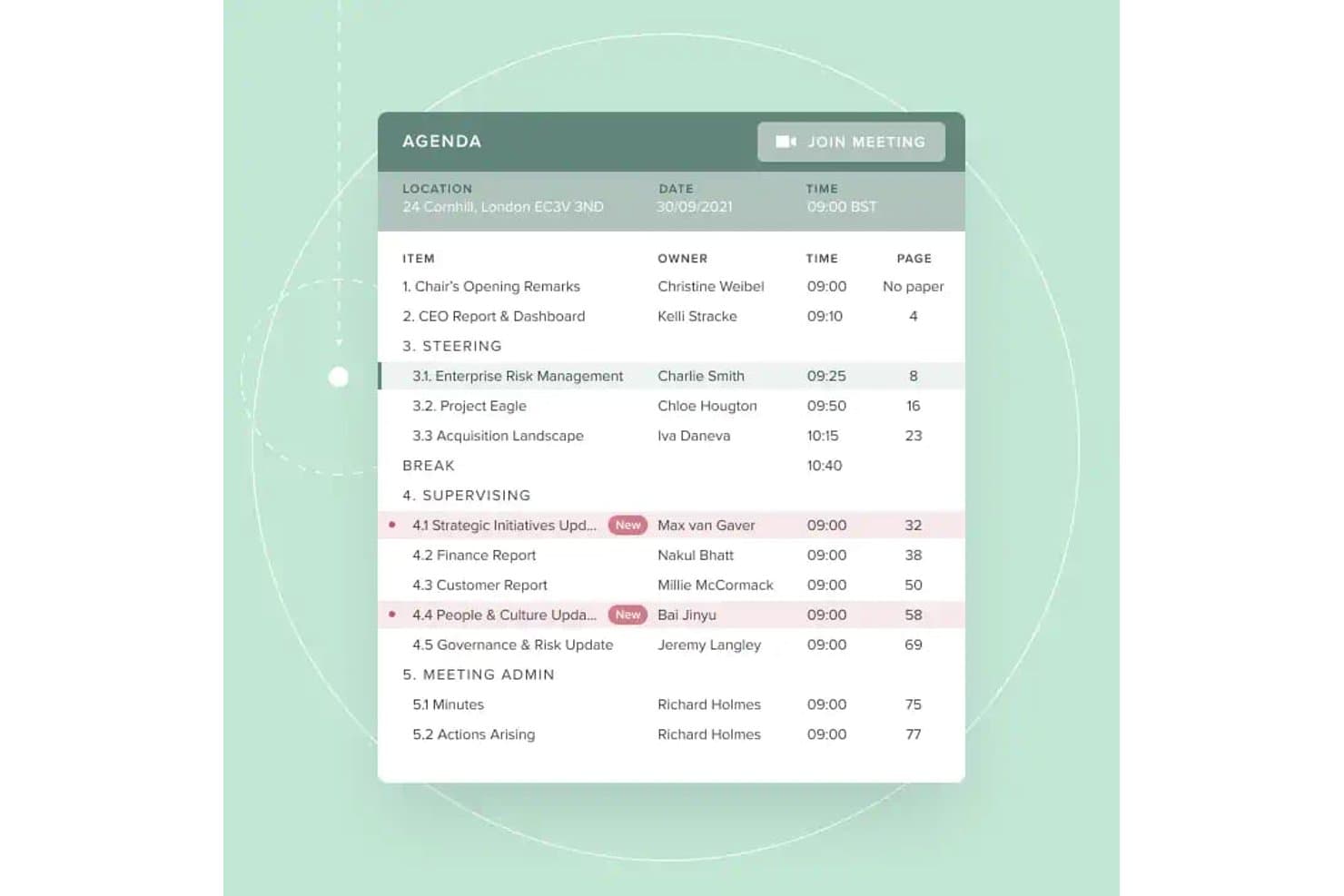
Board Intelligence ofrece una vista estructurada de la agenda digital con responsables de cada punto, marcas de tiempo, referencias de página y un botón directo de 'Unirse a la reunión' para simplificar las reuniones del consejo. Board Intelligence es una plataforma de gestión de juntas directivas que cubre la planificación de agendas, la creación de materiales para reuniones, la elaboración de actas asistida por IA, la distribución segura de documentos y el análisis del rendimiento del consejo a lo largo de todo el ciclo de gobernanza.
¿Para quién es mejor Board Intelligence?
Es ideal para equipos de gobernanza y secretarios corporativos en organizaciones sin fines de lucro medianas o grandes que gestionan múltiples juntas o comités con ciclos de informes complejos.
¿Por qué elegí Board Intelligence?
Board Intelligence ocupa un lugar destacado en mi lista porque sus herramientas de agendas y actas impulsadas por IA realmente reducen la carga administrativa de los equipos de gobernanza. Me encanta cómo Minute Writer AI transforma las transcripciones de reuniones en actas borrador pulidas, mientras que el Planificador de Agenda vincula cada tema directamente a las prioridades estratégicas de la organización. En la práctica, mi equipo puede producir un paquete estructurado de materiales para la junta sin tener que reconstruirlo desde cero en cada ciclo de reuniones.
Características clave de Board Intelligence
- Portal de juntas: Distribuye de forma segura materiales digitales para las juntas y da acceso instantáneo a los usuarios en todos los dispositivos.
- Redactor de informes con IA: Genera informes claros y listos para la junta a partir de notas o documentos directamente en Microsoft 365.
- Rastreador de acciones: Registra los puntos de acción de la junta y da seguimiento al progreso entre reuniones para garantizar la rendición de cuentas total.
- Inicio de sesión único: Permite a los usuarios iniciar sesión con sus credenciales corporativas existentes para facilitar un acceso seguro.
Integraciones de Board Intelligence
Board Intelligence se integra de forma nativa con Microsoft 365, incluyendo Microsoft Word a través de su complemento Report Writer AI. Puede enviar invitaciones de calendario a Outlook y otras plataformas de calendario importantes.
Pros and Cons
Pros:
- Borradores automáticos de agendas y actas con IA
- Soporta controles de permisos granulares para documentos
- Flujos de trabajo de gobernanza sólidos para juntas sin fines de lucro
Cons:
- No dispone de aplicación móvil nativa para miembros del consejo
- Puede ser abrumador para usuarios primerizos
Learn more about Board Intelligence: Ideal para reuniones virtuales seguras
- Prueba gratuita disponible
- Precio a consultar

Ideals Board facilita el trabajo de juntas globales con acceso seguro y herramientas multilingües. Si tu organización sin fines de lucro necesita priorizar la privacidad y la confidencialidad en las reuniones de la junta, Ideals Board está diseñado pensando en la colaboración virtual segura. Es especialmente útil para organizaciones que manejan discusiones o documentos sensibles, ya que ofrece funciones avanzadas de seguridad que van más allá de la videoconferencia estándar. Con Ideals Board puedes organizar reuniones virtuales, compartir archivos y gestionar actividades de la junta mientras mantienes tus datos protegidos.
Por qué elegí Ideals Board
La seguridad suele ser una de las principales preocupaciones de las juntas de organizaciones sin ánimo de lucro, especialmente cuando las reuniones involucran temas confidenciales o documentos sensibles. Ideals Board destaca por su enfoque en reuniones virtuales seguras, ofreciendo características como videoconferencia cifrada y controles de acceso granulares para los participantes. Elegí Ideals Board porque te permite gestionar quién puede unirse, ver o compartir materiales durante las reuniones, lo cual es esencial para organizaciones con estrictos requisitos de privacidad. Estas herramientas centradas en la seguridad ayudan a las organizaciones sin fines de lucro a mantener la confianza y el cumplimiento mientras colaboran a distancia.
Características principales de Ideals Board
Otras funciones que hacen útil a Ideals Board para juntas de organizaciones sin fines de lucro incluyen:
- Compartir documentos: Te permite subir, organizar y distribuir paquetes y archivos de la junta de forma segura.
- Creador de agendas de reuniones: Permite crear y compartir agendas estructuradas para cada reunión.
- Votación y encuestas: Habilita la votación y la toma de decisiones en tiempo real durante las sesiones virtuales.
- Registro de auditoría: Rastrea todas las acciones de los usuarios y cambios en los documentos para garantizar la rendición de cuentas.
Integraciones de Ideals Board
Las integraciones no están disponibles públicamente.
Pros and Cons
Pros:
- Cifrado de extremo a extremo en todas las reuniones virtuales
- El registro de auditoría documenta cada acción de usuario
- Seguimiento automático del quórum en votaciones
Cons:
- Funcionalidad limitada sin conexión en navegadores
- Carece de análisis de desempeño avanzados
Learn more about Ideals Board: Ideal para flujos de trabajo de reuniones automatizados
- Prueba gratuita de 30 días + demo gratuita disponible
- Desde $165/board/mes

BoardPro facilita las reuniones de la junta con votaciones, actas y seguimiento de acciones. BoardPro está diseñado para organizaciones sin fines de lucro que desean automatizar los flujos de trabajo y avanzar hacia reuniones de junta sin papel. Es especialmente útil para organizaciones que buscan reducir tareas administrativas manuales como la creación de agendas, la toma de actas y el seguimiento de acciones. Con BoardPro, puedes mantener las reuniones organizadas y garantizar que los seguimientos no se pierdan entre reuniones.
Por qué elegí BoardPro
BoardPro destaca para las organizaciones sin fines de lucro que desean automatizar tareas repetitivas de reuniones y mantener el funcionamiento de la junta sin inconvenientes. El generador de agendas automatizado y las herramientas para la elaboración de actas permiten prepararse para las reuniones y registrar decisiones sin esfuerzo manual. Me gusta que BoardPro también realiza el seguimiento de los puntos de acción y envía recordatorios, de modo que nada se pierde entre reuniones. Estas automatizaciones de flujos de trabajo facilitan a las juntas directivas mantenerse organizadas y concentradas en su misión.
Características clave de BoardPro
Otras funciones que BoardPro ofrece para juntas de organizaciones sin fines de lucro incluyen:
- Repositorio de documentos: Almacena documentos de la junta y materiales de reunión en una ubicación centralizada y fácil de buscar.
- Constructor de paquetes de la junta: Recopila todos los documentos de la reunión en un único paquete organizado para facilitar su distribución.
- Registro de decisiones: Registra y realiza el seguimiento de las decisiones de la junta para referencia futura y rendición de cuentas.
- Declaraciones de conflictos de intereses: Permite que los miembros de la junta declaren y gestionen conflictos de interés dentro de la plataforma.
Integraciones de BoardPro
Las integraciones no están disponibles públicamente.
Pros and Cons
Pros:
- Automatiza la documentación de la toma de actas
- El registro de decisiones realiza el seguimiento de las resoluciones de la junta
- Las declaraciones de conflicto de interés están integradas
Cons:
- Opciones de formato de documentos limitadas
- No cuenta con función integrada de videollamadas
Learn more about BoardPro.com: Ideal para soporte al cliente dedicado
- Prueba gratuita disponible
- Precio a consultar

Aprio fortalece la gobernanza con controles de reuniones y seguimiento de cumplimiento. Las juntas directivas de organizaciones sin fines de lucro que buscan apoyo personalizado durante todo el proceso de adopción de software pueden encontrar Aprio una excelente opción. La plataforma está diseñada para organizaciones que valoran un servicio al cliente receptivo y personalizado, junto con herramientas seguras de gestión documental y de reuniones. Aprio ayuda a los equipos a desenvolverse en la gobernanza de la junta con confianza, especialmente cuando la orientación técnica o la asistencia en la incorporación es una prioridad.
Por qué elegí Aprio
Para líderes de organizaciones sin fines de lucro que desean ayuda confiable en cada paso, el soporte al cliente dedicado de Aprio destaca. La plataforma ofrece asistencia para la incorporación y capacitación continua, facilitando la adopción de nuevos procesos y características por parte del equipo. Elegí Aprio porque su equipo de soporte está disponible por teléfono, correo electrónico y chat en vivo, por lo que los miembros de la junta pueden obtener respuestas rápidamente cuando surgen problemas. Este nivel de servicio es especialmente valioso para organizaciones con recursos de TI limitados o que son nuevas en el uso de software para la gestión de juntas directivas.
Características clave de Aprio
Otras funciones que hacen que Aprio sea útil para juntas directivas de organizaciones sin fines de lucro incluyen:
- Constructor de paquetes de la junta: Le permite compilar y distribuir materiales de reuniones en un solo archivo organizado.
- Votaciones y encuestas: Permite que los miembros de la junta voten sobre mociones o completen encuestas directamente en la plataforma.
- Sincronización de calendario: Integra los calendarios de reuniones con calendarios personales para facilitar la planificación.
- Control de versiones de documentos: Realiza un seguimiento de los cambios y mantiene un historial de actualizaciones de documentos.
Integraciones de Aprio
Las integraciones no se encuentran disponibles públicamente.
Pros and Cons
Pros:
- Soporte en vivo disponible por teléfono y chat
- Opción de ubicaciones internacionales para la residencia de datos
- Incluye informes de gastos de los miembros de la junta
Cons:
- Sin lista pública de integraciones nativas
- Carece de plantillas nativas de encuestas para juntas
Learn more about Aprio : La mejor para necesidades de gobernanza global
- Demostración gratuita disponible
- Precios a consultar

BoardWorks muestra un panel de gestión de reuniones con cronogramas y agendas. Las organizaciones sin fines de lucro con operaciones internacionales o necesidades complejas de gobernanza pueden encontrar especialmente relevante BoardWorks de Computershare. Esta plataforma está diseñada para ayudar a las organizaciones a gestionar actividades del consejo directivo en varios países y entornos normativos. Es una opción sólida para líderes que necesitan coordinar el cumplimiento global, compartir documentos de forma segura y mantener una comunicación multilingüe con los miembros del consejo.
Por qué elegí BoardWorks
Cuando se trata de gestionar consejos directivos de organizaciones sin fines de lucro con miembros u operaciones en varios países, Computershare BoardWorks destaca por sus capacidades de gobernanza global. La plataforma ofrece interfaces multilingües y herramientas para manejar requisitos de cumplimiento específicos por región, lo cual es esencial para organizaciones que navegan distintos marcos legales. Elegí Computershare porque permite a las organizaciones compartir documentos de forma segura y coordinar reuniones a través de fronteras sin sacrificar la seguridad ni el alineamiento normativo. Estas características hacen que sea una opción ideal para organizaciones sin fines de lucro que necesitan mantener supervisión y comunicación a escala internacional.
Funciones clave de BoardWorks
Otras funciones que hacen útil a Computershare BoardWorks para los consejos directivos de organizaciones sin fines de lucro incluyen:
- Modo de acceso sin conexión: Permite a los miembros del consejo ver documentos y materiales de reuniones sin conexión a internet.
- Herramientas de votación y resoluciones: Permite realizar votaciones digitales seguras y el seguimiento de las resoluciones del consejo.
- Anotaciones y toma de notas: Facilita a los usuarios agregar notas privadas o compartidas directamente en los documentos del consejo.
- Integración con calendario: Sincroniza las reuniones y eventos del consejo con herramientas externas de calendario para una programación más sencilla.
Integraciones de BoardWorks
Las integraciones incluyen Microsoft 365 y Docusign.
Pros and Cons
Pros:
- Soporte multilingüe para miembros internacionales
- Acceso sin conexión a los materiales del consejo
- Inicios de sesión mediante autenticación biométrica y doble factor
Cons:
- Entradas de agenda duplicadas durante las actualizaciones
- Recursos de formación específicos para organizaciones sin fines de lucro limitados
Learn more about BoardWorks: Ideal para una interfaz de usuario intuitiva
- Demo gratuita disponible
- Desde $49/mes

Easy Board lanza flujos de trabajo de juntas rápidamente con acceso seguro a reuniones. Para líderes de organizaciones sin fines de lucro que buscan un software de portal de juntas fácil de usar para todos, Easy Board pone la simplicidad en el centro de su diseño. La plataforma está hecha para organizaciones que necesitan incorporar rápidamente a los miembros de la junta y mantener reuniones, documentos y comunicación accesibles sin barreras técnicas. Su interfaz intuitiva ayuda a los equipos a centrarse en la colaboración y la gobernanza en lugar de navegar por un software complejo.
Por qué elegí Easy Board
Cuando busco software de gestión de juntas que las organizaciones sin fines de lucro puedan adoptar rápidamente, presto especial atención a cómo la interfaz apoya a usuarios con diversos niveles tecnológicos. Easy Board destaca por su panel claro que organiza reuniones, documentos y comunicaciones de manera fácil de navegar. Elegí Easy Board porque su generador de agendas de arrastrar y soltar y su biblioteca centralizada de documentos ayudan a los miembros a encontrar lo que necesitan sin confusiones. Estas características lo convierten en una opción sólida para organizaciones que quieren minimizar el tiempo de capacitación y mantener a todos comprometidos.
Funciones clave de Easy Board
Otras funciones que hacen a Easy Board práctico para juntas directivas de organizaciones sin fines de lucro incluyen:
- Confirmación de asistencia (RSVP) y seguimiento de presencia: Permite gestionar invitaciones a reuniones y monitorear quién planea asistir.
- Firmas electrónicas: Permite que los miembros de la junta firmen documentos electrónicamente desde la plataforma.
- Hilos de discusión: Facilita conversaciones continuas vinculadas a reuniones o documentos específicos.
- Permisos según el rol: Te otorga control sobre los roles de la junta y qué puede ver o editar cada usuario.
Integraciones de Easy Board
Las integraciones no están disponibles públicamente.
Pros and Cons
Pros:
- Generador de agendas con función de arrastrar y soltar para reuniones
- Seguimiento de confirmación de asistencia a reuniones
- Hilos de discusión vinculados a documentos específicos
Cons:
- No cuenta con aplicaciones nativas para iOS o Android
- Suele requerirse reorganización manual de PDFs
Learn more about Easy Board: Ideal con acceso ilimitado de usuarios
- Prueba gratuita de 30 días + demo gratis disponible
- Desde $9.99/usuario/mes

BoardCloud protege los archivos de la junta y agiliza las reuniones con transcripción por IA. BoardCloud es una plataforma de gestión de juntas diseñada para organizaciones sin fines de lucro que necesitan incluir equipos grandes o en crecimiento en su proceso de gobernanza. Es una opción adecuada para organizaciones que desean acceso ilimitado de usuarios sin preocuparse por tarifas adicionales a medida que su junta o comités se expanden. BoardCloud te ayuda con la gestión de reuniones y la colaboración mediante su interfaz flexible de software para juntas.
Por qué elegí BoardCloud
Para las organizaciones sin fines de lucro que necesitan involucrar a muchas personas en sus procesos de junta, el acceso ilimitado de usuarios de BoardCloud es una gran ventaja. Puedes agregar tantos miembros de la junta, participantes de comités o voluntarios como necesites sin preocuparte por alcanzar un límite o incurrir en cargos adicionales. Me gusta que BoardCloud respalde esto con funciones como permisos basados en grupos y administración masiva de usuarios, de modo que puedes organizar equipos grandes de manera eficiente. Esto lo convierte en una opción práctica para organizaciones con estructuras de gobernanza complejas o en evolución.
Características clave de BoardCloud
Además de su acceso ilimitado de usuarios, BoardCloud ofrece otras funciones para juntas directivas de organizaciones sin fines de lucro:
- Creador de agendas: Te permite crear, editar y compartir agendas de reuniones con tu junta.
- Repositorio de documentos: Almacena materiales de juntas, políticas y paquetes de reuniones en una ubicación centralizada.
- Votaciones y resoluciones: Proporciona herramientas para realizar votaciones en línea seguras y rastrear las decisiones de la junta.
- Calendario de reuniones: Muestra las próximas reuniones y fechas límite para todos los miembros de la junta.
Integraciones de BoardCloud
Las integraciones incluyen Microsoft Teams, Zoom y SharePoint.
Pros and Cons
Pros:
- Permite alojamiento privado en servidor propio
- Vista de agenda de reunión sincronizada en tiempo real
- Generación automática de archivos PDF de material para la junta
Cons:
- Cobra excedentes de almacenamiento por gigabyte
- La aplicación móvil carece de funciones administrativas
Learn more about BoardCloud:
Otro software de gestión de juntas directivas para organizaciones sin ánimo de lucro
Estas son algunas opciones adicionales de software de gestión de juntas directivas para organizaciones sin ánimo de lucro que no se incluyeron en mi lista de preselección, pero que aun así merece la pena consultar:
- 11Nasdaq Directors DeskIdeal para la gestión del cumplimiento normativo
- 12My Board ViewLa mejor opción para plantillas de agenda personalizables
- 13BoardlogicMejor con controles de acceso granulares
Cómo evalúo el software de gestión de juntas para organizaciones sin fines de lucro
Divido mi evaluación en criterios básicos—como si una plataforma realmente puede gestionar expedientes de la junta y votaciones digitales—y factores diferenciadores que distinguen las herramientas según las necesidades de gobernanza eclesiástica.
Funcionalidad principal (Requisitos mínimos para esta lista)
Cuando selecciono herramientas para mi lista, califico cada una en una escala de 0 (no ofrece la funcionalidad) a 5 (sobresale en esta área) para cada funcionalidad principal listada a continuación. Luego, calculo la puntuación total de la herramienta en un porcentaje. Cada herramienta necesita alcanzar una puntuación total mínima del 55% para ser considerada para su inclusión.
- Gestión de reuniones de la junta: Reviso si una herramienta respalda todo el ciclo de vida de una reunión—construcción de agendas, ensamblaje de expedientes, captura de actas y seguimiento de tareas—para que los secretarios voluntarios no tengan que juntar piezas manualmente.
- Repositorio seguro de documentos: Los estatutos, estados financieros y manuales de políticas necesitan un hogar con permisos y control de versiones, así que evalúo cómo cada plataforma organiza, protege y archiva los registros de la junta.
- Votación y aprobaciones: Busco mociones digitales, flujos de resolución y soporte para firmas electrónicas que permitan a las juntas tomar decisiones entre reuniones—como aprobar el alquiler de un local sin convocar una sesión especial.
- Gestión de miembros y comités: Cada herramienta debería realizar un seguimiento de los perfiles de los miembros de la junta, las fechas de mandato y la asignación a comités, para que las transiciones de liderazgo durante las elecciones anuales no creen vacíos de información.
- Mensajería segura y colaboración: Evalúo si la plataforma ofrece canales de comunicación exclusivos para la junta, separados del correo electrónico general de la iglesia, dando a los ancianos un espacio privado para discusiones pastorales sensibles.
- Cumplimiento de la gobernanza en organizaciones sin fines de lucro: Aquí son importantes funciones como declaraciones de conflicto de intereses, seguimiento de la aceptación de políticas y exportaciones listas para auditoría, especialmente para juntas responsables ante organismos denominacionales o registros regulatorios.
Una vez que tengo una lista de herramientas que cumplen con los criterios, considero qué distingue a cada plataforma.
Factores diferenciadores (Qué distingue a los proveedores)
Así es como comparo y contrasto distintos proveedores:
Funciones destacadas
Busco integración con sistemas de gestión eclesiástica como Planning Center o Breeze, lo cual permite que las juntas incorporen informes de donaciones y datos de membresía directamente en los materiales de la reunión. Las herramientas para sesiones ejecutivas también son clave—las juntas de ancianos suelen tratar revisiones pastorales confidenciales o temas de personal, por lo que un espacio de trabajo privado con acceso restringido es una verdadera mejora. Una aplicación móvil nativa es el complemento perfecto, ya que los miembros voluntarios de la junta a menudo revisan los expedientes entre servicios o mientras están en movimiento.
Más allá de las funciones
El precio aquí es más importante que en la mayoría de las categorías—las juntas de iglesias funcionan con presupuestos reducidos, así que reviso si los proveedores ofrecen descuentos para organizaciones sin fines de lucro o modelos de tarifa fija que no te penalicen por agregar miembros voluntarios. La incorporación es otro factor que valoro cuidadosamente, ya que los miembros de la junta rotan con frecuencia y no siempre tienen habilidades tecnológicas. Una plataforma con configuración guiada y plantillas de gobernanza listas para usar ahorra semanas de trabajo administrativo durante las transiciones anuales. La seguridad también merece atención, particularmente la encriptación y el acceso basado en roles para proteger registros sensibles de personal y financieros.
Cómo elegir un software de gestión de juntas directivas para organizaciones sin ánimo de lucro
Es fácil perderse entre largas listas de funciones y estructuras de precios complejas. Para ayudarle a mantener la concentración mientras sigue su proceso único de selección de software, estos son los factores que debe tener en cuenta:
| Factor | Qué debe tener en cuenta |
|---|---|
| FactorEscalabilidad | Qué debe tener en cuenta¿El software será compatible con su junta a medida que crezca o cambie? Considere los límites de usuarios, el almacenamiento y la ampliación futura. |
| FactorIntegraciones | Qué debe tener en cuenta¿Se conecta con sus herramientas actuales (como el correo electrónico, los calendarios o el almacenamiento de documentos)? Compruebe que haya integraciones nativas, no solo opciones de API. |
| FactorCapacidad de personalización | Qué debe tener en cuenta¿Puede adaptar los flujos de trabajo, los permisos o las plantillas para ajustarlos a las necesidades específicas de gobernanza de su junta? |
| FactorFacilidad de uso | Qué debe tener en cuenta¿Los miembros de la junta con cualquier nivel de conocimientos tecnológicos podrán navegar por la plataforma y utilizarla con confianza? |
| FactorImplementación e incorporación | Qué debe tener en cuenta¿Cuánto tiempo llevará empezar a utilizarla? Pregunte por la asistencia para la migración, los recursos de formación y la ayuda durante la incorporación. |
| FactorCoste | Qué debe tener en cuenta¿Los niveles de precios son claros y predecibles? Esté atento a las tarifas ocultas, los cargos por usuario o los costes adicionales de asistencia o almacenamiento. |
| FactorMedidas de seguridad | Qué debe tener en cuenta¿La plataforma ofrece cifrado, controles de acceso y registros de auditoría conformes con SOC para proteger los datos confidenciales de la junta? |
| FactorRequisitos de cumplimiento | Qué debe tener en cuenta¿El software le ayudará a cumplir las normas de gobernanza de organizaciones sin ánimo de lucro, privacidad de datos HIPAA o conservación de registros pertinentes en su región? |
¿Qué es el software de gestión de juntas directivas para organizaciones sin ánimo de lucro?
El software de gestión de consejos para organizaciones sin ánimo de lucro es una plataforma digital diseñada para ayudar a estas organizaciones a organizar, comunicar y documentar las actividades del consejo. Estas herramientas centralizan la programación de reuniones, el intercambio de documentos, la mensajería segura y el mantenimiento de registros, lo que facilita que los miembros del consejo colaboren y cumplan con sus responsabilidades de gobernanza. Al centralizar las tareas administrativas, el software de gestión de consejos favorece la transparencia, el cumplimiento normativo y la toma de decisiones eficaz dentro de los consejos de organizaciones sin ánimo de lucro.
Características
Al seleccionar un software de gestión de consejos para organizaciones sin ánimo de lucro, presta atención a las siguientes características clave:
- Programación de reuniones: Permite programar y gestionar reuniones, así como notificar a los miembros del consejo sobre las próximas reuniones, a menudo con sincronización del calendario y seguimiento de confirmaciones de asistencia.
- Gestión de documentos: Proporciona un espacio seguro para cargar, organizar y compartir dosieres del consejo, órdenes del día, actas y materiales complementarios.
- Mensajería segura: Permite la comunicación confidencial entre los miembros del consejo dentro de la plataforma, reduciendo la dependencia del correo electrónico.
- Votaciones y resoluciones: Facilita la votación digital de mociones y realiza un seguimiento de los resultados de las resoluciones para mantener registros precisos.
- Permisos basados en roles: Permite controlar el acceso a documentos y funciones sensibles según el rol de cada usuario o su asignación a un comité.
- Seguimiento de actas y acciones: Ofrece herramientas para registrar las actas de las reuniones, asignar acciones pendientes y supervisar las tareas de seguimiento.
- Registros de auditoría: Mantiene un registro detallado de la actividad de los usuarios, los cambios en los documentos y las decisiones del consejo para garantizar la transparencia y el cumplimiento del RGPD.
- Integración del calendario: Sincroniza las reuniones y los plazos del consejo con herramientas de calendario externas para mantener a todos coordinados.
- Acceso sin conexión: Permite a los miembros del consejo consultar documentos importantes y materiales de las reuniones incluso sin conexión a Internet.
- Compatibilidad con firma electrónica: Permite a los miembros del consejo firmar documentos electrónicamente, agilizando las aprobaciones y reduciendo el papeleo.
Ventajas
La implementación de un software de gestión de consejos para organizaciones sin ánimo de lucro ofrece varias ventajas para tu equipo y tu organización. Estas son algunas de las que puedes esperar:
- Información centralizada: Todos los documentos del consejo, los materiales de las reuniones y las comunicaciones se almacenan en una ubicación segura para facilitar el acceso.
- Mejor gobernanza: El seguimiento integrado del cumplimiento, los registros de auditoría y las votaciones digitales ayudan al consejo a cumplir los requisitos normativos y de presentación de informes.
- Colaboración mejorada: La mensajería segura, las anotaciones en documentos y los calendarios compartidos facilitan que los miembros del consejo trabajen juntos entre reuniones.
- Ahorro de tiempo: La programación automatizada, las plantillas de órdenes del día y las herramientas de firma electrónica reducen el trabajo administrativo manual del personal y los voluntarios.
- Mayor transparencia: Los permisos basados en roles y los registros detallados de actividad garantizan que las acciones y decisiones del consejo sean visibles y estén sujetas a rendición de cuentas.
- Mayor seguridad de los datos: El cifrado, los controles de acceso y el intercambio seguro de documentos protegen la información sensible del consejo frente al acceso no autorizado.
- Mejor participación: Las interfaces fáciles de usar y el acceso móvil ayudan a los miembros del consejo a mantenerse informados y participar, independientemente de su ubicación.
Costes y precios
Seleccionar un software de gestión de consejos para organizaciones sin ánimo de lucro requiere comprender los distintos modelos de precios y planes disponibles. Los costes varían según las características, el tamaño del equipo, los complementos y otros factores. La tabla siguiente resume los planes habituales, sus precios medios y las características que suelen incluir las soluciones de software de gestión de consejos para organizaciones sin ánimo de lucro:
Tabla comparativa de planes
| Tipo de plan | Precio medio | Características habituales |
|---|---|---|
| Tipo de planPlan gratuito | Precio medio$0 | Características habitualesProgramación básica de reuniones, almacenamiento de documentos limitado, gestión sencilla de usuarios y notificaciones por correo electrónico. |
| Tipo de planPlan personal | Precio medio$5-$15/usuario/mes | Características habitualesIntercambio de documentos, integración del calendario, mensajería segura y herramientas básicas de votación. |
| Tipo de planPlan empresarial | Precio medio$20-$40/usuario/mes | Características habitualesPermisos avanzados, registros de auditoría, compatibilidad con firma electrónica, seguimiento del cumplimiento y acceso móvil. |
| Tipo de planPlan corporativo | Precio medio$50-$100/usuario/mes | Características habitualesFlujos de trabajo personalizados, asistencia específica, seguridad avanzada, compatibilidad multilingüe e integración con sistemas externos. |
Preguntas frecuentes sobre software de gestión de juntas directivas para organizaciones sin ánimo de lucro
Estas son algunas respuestas a preguntas frecuentes sobre el software de gestión de juntas directivas para organizaciones sin ánimo de lucro:
¿Puede el software de gestión de juntas directivas ayudar a las organizaciones sin ánimo de lucro a cumplir los requisitos normativos?
Sí, muchas soluciones de software de gestión de juntas directivas incluyen funciones como registros de auditoría, registros digitales de votaciones y almacenamiento seguro de documentos para ayudar a las organizaciones sin ánimo de lucro a cumplir las normas de gobernanza y los requisitos normativos. Estas herramientas pueden simplificar los informes anuales y garantizar que las decisiones de la junta directiva queden debidamente documentadas.
¿Cómo garantizan las organizaciones sin ánimo de lucro la seguridad de los datos al utilizar software de gestión de juntas directivas?
Las organizaciones sin ánimo de lucro deben buscar un software que ofrezca cifrado, controles de acceso basados en roles y auditorías de seguridad periódicas. También es importante revisar las políticas de privacidad de datos del proveedor y confirmar que la información confidencial de la junta directiva está protegida frente a accesos no autorizados.
¿Qué debemos tener en cuenta al incorporar nuevos miembros de la junta directiva al software?
Proporcione acceso a recursos de formación como tutoriales en vídeo, recorridos por el producto y centros de ayuda. Elija un software con una interfaz intuitiva y asistencia durante la incorporación para ayudar a los nuevos miembros a familiarizarse rápidamente, independientemente de sus conocimientos técnicos.
¿Es posible integrar el software de gestión de juntas directivas con otras herramientas para organizaciones sin ánimo de lucro?
Sí, muchas plataformas ofrecen integraciones con herramientas de correo electrónico, calendarios y almacenamiento de documentos. Compruebe si el software se conecta con sus sistemas actuales para evitar duplicar tareas y mantener la eficiencia del flujo de trabajo de su junta directiva.
¿Cómo elegimos el plan de precios adecuado para nuestra organización sin ánimo de lucro?
Evalúe el tamaño de su junta directiva, las funciones que necesita y su presupuesto. Comience con una prueba gratuita o una demostración, si están disponibles, y compare lo que incluye cada nivel de precios. Busque descuentos para organizaciones sin ánimo de lucro y asegúrese de que no haya costes ocultos antes de comprometerse.