

Shelby Systems Bewertung: Vorteile, Nachteile, Funktionen & Preise
Wie geht es weiter? Abonnieren Sie unseren Newsletter, um die neuesten Ressourcen, Best Practices und Einblicke zum Kirchenmanagement von erfahrenen Pastoren und Kirchenleitern zu erhalten.

Wir bewerten Tools unabhängig, und Provisionen tragen zur Finanzierung unserer Tests bei. Lesen Sie unsere transparente Richtlinie, unsere Methodik oder schlagen Sie ein Tool vor.
Shelby Systems is a church software built for mid-to-large congregations managing membership, contributions, and fund accounting in one platform. It's worth considering when your church has outgrown lighter tools and needs financial management that's genuinely built in. Planning Center handles ministry coordination well but leans on third-party tools for church finances. Shelby Systems keeps accounting and membership management in the same place.
ShelbySystems Evaluation Summary
0/5
- Pricing upon request
- 30-day free trial upon request
Warum Sie unseren Software-Empfehlungen vertrauen können
6,700+
Reviews
20
Industry experts
16+
Evaluation factors
14
Years
Unser Team testet und bewertet Software seit 2012. Als Kirchenleiter wissen wir selbst, wie schwierig – und wichtig – es ist, die richtige Software auszuwählen.
Für diesen Leitfaden haben wir Tools mithilfe von praktischen Tests und unabhängiger Recherche bewertet und dabei unsere Bewertungskriterien angewendet.
Unsere Bewertungen spiegeln unser menschliches redaktionelles Urteilsvermögen wider, keine Verkaufsstrategie.
ShelbySystems Overview
In my opinion, Shelby Systems is a strong contender in the church management software space, offering comprehensive tools that cater to the specific needs of larger church organizations. While its interface might not be the most intuitive, the software compensates with excellent customer support and a thorough onboarding process.
It outshines competitors with its robust financial management features, though its pricing should be carefully considered by smaller churches who may not need Shelby System’s detailed financial capabilities..
At the end of the day, I believe Shelby Systems is best suited for churches that require detailed administrative control and can benefit from its extensive support and training options.
Pros
- You get excellent financial management tools for your church.
- The customer support team is responsive and helpful.
- Onboarding is thorough, making it easier for your team to get started.
Cons
- The interface can feel outdated and clunky.
- Navigating the system isn't always intuitive for new users.
- Customization options are limited compared to other tools.
Is ShelbySystems Right For Your Needs?
Für wen ist Shelby Systems besonders geeignet?
Mid to large-sized churches and religious organizations would be well-suited for Shelby Systems due to its robust financial management tools and responsive customer support. If your church needs detailed administrative control and values thorough onboarding, Shelby Systems can streamline your operations and help your team focus more on community engagement. It's particularly beneficial if you have a dedicated administrative staff ready to leverage its full capabilities.
- Large ChurchesShelby Systems excels in managing complex operations and large congregations with its detailed financial and membership tools.
- Church TreasurersThe software provides comprehensive financial management features that help church treasurers maintain accurate and organized records.
- Administrative TeamsWith its structured onboarding and customer support, administrative teams can efficiently manage day-to-day operations and focus on community building.
- Religious OrganizationsShelby Systems offers tools that support the unique needs of religious organizations, from membership tracking to event management.
- Financial ManagersThe robust financial tools make it easier for financial managers to handle budgeting, accounting, and reporting tasks.
- Community CoordinatorsCommunity coordinators benefit from its ability to manage events and communication, helping to foster better engagement within the congregation.
Für wen ist Shelby Systems weniger geeignet?
Small churches or volunteer-run organizations might not find Shelby Systems suitable due to its complex interface and extensive features that can be overwhelming. If budget constraints are a concern, the pricing might not align with your needs. Additionally, if you require a highly customizable solution, Shelby Systems' limited customization could be a drawback, making it less ideal for those who need tailored functionalities.
- Small ChurchesSmall churches may find Shelby Systems' extensive features unnecessary and costly for their limited needs.
- Volunteer-Run TeamsVolunteer-run teams could struggle with the software's complexity and lack the resources for thorough onboarding.
- Tech-Averse UsersUsers who aren't comfortable with technology might find the interface clunky and challenging to navigate.
- Budget-Conscious OrganizationsOrganizations with tight budgets may struggle with the software's price tag and find it not cost-effective.
- Highly Customized NeedsIf you need a highly customizable solution, Shelby Systems' limited customization options might not meet your requirements.
- Simple Administrative TasksFor those managing simple administrative tasks, the comprehensive nature of Shelby Systems might be overkill and not worth the investment.
Wie wir Tools testen & bewerten
Wir haben jahrelang unser System zur Softwarebewertung entwickelt, verfeinert und verbessert. Der Bewertungsmaßstab erfasst die Feinheiten bei der Softwareauswahl und was ein Tool effektiv macht, mit Fokus auf die wichtigsten Entscheidungsaspekte. Nachfolgend sehen Sie genau, wie unsere Tests und Bewertungen in sieben Kategorien funktionieren. So können wir eine objektive Bewertung der Software anhand von Kernfunktionen, herausragenden Merkmalen, Benutzerfreundlichkeit, Onboarding, Kundensupport, Integrationen, Kundenbewertungen und Preis-Leistungs-Verhältnis liefern.
Kernfunktionalität (25% der Gesamtbewertung)
Der Ausgangspunkt unserer Bewertung ist immer die Basisfunktionalität des Tools. Verfügt es über die grundlegenden Funktionen und Merkmale, die ein Nutzer erwarten würde? Sind einige dieser Kernfunktionen auf höherpreisige Tarife beschränkt? Im Kern erwarten wir, dass ein Tool den Grundfunktionen seiner Mitbewerber standhält.
Herausragende Funktionen (25% der Gesamtbewertung)
Als Nächstes bewerten wir ungewöhnliche, herausragende Funktionen, die über die übliche Kernfunktionalität hinausgehen. Eine hohe Punktzahl spiegelt spezialisierte oder einzigartige Funktionen wider, die das Produkt schneller, effizienter oder für den Nutzer wertvoller machen. Wir bewerten außerdem, wie einfach sich das Tool mit anderen, typischerweise in der technologischen Infrastruktur verwendeten Tools integrieren lässt, um die Funktionalität und den Nutzen der Software zu erweitern. Tools mit vielen nativen Integrationen, Verbindungen zu Drittanbietern und API-Zugängen für maßgeschneiderte Integrationen schneiden am besten ab.
Benutzerfreundlichkeit (10% der Gesamtbewertung)
Wir betrachten, wie schnell und einfach sich die Kernfunktionen mit dem Tool ausführen lassen. Hoch bewertete Software ist gut gestaltet, intuitiv zu bedienen, bietet mobile Apps, stellt Vorlagen bereit und macht selbst komplexere Aufgaben einfach.
Onboarding (10% der Gesamtbewertung)
Wir wissen, wie wichtig eine schnelle Akzeptanz im Team für eine neue Plattform ist, daher bewerten wir, wie leicht ein Tool mit minimaler Schulung zu erlernen und zu nutzen ist. Entscheidend ist, wie schnell ein Teammitglied ohne Vorkenntnisse das Tool einrichten und verwenden kann. Lösungen mit hoher Bewertung erfordern wenig bis keine Unterstützung.
Kundensupport (10% der Gesamtbewertung)
Wir prüfen, wie schnell und unkompliziert Hilfe per Telefon, Live-Chat oder Wissensdatenbank erreichbar ist. Tools und Unternehmen, die Echtzeit-Support bieten, erzielen die besten Ergebnisse, während Chatbots am schlechtesten abschneiden.
Kundenbewertungen (10% der Gesamtbewertung)
Zusätzlich zu unseren eigenen Tests berücksichtigen wir auch den Net Promoter Score aktueller und ehemaliger Kunden. Wir analysieren, wie wahrscheinlich diese Kunden das Tool erneut für die Kernfunktionen wählen würden. Eine hohe Bewertung spiegelt einen hohen Net Promoter Score wider.
Preis-Leistungs-Verhältnis (10% der Gesamtbewertung)
Abschließend vergleichen wir den durchschnittlichen Preis der Einstiegstarife angesichts der Kernfunktionen und der anderen Bewertungskriterien. Software, die mehr für weniger bietet, erhält eine bessere Bewertung.
Core Features
Membership Management:
Track and manage your congregation's information effortlessly, keeping records organized and up-to-date for easy access.
Financial Management:
Handle budgeting, accounting, and reporting with robust tools that ensure your church's finances are precise and well-organized.
Event Management:
Plan and organize church events seamlessly, allowing your team to coordinate logistics and communicate details effectively.
Donation Tracking:
Record and manage donations with ease, ensuring transparency and accuracy in donor contributions and reporting.
Communications:
Send newsletters and updates to your congregation, keeping everyone informed and engaged with your church's activities.
Volunteer Management:
Organize and schedule volunteers efficiently, ensuring your church events and activities run smoothly with the right support.
.png&w=3840&q=75)
Ease of Use
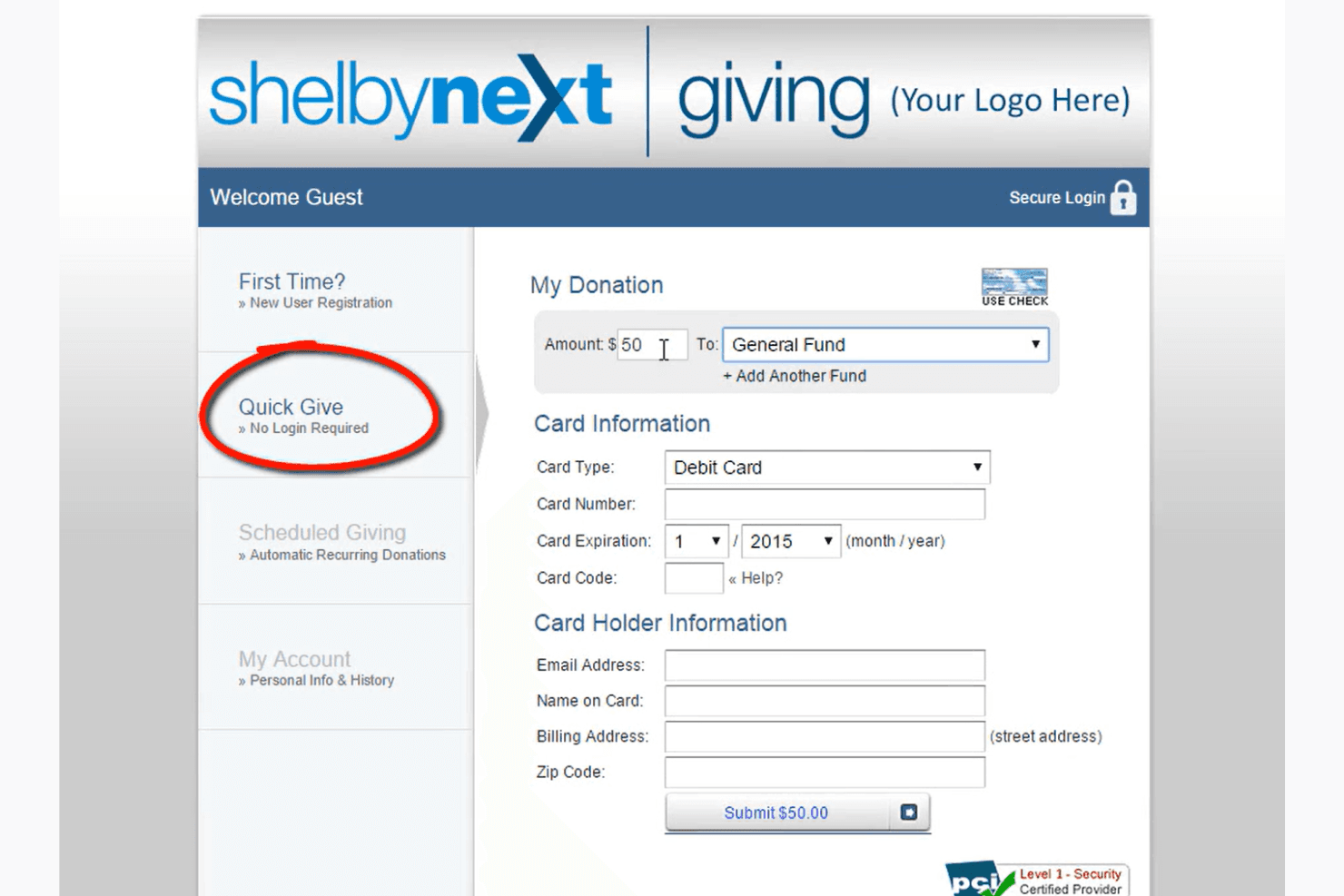
Shelby Systems isn't the most intuitive option out there, which can make it challenging for new users. Its interface feels a bit dated, and navigating through features requires a learning curve. However, once you get the hang of it, the comprehensive tools become valuable for managing your church's operations. If your team is tech-savvy or willing to invest time in training, you'll find its capabilities rewarding for your administrative needs.
.png&w=3840&q=75)
ShelbySystems Specs
- API: No
- Calendar Management: No
- Contact Management: No
- Dashboards: No
- Data Export: No
- Data Import: No
- Document Management: No
- External Integrations: No
- Multi-User: No
- Notifications: No
- Payment Gateway Integration: No
- Scheduling: No
- Workflow Management: No
Alternatives to ShelbySystems


ShelbySystems FAQs
Wie geht es weiter?
Abonnieren Sie unseren Newsletter, um die neuesten Ressourcen, Best Practices und Einblicke zur Leitung von Kirchen direkt von erfahrenen Pastoren und kirchlichen Führungskräften zu erhalten.