

Botkeeper Testbericht: Vorteile, Nachteile, Funktionen und Preise
Botkeeper zeichnet sich dadurch aus, dass es automatisierte Buchhaltungs- und Rechnungslegungsfunktionen bietet, die das Finanzmanagement für Kirchen vereinfachen und Genauigkeit sowie Effizienz gewährleisten.

Wir bewerten Tools unabhängig, und Provisionen tragen zur Finanzierung unserer Tests bei. Lesen Sie unsere transparente Richtlinie, unsere Methodik oder schlagen Sie ein Tool vor.
Botkeeper is a church accounting software built around AI-powered bookkeeping automation, backed by a team of human accountants who review and manage your financial records. It's a good fit for churches that want to move away from manual bookkeeping without hiring a full-time finance staff. Compared to something like Aplos, which requires your team to handle the bookkeeping themselves, Botkeeper takes that work off your plate entirely—making it a stronger option if your staff or volunteers don't have a financial background.
Botkeeper Evaluation Summary

4.4/5
- From $69/license/month
- Free plan available
Warum Sie unseren Software-Empfehlungen vertrauen können
6,700+
Reviews
20
Industry experts
16+
Evaluation factors
14
Years
Unser Team testet und bewertet Software seit 2012. Als Kirchenleiter wissen wir selbst, wie schwierig – und wichtig – es ist, die richtige Software auszuwählen.
Für diesen Leitfaden haben wir Tools mithilfe von praktischen Tests und unabhängiger Recherche bewertet und dabei unsere Bewertungskriterien angewendet.
Unsere Bewertungen spiegeln unser menschliches redaktionelles Urteilsvermögen wider, keine Verkaufsstrategie.
Botkeeper Overview
In my opinion, Botkeeper is a solid choice for churches looking for reliable accounting software. Its automated features and ease of use make it a strong contender, especially for small to medium-sized churches with limited accounting resources. While the onboarding process might require some patience, the overall functionality and customer support are commendable. Compared to other options, Botkeeper offers competitive pricing and integrates well with existing systems, though some might find the lack of certain advanced features a drawback. If your team values automation and straightforward accounting processes, Botkeeper should be on your list.
Pros
- Automates repetitive bookkeeping tasks to save your team time.
- Offers accurate financial reports that help you make informed decisions.
- Easy-to-use interface makes it simple for your team to learn and use.
Cons
- Onboarding can be time-consuming for your team.
- Some advanced features might be missing from your toolkit.
- Customer support response times can be slower than expected.
Is Botkeeper Right For Your Needs?
Who Would be a Good Fit for Botkeeper?
Botkeeper is ideal for small to medium-sized churches and nonprofit organizations that prioritize accuracy in financial management. If your team struggles with manual bookkeeping tasks and needs automated solutions, Botkeeper's capabilities can streamline your accounting processes effectively. Its user-friendly interface ensures quick adoption, allowing your team to focus on core activities without getting bogged down by complex software.
- Small ChurchesBotkeeper automates bookkeeping, saving time and reducing errors for small churches with limited accounting resources.
- Nonprofit OrganizationsIts accurate financial reporting helps nonprofits track donations and expenses effectively, ensuring transparency and compliance.
- Volunteer AccountantsIf your team includes volunteers, Botkeeper's ease of use means they can quickly learn and manage accounting tasks.
- Religious InstitutionsBotkeeper supports religious institutions with varying financial needs by offering customizable and automated financial solutions.
- Finance TeamsFinance teams benefit from Botkeeper’s automated data entry and reporting, allowing them to focus on strategic planning.
- Community CentersCommunity centers with tight budgets can use Botkeeper to keep their accounting accurate and efficient without hiring extra staff.
Who Would be a Bad Fit for Botkeeper?
Botkeeper might not be suitable for large enterprises or organizations needing highly specialized accounting features. If your team requires advanced customization or specific industry-related accounting tools, Botkeeper's standard functionalities might not meet your expectations. Large organizations with complex financial structures may find Botkeeper lacking in the depth and sophistication needed for their accounting processes.
- Large CorporationsTheir complex financial needs may exceed Botkeeper's capabilities, requiring more advanced accounting solutions.
- Specialized IndustriesIndustries needing niche-specific accounting features might find Botkeeper lacking the necessary custom tools.
- International BusinessesIf your work involves multiple currencies and international regulations, Botkeeper might not offer the flexibility you need.
- High-Volume RetailersRetailers with high transaction volumes may require more robust accounting solutions than Botkeeper provides.
- Advanced Financial TeamsTeams requiring deep financial analysis tools might find Botkeeper's offerings too basic.
- Custom Software SeekersIf you need highly customizable accounting software, Botkeeper's standard setup may not suffice.
Wie wir Tools testen & bewerten
Wir haben jahrelang unser System zur Softwarebewertung entwickelt, verfeinert und verbessert. Der Bewertungsmaßstab erfasst die Feinheiten bei der Softwareauswahl und was ein Tool effektiv macht, mit Fokus auf die wichtigsten Entscheidungsaspekte. Nachfolgend sehen Sie genau, wie unsere Tests und Bewertungen in sieben Kategorien funktionieren. So können wir eine objektive Bewertung der Software anhand von Kernfunktionen, herausragenden Merkmalen, Benutzerfreundlichkeit, Onboarding, Kundensupport, Integrationen, Kundenbewertungen und Preis-Leistungs-Verhältnis liefern.
Kernfunktionalität (25% der Gesamtbewertung)
Der Ausgangspunkt unserer Bewertung ist immer die Basisfunktionalität des Tools. Verfügt es über die grundlegenden Funktionen und Merkmale, die ein Nutzer erwarten würde? Sind einige dieser Kernfunktionen auf höherpreisige Tarife beschränkt? Im Kern erwarten wir, dass ein Tool den Grundfunktionen seiner Mitbewerber standhält.
Herausragende Funktionen (25% der Gesamtbewertung)
Als Nächstes bewerten wir ungewöhnliche, herausragende Funktionen, die über die übliche Kernfunktionalität hinausgehen. Eine hohe Punktzahl spiegelt spezialisierte oder einzigartige Funktionen wider, die das Produkt schneller, effizienter oder für den Nutzer wertvoller machen. Wir bewerten außerdem, wie einfach sich das Tool mit anderen, typischerweise in der technologischen Infrastruktur verwendeten Tools integrieren lässt, um die Funktionalität und den Nutzen der Software zu erweitern. Tools mit vielen nativen Integrationen, Verbindungen zu Drittanbietern und API-Zugängen für maßgeschneiderte Integrationen schneiden am besten ab.
Benutzerfreundlichkeit (10% der Gesamtbewertung)
Wir betrachten, wie schnell und einfach sich die Kernfunktionen mit dem Tool ausführen lassen. Hoch bewertete Software ist gut gestaltet, intuitiv zu bedienen, bietet mobile Apps, stellt Vorlagen bereit und macht selbst komplexere Aufgaben einfach.
Onboarding (10% der Gesamtbewertung)
Wir wissen, wie wichtig eine schnelle Akzeptanz im Team für eine neue Plattform ist, daher bewerten wir, wie leicht ein Tool mit minimaler Schulung zu erlernen und zu nutzen ist. Entscheidend ist, wie schnell ein Teammitglied ohne Vorkenntnisse das Tool einrichten und verwenden kann. Lösungen mit hoher Bewertung erfordern wenig bis keine Unterstützung.
Kundensupport (10% der Gesamtbewertung)
Wir prüfen, wie schnell und unkompliziert Hilfe per Telefon, Live-Chat oder Wissensdatenbank erreichbar ist. Tools und Unternehmen, die Echtzeit-Support bieten, erzielen die besten Ergebnisse, während Chatbots am schlechtesten abschneiden.
Kundenbewertungen (10% der Gesamtbewertung)
Zusätzlich zu unseren eigenen Tests berücksichtigen wir auch den Net Promoter Score aktueller und ehemaliger Kunden. Wir analysieren, wie wahrscheinlich diese Kunden das Tool erneut für die Kernfunktionen wählen würden. Eine hohe Bewertung spiegelt einen hohen Net Promoter Score wider.
Preis-Leistungs-Verhältnis (10% der Gesamtbewertung)
Abschließend vergleichen wir den durchschnittlichen Preis der Einstiegstarife angesichts der Kernfunktionen und der anderen Bewertungskriterien. Software, die mehr für weniger bietet, erhält eine bessere Bewertung.
Core Features
Automated Bookkeeping: Botkeeper handles repetitive bookkeeping tasks like journal entries, reconciliations, and categorizing for you, ensuring accuracy without manual input. This saves your team time and reduces errors.
Financial Reporting: Generate detailed financial reports with ease and view insights through clear dashboards, allowing you to make informed decisions quickly. Reports are customizable to fit your church's specific needs.
Expense Tracking: Keep a close eye on your expenses, including credit card transactions, with Botkeeper's efficient tracking system. It helps your team manage budgets and control spending effectively.
Donation Management: Easily record and track donations, providing transparency and accountability for your church's contributions. This feature helps build trust with your donors.
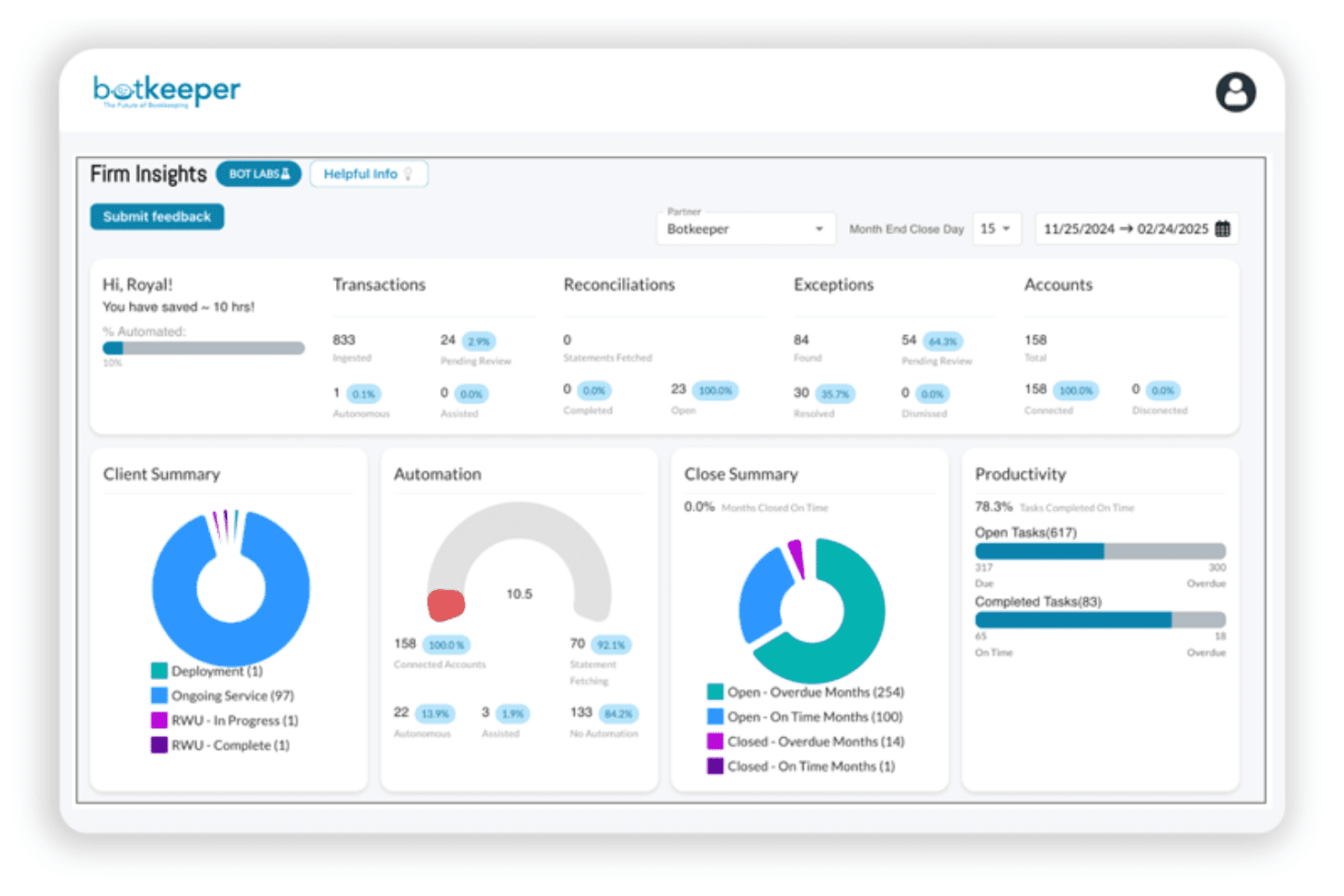
Ease of Use
Botkeeper offers a user-friendly interface that's easy for your team to navigate, making it accessible for members with varying tech skills. The intuitive design helps reduce the learning curve, allowing you to get up and running quickly. Automated features like bookkeeping and payroll simplify complex tasks, enhancing usability. Compared to bookkeeping services, Botkeeper's straightforward setup and clear instructions make managing your church's finances less daunting and more efficient for everyone involved.

Integrations
Botkeeper integrates with QuickBooks Online and Xero. Botkeeper also provides an API and connects with third-party integration tools like Zapier.

Botkeeper Specs
- API: Yes
- Calendar Management: No
- Contact Management: No
- Dashboards: No
- Data Export: No
- Data Import: Yes
- Document Management: No
- External Integrations: Yes
- Multi-User: Yes
- Notifications: No
- Payment Gateway Integration: No
- Scheduling: No
- Workflow Management: No


