

Freshbooks-anmeldelse: Fordele, ulemper, funktioner og priser
Freshbooks udmærker sig ved at tilbyde brugervenlig fakturering og udgiftssporing, hvilket gør tjenesten til et oplagt valg for kirker, der søger enkel økonomistyring.

We review tools independently, and commissions help fund our testing. See our transparency policy, our methodology, or suggest a tool.
FreshBooks is a church accounting software built for small to mid-sized ministries that need to track donations, manage expenses, and handle invoicing without a dedicated finance team. I'd recommend it if your church has outgrown spreadsheets but finds QuickBooks more complex than your actual financial needs require. FreshBooks covers the core accounting functions with a much lower learning curve, which makes it a practical fit for pastors or administrators managing the books alongside everything else on their plate.
FreshBooks Evaluation Summary
4.5/5
- From $12/month (billed annually)
- Free demo + 30-day free trial available
Why Trust Our Software Recommendations
6,700+
Reviews
20
Industry experts
16+
Evaluation factors
14
Years
Our team has been testing and reviewing software since 2012. As church leaders ourselves, we know how difficult—and important—it is to choose the right software.
For this guide, we evaluated tools using hands-on testing and independent research, scoring tools using our selection criteria.
Our reviews reflect our human editorial judgment, not a sales pitch.
FreshBooks Overview
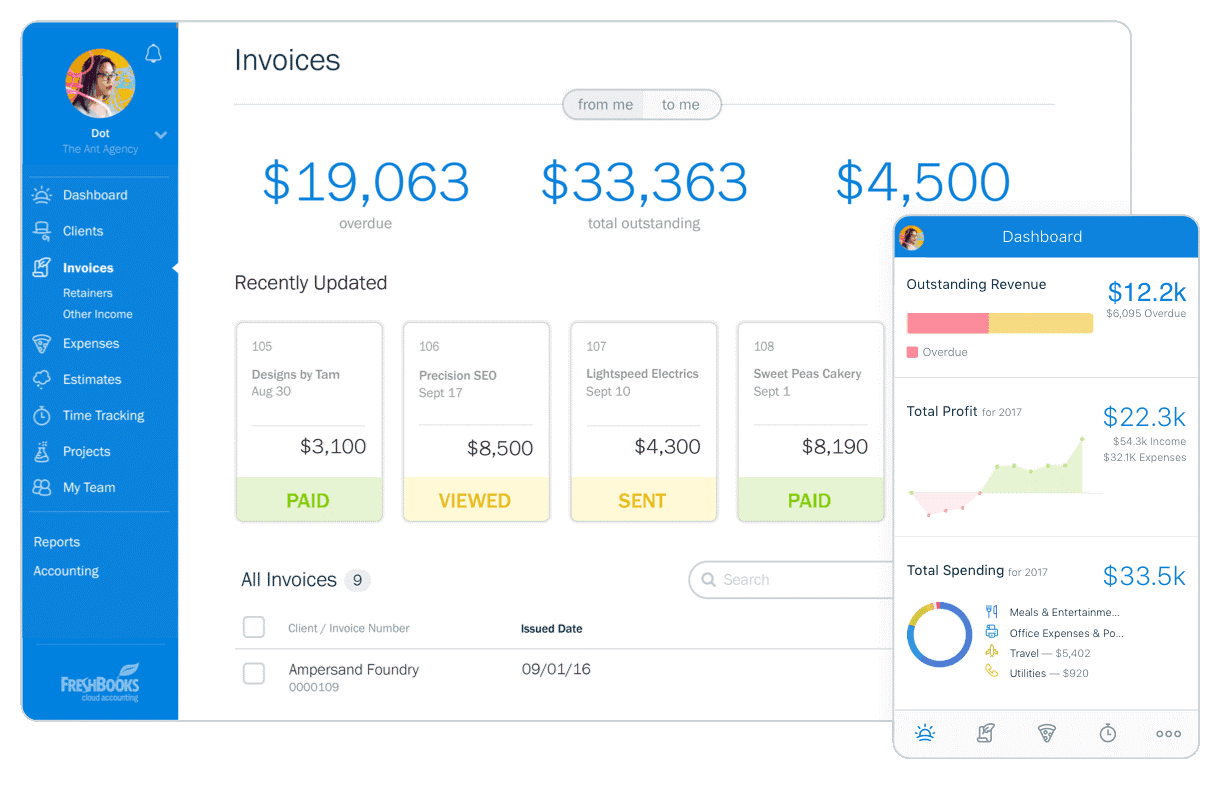
In my opinion, Freshbooks is a solid option for churches looking for straightforward accounting software. It outshines competitors with its user-friendly interface and efficient invoice management. While its feature set may not be as extensive as some other platforms, it excels in simplicity and ease of use, making it ideal for small to medium-sized churches.
For those who value simplicity and effective customer support, Freshbooks is a worthy consideration. However, for larger organizations needing more detailed transaction tracking and reporting, other options might better serve those needs.
Pros
- You can easily track expenses and manage invoices with Freshbooks.
- The intuitive interface makes it simple for your team to use.
- Freshbooks offers reliable customer support to assist you when needed.
Cons
- Freshbooks may lack some advanced reporting features for detailed financial analysis.
- It can be less suitable for very large churches with complex accounting needs.
- Freshbooks might require some manual workarounds for specific church-related transactions.
Is FreshBooks Right For Your Needs?
Hvem passer Freshbooks godt til?
Small to medium-sized churches and non-profit organizations would be a good fit for Freshbooks. If your church needs simple invoicing and expense tracking without the complexity of larger systems, Freshbooks offers a straightforward solution. Youth ministries and community outreach programs, which often require quick and efficient financial management, will find Freshbooks's user-friendly interface and reliable support particularly beneficial.
Små og mellemstore kirker samt nonprofitorganisationer vil passe godt til Freshbooks. Hvis din kirke har brug for enkel fakturering og udgiftssporing uden kompleksiteten fra større systemer, tilbyder Freshbooks en ligetil løsning. Ungdomsministerier og opsøgende fællesskabsprogrammer, som ofte kræver hurtig og effektiv økonomistyring, vil især få glæde af Freshbooks’ brugervenlige grænseflade og pålidelige support.
- Small ChurchesFreshbooks is great for small churches needing basic accounting without complex features.
- Youth MinistriesIts easy-to-use interface helps youth ministries manage their budgets efficiently.
- Community OutreachFreshbooks supports simple expense tracking for community outreach projects.
- Non-Profit OrganizationsNon-profits benefit from Freshbooks's straightforward invoicing and expense tools.
- Freelance AccountantsFreelance accountants can use Freshbooks for managing multiple small clients with ease.
- Volunteer TeamsVolunteer teams find Freshbooks useful for handling basic financial tasks without hassle.
Hvem passer Freshbooks ikke godt til?
Large churches or organizations with complex financial needs wouldn't be a good fit for Freshbooks. If your church requires detailed financial reporting, advanced transaction tracking, or multiple integrations, Freshbooks might fall short. Large finance departments needing comprehensive accounting solutions will find its feature set too basic for their needs.
Store kirker eller organisationer med komplekse økonomiske behov vil ikke passe godt til Freshbooks. Hvis din kirke har brug for detaljeret økonomirapportering, avanceret transaktionssporing eller flere integrationer, kan Freshbooks komme til kort. Store økonomiafdelinger, der har brug for omfattende regnskabsløsninger, vil finde funktionaliteten for grundlæggende til deres behov.
- Large ChurchesLarge churches need more advanced reporting and complex accounting functionalities.
- Corporate AccountingCorporate accounting requires detailed financial analysis that Freshbooks doesn't offer.
- Finance DepartmentsFinance departments need robust features beyond Freshbooks's basic capabilities.
- Educational InstitutionsSchools often require more comprehensive budgeting and financial management tools.
- Government AgenciesGovernment agencies demand intricate financial systems Freshbooks can't provide.
- Manufacturing CompaniesManufacturers need detailed cost tracking and inventory management, which Freshbooks lacks.
How We Test & Score Tools
We’ve spent years building, refining, and improving our software testing and scoring system. The rubric is designed to capture the nuances of software selection and what makes a tool effective, focusing on critical aspects of the decision-making process.
Below, you can see exactly how our testing and scoring works across seven criteria. It allows us to provide an unbiased evaluation of the software based on core functionality, standout features, ease of use, onboarding, customer support, integrations, customer reviews, and value for money.
Core Functionality (25% of final scoring)
The starting point of our evaluation is always the core functionality of the tool. Does it have the basic features and functions that a user would expect to see? Are any of those core features locked to higher-tiered pricing plans? At its core, we expect a tool to stand up against the baseline capabilities of its competitors.
Standout Features (25% of final scoring)
Next, we evaluate uncommon standout features that go above and beyond the core functionality typically found in tools of its kind. A high score reflects specialized or unique features that make the product faster, more efficient, or offer additional value to the user.
We also evaluate how easy it is to integrate with other tools typically found in the tech stack to expand the functionality and utility of the software. Tools offering plentiful native integrations, 3rd party connections, and API access to build custom integrations score best.
Ease of Use (10% of final scoring)
We consider how quick and easy it is to execute the tasks defined in the core functionality using the tool. High scoring software is well designed, intuitive to use, offers mobile apps, provides templates, and makes relatively complex tasks seem simple.
Onboarding (10% of final scoring)
We know how important rapid team adoption is for a new platform, so we evaluate how easy it is to learn and use a tool with minimal training. We evaluate how quickly a team member can get set up and start using the tool with no experience. High scoring solutions indicate little or no support is required.
Customer Support (10% of final scoring)
We review how quick and easy it is to get unstuck and find help by phone, live chat, or knowledge base. Tools and companies that provide real-time support score best, while chatbots score worst.
Customer Reviews (10% of final scoring)
Beyond our own testing and evaluation, we consider the net promoter score from current and past customers. We review their likelihood, given the option, to choose the tool again for the core functionality. A high scoring software reflects a high net promoter score from current or past customers.
Value for Money (10% of final scoring)
Lastly, in consideration of all the other criteria, we review the average price of entry level plans against the core features and consider the value of the other evaluation criteria. Software that delivers more, for less, will score higher.
Core Features
Invoicing:
Freshbooks lets you create and send professional invoices quickly. Customize templates to suit your church's branding, making your financial interactions more personal.
Expense Tracking:
You can easily track and categorize expenses, helping you manage your church's budget efficiently. Snap photos of receipts and attach them directly to expenses for better record-keeping.
Time Tracking:
Track time spent on various church activities or projects, ensuring accurate billing and time management. This feature is especially useful for managing volunteer hours.
Reporting:
Freshbooks offers basic financial reports that give you a clear view of your church's financial health. Access income statements and expense reports with just a few clicks.
Estimates:
Create detailed estimates for church projects or events, and convert them into invoices once approved. This helps you manage project finances from start to finish.
Client Portal:
Your team can provide clients or church members with a portal to view invoices and payment history. This transparency builds trust and streamlines communication.

Ease of Use
Freshbooks stands out for its user-friendly interface, making it a breeze for your team to navigate. The clean design and intuitive layout mean you won't waste time hunting for features. Even those with minimal accounting experience can manage church finances with ease. Its straightforward setup and accessible help resources ensure you get up and running quickly. Compared to other options, Freshbooks simplifies tasks like invoicing and expense tracking, making it a favorite for busy church staff.

Integrations
Integrations include FreshCurrencies, Cash Flow Frog, Approveit, Tallyfor, Syft Analytics, FreshBooks Payroll, Gusto, SurePayroll, Payment Evolution, NiceJob, Acuity Scheduling, and Gmail and Microsoft Outlook Add-Ons.
FreshBooks Specs
- 2-Factor Authentication: Yes
- Accounts Payable: Yes
- Accounts Receivable: Yes
- API: Yes
- Balance Sheet: Yes
- Billing/Invoicing: Yes
- BitCoin: No
- Budgeting: Yes
- Calendar Management: No
- Contact Management: No
- CRM Integration: Yes
- Customer Management: Yes
- Dashboard: Yes
- Data Export: Yes
- Data Import: Yes
- Data Visualization: Yes
- Expense Tracking: Yes
- External Integrations: Yes
- Forecasting: No
- General Account Ledger: Yes
- Inventory Tracking: No
- Multi-Currency: Yes
- Multi-User: No
- Notifications: Yes
- P&L: Yes
- PayPal: Yes
- Payroll: Yes
- SAP Integration: No
- Stripe: Yes
- Supplier Management: No
- Tax Management: Yes
Alternatives to FreshBooks


FreshBooks FAQs
Hvad er det næste?
Tilmeld dig vores nyhedsbrev for at få de seneste ressourcer, bedste praksis og indsigt i ledelse af kirker fra erfarne præster og kirkeledere.