

Het beheren van de planning van een kerk kan overweldigend zijn. Tussen het coördineren van vrijwilligers, het plannen van evenementen en het beheren van middelen door is het gemakkelijk om je overspoeld te voelen. Daar komt software voor kerkplanning om de hoek kijken: die helpt je alles georganiseerd te houden.
Ik heb tijd besteed aan het testen en beoordelen van verschillende softwareoplossingen om je de beste beschikbare opties te bieden. Door mijn ervaring in de kerkmanagementsector kan ik een onbevooroordeeld perspectief bieden. Je kunt erop vertrouwen dat mijn beoordelingen goed zijn onderzocht en gericht zijn op jouw behoeften.
In dit artikel leid ik je langs de beste keuzes op het gebied van software voor kerkplanning en belicht ik hun voordelen en functies. Je vindt de juiste tool om je planningstaken eenvoudiger en efficiënter te maken.
Waarom u onze softwareaanbevelingen kunt vertrouwen
6,700+
Reviews
20
Industry experts
16+
Evaluation factors
14
Years
Ons team test en beoordeelt software sinds 2012. Als kerkleiders weten we zelf hoe moeilijk — en belangrijk — het is om de juiste software te kiezen.
Voor deze gids hebben we tools geëvalueerd met behulp van praktijktests en onafhankelijk onderzoek, waarbij we tools beoordeelden aan de hand van onze selectiecriteria.
Onze reviews weerspiegelen ons menselijke redactionele oordeel, geen verkooppraatje.
Vergelijkingstabel voor software voor kerkplanning
In deze vergelijkingstabel staan de prijsgegevens van mijn beste keuzes op het gebied van software voor kerkplanning samengevat
| Tool | Best For | Trial Info | Price | ||
|---|---|---|---|---|---|
| 1 | Het beste voor het reserveren van kerkfaciliteiten en evenementen | Gratis demo beschikbaar | Vanaf $99/maand (jaarlijks gefactureerd) | Website | |
| 2 | Beste voor eenmalige en terugkerende evenementen | Gratis proefperiode van 30 dagen + gratis abonnement beschikbaar | Vanaf $12/maand | Website | |
| 3 | Het beste voor eenvoudige planning van kerkfaciliteiten | 14 dagen gratis uitproberen + gratis abonnement + gratis demo beschikbaar | Vanaf $22/maand (jaarlijks gefactureerd) | Website | |
| 4 | Beste voor eenvoudige afspraakplanning | Gratis proefperiode van 14 dagen + gratis abonnement + gratis demo beschikbaar | Vanaf $10/gebruiker/maand (jaarlijks gefactureerd) | Website | |
| 5 | Ideaal voor kleine tot middelgrote kerken | Gratis demo beschikbaar | Vanaf $72/maand | Website | |
| 6 | Beste voor flexibel teambeheer | Gratis proefperiode van 30 dagen beschikbaar | Vanaf $15/maand | Website | |
| 7 | Ideaal voor teamsamenwerkingsfuncties | Een gratis proefperiode van 30 dagen beschikbaar | Vanaf $37/maand | Website | |
| 8 | Ideaal voor het plannen van vrijwilligers | abonnement van zes maanden (met geld-teruggarantie), gevolgd door jaarlijkse verlengingen | Prijzen variëren op basis van het abonnement en het aantal vrijwilligers | Website | |
| 9 | Het beste voor het verenigen van aanbiddings-, vrijwilligers- en faciliteitsplanningen | Gratis demo beschikbaar | Prijs op aanvraag | Website | |
| 10 | Beste voor evenementgerichte planning | Gratis demo op aanvraag. | Aangepaste prijzen op aanvraag | Website |


Beoordelingen van de beste software voor kerkplanning
Hieronder vind je mijn uitgebreide samenvattingen van de beste software voor kerkplanning die op mijn shortlist is gekomen. In mijn beoordelingen bespreek ik uitgebreid de belangrijkste functies, voor- en nadelen, integraties en ideale gebruikssituaties van elke tool, zodat je de beste keuze voor jou kunt vinden.
 Het beste voor het reserveren van kerkfaciliteiten en evenementen
- Gratis demo beschikbaar
- Vanaf $99/maand (jaarlijks gefactureerd)
Visit WebsiteCustomer Rating:4.3/5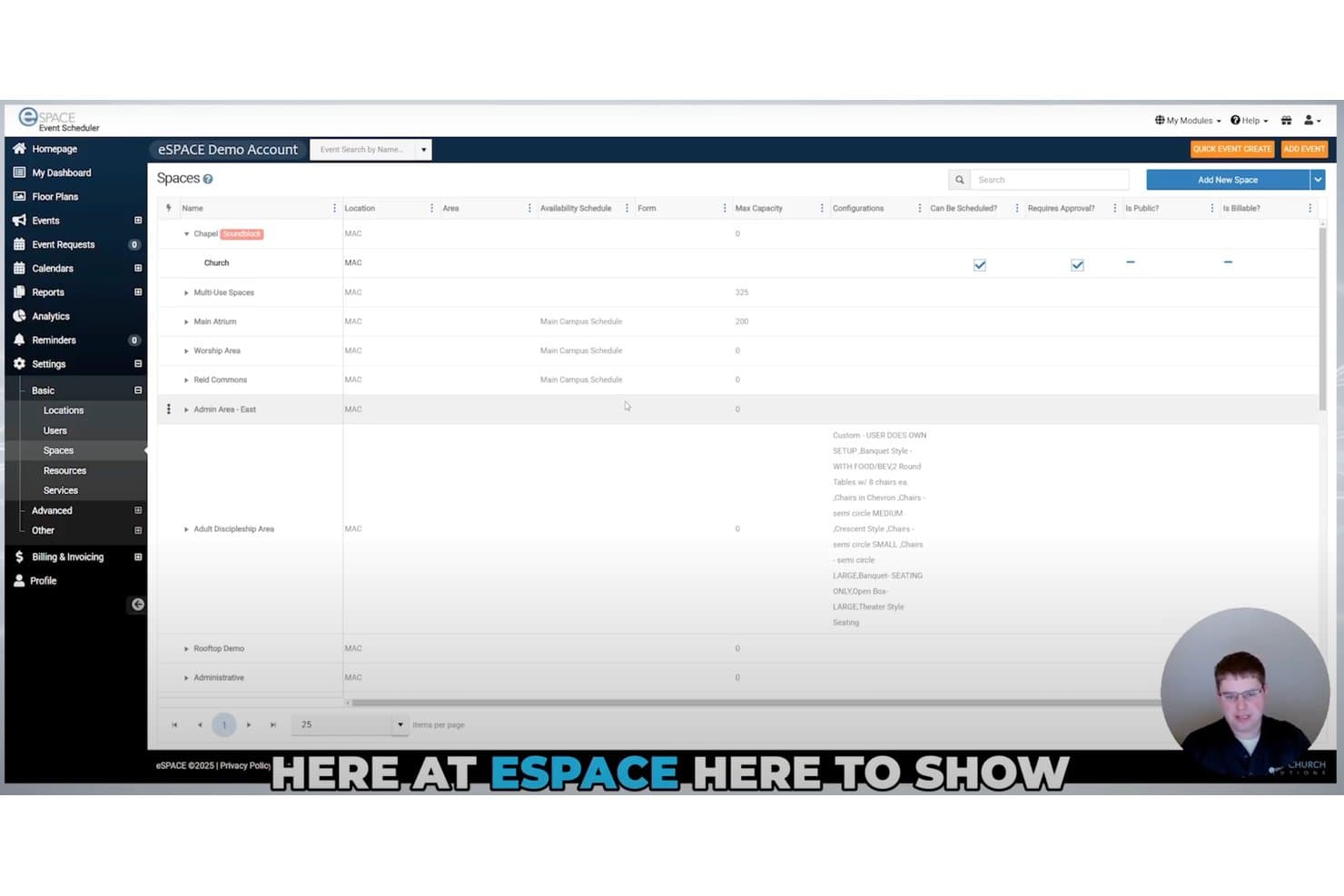
Met eSPACE kunnen gebruikers alle reserveerbare kerkruimtes op één plek beheren en bekijken. eSPACE is een platform voor het plannen van kerkfaciliteiten en evenementen, dat reserveringen van ruimtes en middelen, conflictdetectie, evenementenkalenders, werkopdrachten en IoT-gebaseerde automatisering van faciliteiten beheert.
Voor wie is eSPACE het meest geschikt?
eSPACE is zeer geschikt voor kerkbeheerders die reserveringen van faciliteiten, ruimtereserveringen en evenementlogistiek op één of meerdere locaties beheren.
Waarom ik voor eSPACE heb gekozen
eSPACE staat op mijn shortlist omdat het plannen van faciliteiten en evenementen precies is waar het platform in uitblinkt. Ik vind het geweldig hoe de realtimeconflictdetectie dubbele boekingen van ruimtes, middelen zoals tafels en stoelen en diensten zoals kinderopvang allemaal binnen één aanvraag signaleert. Je kunt ook openbare aanvraagformulieren voor evenementen en een kerkkalender op de website instellen, zodat externe groepen reserveringen kunnen indienen zonder naar kantoor te bellen.
Belangrijkste functies van eSPACE
- Openbare aanvraagformulieren voor evenementen: Externe groepen en bedieningen kunnen rechtstreeks via een openbaar formulier reserveringsaanvragen indienen, zonder naar kantoor te bellen.
- Kalenderweergave met meerdere opties: Kleurgecodeerde categorieën, groepssjablonen en meerdere kalenderweergaven geven beheerders een duidelijk overzicht van wat er binnen de faciliteit gebeurt.
- ChMS-integraties: eSPACE maakt verbinding met Planning Center, Rock RMS, Breeze en verschillende andere kerkbeheersystemen om gegevens gesynchroniseerd te houden.
- Beheer van werkopdrachten: Met een aparte module kan je faciliteitenteam onderhoudswerkopdrachten en preventief onderhoud aanmaken, volgen en beheren naast evenementreserveringen.
Integraties van eSPACE
eSPACE biedt gedocumenteerde integraties met Planning Center, Rock RMS, Breeze, ACS Technologies, Ministry Platform, ChurchTeams, TouchPoint en DynaCal. Het maakt ook verbinding met Google Calendar en Outlook, ondersteunt iCal-export en biedt een open API voor aangepaste integraties.
Pros and Cons
Pros:
- Voorkomt dubbele boekingen van ruimtes en middelen
- Verwerkt openbare evenementaanvragen zonder telefoontjes naar kantoor
- Verbindt evenementplanningen met automatisering van faciliteiten
Cons:
- Plant geen vrijwilligers of aanbiddingsteams
- Biedt geen serviceplannen, liederen en vervangingen
Learn more about eSPACE: Beste voor eenmalige en terugkerende evenementen
- Gratis proefperiode van 30 dagen + gratis abonnement beschikbaar
- Vanaf $12/maand
Visit WebsiteCustomer Rating:4.9/5
Dashboard van ChMeetings met de belangrijkste kerkelijke statistieken, waaronder personen, evenementen, bijdragen, opvolging van vrijwilligers en recente aanwezigheidsgegevens. ChMeetings richt zich op kerken die hun organisatorische efficiëntie en betrokkenheid van de gemeenschap willen verbeteren. Deze software is ontworpen voor kerkleiders en beheerders en voorziet in de behoefte aan gestroomlijnde planning, effectief vrijwilligersbeheer en vereenvoudigde coördinatie van evenementen. Door essentiële functionaliteiten in één platform te integreren, vermindert ChMeetings de complexiteit van het beheren van kerkelijke activiteiten, zodat je je kunt richten op het bevorderen van een levendige kerkgemeenschap.
Waarom ik voor ChMeetings koos
Ik koos voor ChMeetings omdat het uitblinkt in het vereenvoudigen van de complexiteit van kerkelijke planning en vrijwilligersbeheer. Het robuuste evenementbeheersysteem stelt je in staat om moeiteloos zowel eenmalige als terugkerende evenementen te organiseren, inclusief RSVP-tracking en capaciteitsbeheer. Daarnaast is de functie voor vrijwilligersplanning van onschatbare waarde: hiermee kun je rollen toewijzen en automatische herinneringen versturen om een soepele werking te garanderen. Deze functies pakken de uitdagingen van kerkbeheerders rechtstreeks aan, waardoor ChMeetings een praktische keuze is voor het beheren van kerkelijke activiteiten.
Belangrijkste functies van ChMeetings
Naast de opvallende mogelijkheden voor evenementen- en vrijwilligersbeheer biedt ChMeetings verschillende andere functies die de bruikbaarheid als planningstool voor kerken vergroten.
- Beheer van personen & groepen: Maak gedetailleerde ledenprofielen en groepsindelingen aan en beheer deze, zodat iedereen verbonden is en in beeld blijft.
- Plannen van erediensten: Coördineer erediensten door liederen en onderdelen van de dienst te beheren voor een naadloze eredienstervaring.
- Ledenportaal: Stel leden in staat om hun gegevens bij te werken, zich voor evenementen te registreren en groepsgegevens te bekijken via een gebruiksvriendelijk portaal.
- Berichtentools: Communiceer moeiteloos met je gemeente via geïntegreerde opties voor e-mail, sms en pushmeldingen.
Integraties van ChMeetings
Integraties omvatten PayPal, Mailchimp, Stripe en Zapier voor verbinding met meer dan 7.000 aanvullende apps, wat de flexibiliteit en functionaliteit verder vergroot.
Pros and Cons
Pros:
- Robuuste planning van evenementen en aanwezigheid
- Vrijwilligersplanning met automatische herinneringen
- Ledenportaal voor zelfbedieningstoegang
Cons:
- Geavanceerde rapportages kunnen beperkt aanvoelen
- Momenteel geen volledige offlinefunctionaliteit
Learn more about ChMeetings: Het beste voor eenvoudige planning van kerkfaciliteiten
- 14 dagen gratis uitproberen + gratis abonnement + gratis demo beschikbaar
- Vanaf $22/maand (jaarlijks gefactureerd)
Visit WebsiteCustomer Rating:4.6/5
Kalenderweergave van Whatspot, met reserveringen gefilterd op middelengroepen zoals ruimtes en laboratoria. Whatspot is een eenvoudig systeem voor het reserveren van faciliteiten en middelen, ontworpen om organisaties te helpen gedeelde ruimtes en apparatuur te beheren. Voor kerken is het een effectief hulpmiddel om de chaos van dubbel geboekte gemeenschapszalen, klaslokalen en kerkbusjes te voorkomen. Het lost de uitdaging op van het coördineren van meerdere gemeenteactiviteiten op een druk kerkterrein door alle reserveringen van fysieke middelen te centraliseren.
Voor wie is Whatspot het meest geschikt?
Het is het meest geschikt voor kleine tot middelgrote kerken die behoefte hebben aan een toegewijd, gebruiksvriendelijk systeem dat uitsluitend bedoeld is voor het beheren van fysieke ruimtes en middelen.
Waarom ik voor Whatspot heb gekozen
Hoewel veel kerkplatforms sterk gericht zijn op vrijwilligersroosters, heb ik Whatspot opgenomen omdat het beheer van het daadwerkelijke kerkgebouw net zo belangrijk is. Het onderscheidt zich als de beste optie voor eenvoudige planning van kerkfaciliteiten en zorgt ervoor dat bedieningen niet hoeven te strijden om dezelfde vergaderruimte. De opvallendste functie is de QR-codefunctionaliteit, waarmee kerkmedewerkers of leiders van kleine groepen naar een ruimte kunnen lopen, een code met hun telefoon kunnen scannen en de ruimte direct kunnen reserveren als deze leeg is.
Belangrijkste functies van Whatspot
- Reserveringen via QR-codes: Hiermee kunnen gebruikers een code scannen die buiten een kerkruimte is geplaatst om deze direct te reserveren of het dagschema te bekijken.
- Groepering van middelen: Hiermee kunnen beheerders reserveerbare middelen categoriseren, bijvoorbeeld door alle multimedia-apparatuur of kerkvoertuigen bij elkaar te zetten.
- Goedkeuringsprocessen: Biedt de mogelijkheid om goedkeuring van een faciliteitenbeheerder te vereisen voordat een grote ruimte, zoals de kerkzaal, definitief wordt gereserveerd.
- Visuele kalender: Toont een duidelijk, met kleuren gecodeerd dagelijks of wekelijks overzicht van alle ruimtes op het kerkterrein, zodat medewerkers de beschikbaarheid gemakkelijk kunnen zien.
Integraties van Whatspot
Integraties omvatten Google Calendar, Microsoft Outlook en Microsoft Teams.
Pros and Cons
Pros:
- Voorkomt dubbele reserveringen van ruimtes
- Cloudgebaseerd, zonder installatie
- Gratis abonnement voor maximaal 3 middelen
Cons:
- Beperkte gebruikersrollen bij basisabonnementen
- Mist functies voor eredienstplanning
Learn more about Whatspot: Beste voor eenvoudige afspraakplanning
- Gratis proefperiode van 14 dagen + gratis abonnement + gratis demo beschikbaar
- Vanaf $10/gebruiker/maand (jaarlijks gefactureerd)
Visit WebsiteCustomer Rating:4.7/5
Calendly automatiseert afspraken door agenda's te synchroniseren en beschikbaarheid te beheren. Calendly is een planningstool die is ontworpen voor personen en teams die behoefte hebben aan afspraakbeheer. Het helpt gebruikers bij het automatiseren van het plannen van vergaderingen door agenda's te synchroniseren en beschikbaarheid te beheren.
Waarom ik Calendly heb gekozen: Het is ideaal voor het eenvoudig plannen van afspraken en biedt een overzichtelijke interface om vergaderingen te coördineren. Je kunt je beschikbaarheidsvoorkeuren instellen, zodat anderen tijdvakken kunnen boeken zonder heen-en-weer e-mails. De software kan met verschillende agenda's worden geïntegreerd om dubbele boekingen te voorkomen. Naar mijn ervaring maken de eenvoud en de focus op het voorkomen van planningsconflicten het een uitstekende keuze voor kerken en organisaties die behoefte hebben aan eenvoudig afspraakbeheer.
Belangrijkste functies & integraties:
Functies omvatten aanpasbare planningslinks die je met anderen kunt delen, automatische detectie van tijdzones om verwarring te voorkomen en buffertijden tussen vergaderingen, zodat je genoeg voorbereidingstijd hebt. Deze functies helpen bij het proces voor het plannen van afspraken.
Integraties omvatten Google Calendar, Microsoft Outlook, Zoom, Slack, Salesforce, HubSpot, Mailchimp, Stripe, PayPal en Microsoft Teams.
Pros and Cons
Pros:
- Vermindert achterstanden bij het plannen via e-mail
- Ondersteunt meerdere typen vergaderingen
- Verwerkt boekingen over verschillende tijdzones heen
Cons:
- Geen kerkspecifieke gegevensvelden
- Voor complexe evenementen zijn andere tools nodig
Learn more about Calendly: Ideaal voor kleine tot middelgrote kerken
- Gratis demo beschikbaar
- Vanaf $72/maand
Visit WebsiteCustomer Rating:4.8/5
Tithely Church Management (voorheen Breeze ChMs) helpt kleine kerken bij dagelijkse taken zoals aanwezigheid, rollen en evenementen. Tithely Church Management (Breeze ChMs) is software voor kerkbeheer, ontworpen voor kleine tot middelgrote kerken. Het biedt hulpmiddelen voor planning, ledenbeheer en evenementenorganisatie om te helpen bij de dagelijkse werkzaamheden van de kerk.
Waarom ik voor Tithely Church Management (Breeze ChMs) heb gekozen: Het is afgestemd op kleine tot middelgrote kerken en biedt gebruiksvriendelijke functies voor planning en communicatie. Je kunt evenementen beheren en aanwezigheid bijhouden, zodat je kerkelijke activiteiten georganiseerd blijven. De software biedt ook hulpmiddelen voor ledenbeheer waarmee je gedetailleerde gegevens kunt bijhouden. Naar mijn ervaring maakt de gebruiksvriendelijke interface het een uitstekende keuze voor kerken met beperkte technische middelen.
Opvallende functies & integraties:
Functies zijn onder andere een ingebouwde kalender voor het plannen van evenementen, aanpasbare ledenprofielen om betrokkenheid bij te houden en een donatiebeheersysteem voor het verwerken van bijdragen. Met deze functies kun je de behoeften van je kerk beheren.
Integraties zijn onder andere QuickBooks, Mailchimp, Google Calendar, Microsoft Outlook, Planning Center, PayPal, Stripe, Twilio, Zoom en Elvanto.
Pros and Cons
Pros:
- Eenvoudige hulpmiddelen voor terugkerende evenementen
- Geschikt voor kleine kerkelijke teams
- Ondersteunt eenvoudige vrijwilligersroosters
Cons:
- Grotere kerken kunnen er na verloop van tijd uitgroeien
- Beperkte opties voor hardware voor het inchecken
Learn more about Breeze ChMS: Beste voor flexibel teambeheer
- Gratis proefperiode van 30 dagen beschikbaar
- Vanaf $15/maand
Visit WebsiteCustomer Rating:4.7/5
Planning Center beheert vrijwilligers, middelen en evenementen. Planning Center is kerkplanningssoftware voor kerken van elke omvang. Het helpt bij het beheren van vrijwilligersplanning, middelenplanning en evenementencoördinatie.
Waarom ik Planning Center heb gekozen: Het is ideaal voor flexibel teambeheer en biedt functies zoals aanpasbare planningssjablonen en communicatietools voor vrijwilligers. Met de software kun je eenvoudig planningen maken en aanpassen, zodat wijzigingen binnen je team gemakkelijk kunnen worden verwerkt. Je kunt ook het check-insysteem gebruiken om aanwezigheid bij te houden en evenementen te beheren. Doordat je via het platform rechtstreeks met vrijwilligers kunt communiceren, staan al je gegevens op één plek.
Opvallende functies & integraties:
Functies omvatten een planner met slepen-en-neerzetten voor eenvoudige aanpassingen, een check-insysteem voor het beheren van aanwezigheid en een gecentraliseerd communicatiecentrum om contact te houden met je team.
Integraties omvatten Mailchimp, Zoom, QuickBooks, Stripe, PayPal, Twilio, Google Calendar, Microsoft Outlook, Slack en Dropbox.
Pros and Cons
Pros:
- Past zich aan veel bedieningen aan
- Ondersteunt campussen op meerdere locaties
- Sterke beheermogelijkheden voor vrijwilligersroulatie
Cons:
- Veel modules om te configureren
- Kleinere kerken schaffen mogelijk meer aan dan nodig
Learn more about Planning Center: Ideaal voor teamsamenwerkingsfuncties
- Een gratis proefperiode van 30 dagen beschikbaar
- Vanaf $37/maand
Visit WebsiteCustomer Rating:4.7/5
Churchteams richt zich op het groepsleven en helpt teams bij het coördineren van rollen en de opvolging. Churchteams is software voor kerkbeheer dat is ontworpen om teamsamenwerking en communicatie te bevorderen. Het is geschikt voor kerken van alle groottes en helpt bij planning, ledenbeheer en groepscoördinatie.
Waarom ik voor Churchteams koos: Het biedt functies voor teamsamenwerking, met hulpmiddelen die de communicatie tussen kerkmedewerkers en vrijwilligers ondersteunen. De software bevat een groepsbeheersysteem waarmee je kleine groepen kunt organiseren en volgen. Je kunt ook de sms- en e-mailcommunicatietools gebruiken om iedereen op de hoogte te houden. Naar mijn ervaring maakt de focus op teamsamenwerking het bijzonder nuttig voor kerken met actieve vrijwilligersteams.
Opvallende functies & integraties:
Functies omvatten een geautomatiseerd opvolgingssysteem om nieuwe leden te betrekken, een aanpasbare formulierbouwer voor het verzamelen van informatie en een inchecksysteem voor evenementen en diensten. Deze functies helpen je de betrokkenheid te behouden en kerkelijke activiteiten te beheren.
Integraties omvatten QuickBooks, Mailchimp, Planning Center, PayPal, Stripe, Google Calendar, Microsoft Outlook, Zoom, Twilio en FellowshipOne.
Pros and Cons
Pros:
- Handige automatisering voor opvolging
- Goed overzicht binnen verschillende bedieningen
- Flexibele vrijwilligerssjablonen beschikbaar
Cons:
- Geen algemene kalenderweergave
- Abonnementen worden beperkt door het aantal mensen
Learn more about Churchteams: Ideaal voor het plannen van vrijwilligers
- abonnement van zes maanden (met geld-teruggarantie), gevolgd door jaarlijkse verlengingen
- Prijzen variëren op basis van het abonnement en het aantal vrijwilligers
Visit WebsiteCustomer Rating:4.6/5
Ministry Scheduler Pro organiseert vrijwilligers en houdt communicatie eenvoudig. Ministry Scheduler Pro is software voor kerkroosters, afgestemd op vrijwilligersbeheer. Het is geschikt voor kerken van verschillende groottes door vrijwilligersroosters te organiseren en communicatie te vereenvoudigen.
Waarom ik Ministry Scheduler Pro heb gekozen: Het is ideaal voor het plannen van vrijwilligers en biedt functies zoals geautomatiseerde herinneringen en conflictbeheer. De software helpt je de beschikbaarheid van vrijwilligers te beheren en voorkomt planningsconflicten. Je kunt ook geautomatiseerde e-mails versturen om je team geïnformeerd en betrokken te houden. Naar mijn ervaring maakt de mogelijkheid om complexe planningsbehoeften te verwerken het een goede keuze voor kerken met actieve vrijwilligersprogramma's.
Opvallende functies & integraties:
Functies omvatten gedetailleerde vrijwilligersprofielen waarin voorkeuren en beschikbaarheid worden opgeslagen, een mobiele app voor toegang onderweg en aanpasbare rapporten om deelname bij te houden. Deze functies helpen je je vrijwilligersprogramma te beheren.
Integraties omvatten Google Calendar, Microsoft Outlook, Apple Calendar, Mailchimp, Planning Center, Church Community Builder, Elvanto, Realm, FellowshipOne en Servant Keeper.
Pros and Cons
Pros:
- Sterke logica voor het voorkomen van conflicten
- Geschikt voor grote vrijwilligerslijsten
- Handige workflows voor ruilverzoeken
Cons:
- Beperktere geavanceerde beheerdersfuncties
- Moeilijker voor informele coördinatoren
Learn more about Ministry Scheduler Pro: Het beste voor het verenigen van aanbiddings-, vrijwilligers- en faciliteitsplanningen
- Gratis demo beschikbaar
- Prijs op aanvraag
Visit WebsiteCustomer Rating:4/5
Pushpay stimuleert mobiel geven, betrokkenheid en interactie met donateurs. Pushpay is een platform voor kerkbeheer dat kerken helpt alles te coördineren wat er op een zondag gebeurt—van het aanbiddingsplan en vrijwilligerstaken tot de ruimtes en middelen die elke bediening nodig heeft. Het is ontworpen voor kerken die hun planning, dienstvoorbereiding en faciliteitscoördinatie op één plek willen beheren in plaats van via meerdere tools.
Waarom ik voor Pushpay heb gekozen: Pushpay onderscheidt zich door de nauwe koppeling tussen aanbiddingsplannen en de betrokken mensen en ruimtes. De tools voor automatische planning helpen je vrijwilligersrollen in te vullen op basis van rotaties en beschikbaarheid, terwijl het systeem voor Ruimtes & Middelen ervoor zorgt dat evenementen en diensten de juiste ruimtes en apparatuur krijgen zonder dubbele boekingen. Naar mijn ervaring is dit “alles-in-één-planningsecosysteem” vooral handig voor kerken met meerdere bedieningen, diensttypen of campussen.
Opvallende functies & integraties:
Functies omvatten een geïntegreerde planning van diensten en vrijwilligers, waarmee je gedetailleerde dienstplannen kunt opstellen en rollen binnen dezelfde workflow kunt toewijzen. Pushpay biedt ook automatische planning om vrijwilligersposities in te vullen op basis van inzetpatronen, plus faciliteitsbeheer voor het reserveren van ruimtes, het beheren van apparatuur en het voorkomen van conflicten tussen bedieningen. Je kunt evenement- en ruimtekalenders synchroniseren met Google, iCal of Outlook en iedereen op de hoogte houden met ingebouwde communicatietools voor het versturen van herinneringen, updates en dienstgegevens.
Integraties omvatten Salesforce, Planning Center, QuickBooks, Church Community Builder, Rock RMS, Elvanto, Google Calendar, Microsoft Outlook, Zoom en Twilio.
Pros and Cons
Pros:
- Biedt ook donatietools en -functies
- Ideaal voor kerken met meerdere campussen die gecoördineerde dienstplannen nodig hebben
- Schaalt goed voor kerken met meerdere bedieningen
Cons:
- Voegt een extra administratieve laag toe als je al afzonderlijke planningstools gebruikt
- Configuratiepaden voelen complex aan
Learn more about Pushpay: 10Beste voor evenementgerichte planning
EventPro
- Gratis demo op aanvraag.
- Aangepaste prijzen op aanvraag
Visit WebsiteCustomer Rating:4.1/5
EventPro ondersteunt het plannen, organiseren en uitvoeren van gedetailleerde evenementen. EventPro is software voor evenementenbeheer, ontworpen voor organisaties die planningsoplossingen nodig hebben. Het bedient verschillende gebruikers, waaronder kerken, door hulpmiddelen te bieden voor het plannen, organiseren en uitvoeren van evenementen.
Waarom ik voor EventPro koos: Het is gespecialiseerd in evenementgerichte planning en biedt uitgebreide hulpmiddelen voor het beheren van grote en kleine evenementen. Je kunt meerdere aspecten van een evenement coördineren, van het boeken van locaties tot het toewijzen van middelen. De software biedt ook planningshulpmiddelen waarmee je deadlines en tijdlijnen goed kunt bijhouden. Naar mijn ervaring maakt de focus op evenementenbeheer het een goede keuze voor kerken met een actieve evenementenkalender.
Opvallende functies & integraties:
Functies omvatten een locatiebeheersysteem waarmee je ruimtes kunt boeken en beheren, een module voor middelenbeheer om apparatuur en personeel toe te wijzen, en een tijdlijnfunctie om evenementenschema's bij te houden. Deze functies zorgen ervoor dat je evenementen goed georganiseerd en soepel uitgevoerd worden.
Integraties omvatten Microsoft Outlook, Google Calendar, QuickBooks, Salesforce, Mailchimp, Zoom, Twilio, Eventbrite, Constant Contact en Slack.
Pros and Cons
Pros:
- Blinkt uit in complexe logistiek rond evenementen
- Handige ingebouwde planningstijdlijnen
- Goede ondersteuning voor meerdaagse evenementen
Cons:
- Veel parameters om te configureren
- Niet specifiek ontworpen voor gebruik door kerken
Learn more about EventPro:
Andere software voor kerkplanning
Hier zijn enkele aanvullende opties voor software voor kerkplanning die mijn shortlist niet hebben gehaald, maar die toch het bekijken waard zijn:
- 11ChurchTracIdeaal voor kerken die op hun budget letten
- 12ParishSOFTBeste voor katholieke parochies
- 13Fellowship OneIdeaal voor grote kerknetwerken
- 14Shepherd's StaffHet beste voor traditionele kerkelijke werkzaamheden
- 15B1 ChurchBeste voor betrokkenheid van de gemeenschap
- 16One Church SoftwareBeste voor geïntegreerd kerkbeheer
Hoe ik software voor kerkplanning beoordeel
Ik deel mijn beoordeling op in twee lagen: basisvereisten zoals vrijwilligersroulatie en dienstplanning, en onderscheidende factoren zoals ondersteuning voor meerdere locaties en CCLI-integratie.
Kernfunctionaliteit (basisvereisten voor deze lijst)
Bij het selecteren van tools voor mijn lijst beoordeel ik elke tool op een schaal van 0 (biedt de functionaliteit niet) tot 5 (blink uit op dit gebied) voor elke hieronder vermelde kernfunctionaliteit. Vervolgens zet ik de totaalscore van de tool om in een percentage. Elke tool moet een minimale totaalscore van 65% behalen om in aanmerking te komen voor opname.
- Vrijwilligersplanning: Ik beoordeel hoe goed elke tool het toewijzen, rouleren en volgen van vrijwilligers voor terugkerende zondagse diensten, doordeweekse groepen en speciale evenementen afhandelt.
- Dienstplanning: Elke tool moet aanbiddingsleiders in staat stellen gestructureerde draaiboeken op te stellen met roltoewijzingen, liedsets, toonsoorten en overgangstijden voor elke bijeenkomst.
- Beschikbaarheid & blokkeringen: Ik zoek naar tools waarmee vrijwilligers hun eigen beschikbaarheid kunnen doorgeven, vakantiedata kunnen blokkeren en vervangers kunnen aanvragen zonder een coördinator te hoeven e-mailen of sms'en.
- Geautomatiseerde meldingen: Planningsbevestigingen, wekelijkse herinneringen en last-minute wijzigingen moeten vrijwilligers automatisch via e-mail, sms of pushmeldingen bereiken.
- Reservering van ruimtes & middelen: Ik controleer of een tool ruimtes, projectoren of geluidsapparatuur kan reserveren naast de dienstroosters, om dubbele boekingen tijdens drukke weekenden te voorkomen.
- Teamcommunicatie: Tools moeten berichtenuitwisseling in de app of groepsgesprekken bieden, zodat aanbiddingsteams en techniekploegen vóór de dag van de dienst wijzigingen in liederen of behoeften voor de opbouw kunnen afstemmen.
Nadat ik een lijst heb samengesteld van tools die aan deze criteria voldoen, kijk ik naar wat elk platform onderscheidt.
Onderscheidende factoren (waarmee leveranciers zich onderscheiden)
Zo vergelijk ik verschillende leveranciers met elkaar:
Opvallende functies
Kerken met meerdere locaties hebben een tool nodig die afzonderlijke teams, diensten en roosters op verschillende locaties vanuit één dashboard beheert. Ik beoordeel ook de ervaring met de mobiele vrijwilligersapp: of bandleden en begroeters diensten rechtstreeks vanaf hun telefoon kunnen bevestigen, ruilen of weigeren, heeft direct invloed op de acceptatie. Een ingebouwde bibliotheek met liederen en akkoorden, gecombineerd met repetitietools, maakt een groot verschil voor aanbiddingsteams die zich doordeweeks voorbereiden zonder extra apps of gedeelde schijven te hoeven gebruiken.
Meer dan functies
Ik controleer of een tool native integreert met populaire ChMS-platforms zoals Planning Center, Breeze of Church Community Builder, zodat vrijwilligersgegevens gesynchroniseerd blijven zonder handmatige imports. Ook de prijsstructuur is belangrijk: een kerkplanting met 50 personen en een kerk met meerdere locaties en 5.000 zitplaatsen hebben zeer verschillende budgetten, dus ik zoek naar modellen met verschillende prijsniveaus of op basis van bezoekersaantallen. Het gemak waarmee vrijwilligers de tool kunnen gebruiken, is een andere belangrijke factor. Als een 70-jarige begroeter een rooster vanaf zijn telefoon niet kan accepteren zonder een handleiding, zal de tool moeilijk ingang vinden in de hele gemeente.
Zo kies je software voor kerkplanning
Het is gemakkelijk om verstrikt te raken in lange functielijsten en ingewikkelde prijsstructuren. Om je te helpen gefocust te blijven tijdens je unieke softwareselectieproces, vind je hier een checklist met factoren om rekening mee te houden:
| Factor | Waar je op moet letten |
| Schaalbaarheid | Ondersteunt de software de groei van je kerk? Controleer of de software meer gebruikers en evenementen aankan naarmate je gemeenschap groeit. |
| Integraties | Kan de software worden gekoppeld aan tools die je al gebruikt, zoals Google Agenda of Mailchimp? Een goede gegevensstroom bespaart tijd en vermindert fouten. |
| Aanpasbaarheid | Kun je de software aanpassen aan de specifieke behoeften en werkprocessen van je kerk? Zoek naar flexibele instellingen en opties. |
| Gebruiksgemak | Is de software intuïtief voor medewerkers en vrijwilligers? Een gebruiksvriendelijke interface beperkt de benodigde trainingstijd en bevordert de ingebruikname. |
| Implementatie en ingebruikname | Hoe lang duurt het voordat je aan de slag kunt? Let op het gemak van gegevensmigratie, de installatiestappen en de beschikbare trainingsmaterialen. |
| Kosten | Past de prijs binnen je budget? Kijk verder dan de vermelde prijs—houd rekening met de totale eigendomskosten, inclusief uitbreidingen en toekomstige upgrades. |
| Beveiligingsmaatregelen | Hoe beschermt de software je gegevens? Controleer of de software met versleuteling en regelmatige updates aan je beveiligingsnormen voldoet. |
| Beschikbaarheid van ondersteuning | Welke ondersteuningskanalen zijn beschikbaar? Zorg voor snelle hulp via livechat, telefonische ondersteuning en een bruikbare kennisbank. |
Wat is software voor kerkplanning?
Software voor kerkplanning is een hulpmiddel dat is ontworpen om kerken te helpen evenementen, vrijwilligers en middelen efficiënt te beheren. Kerkbeheerders, evenementencoördinatoren en vrijwilligersmanagers gebruiken deze hulpmiddelen doorgaans om activiteiten te organiseren en de communicatie te verbeteren. Kalenderbeheer, coördinatie van vrijwilligers en geautomatiseerde herinneringen helpen bij het organiseren van planningen en het beheren van middelen. Over het algemeen vereenvoudigen deze hulpmiddelen de administratie en vergroten ze de betrokkenheid van de gemeenschap binnen kerken.
Functies van software voor kerkplanning
Let bij het selecteren van software voor kerkplanning op de volgende belangrijke functies:
- Coördinatie van vrijwilligers: Beheer en plan vrijwilligers efficiënt om ervoor te zorgen dat alle rollen tijdens evenementen en diensten zijn ingevuld.
- Evenementbeheer: Organiseer en volg kerkevenementen, inclusief zaalreserveringen en de toewijzing van middelen, om conflicten en overlap te voorkomen.
- Geautomatiseerde herinneringen: Stuur meldingen naar vrijwilligers en medewerkers om iedereen op de hoogte te houden en last-minute wijzigingen te beperken.
- Kalenderintegratie: Synchroniseer met populaire kalenderapps zoals Google Calendar en Outlook om alle planningen op één plek te houden.
- Ledenbeheer: Houd een database bij van kerkleden met contactgegevens en een geschiedenis van betrokkenheid voor beter relatiebeheer.
- Aanpasbare sjablonen: Gebruik vooraf ontworpen sjablonen om snel planningen en evenementen in te stellen die zijn afgestemd op de behoeften van uw kerk.
- Toegang via mobiele app: Bied gebruikers de mogelijkheid om onderweg planningen te beheren en de beschikbaarheid te controleren, waardoor het gemak en de toegankelijkheid toenemen.
- Rapportage en analyses: Genereer rapporten over aanwezigheid, deelname van vrijwilligers en het succes van evenementen om goed geïnformeerde beslissingen te nemen.
- Beveiligingsfuncties: Bescherm gevoelige gegevens met versleuteling en toegangsbeheer om privacy en naleving van regelgeving te waarborgen.
- Communicatiemiddelen: Vergemakkelijk de communicatie tussen medewerkers, vrijwilligers en leden via geïntegreerde berichten- en e-mailsystemen.
Voordelen van software voor kerkplanning
De implementatie van software voor kerkplanning biedt verschillende voordelen voor uw team en uw organisatie. Hier zijn enkele voordelen waar u naar kunt uitkijken:
- Verbeterde organisatie: Houd evenementen, vrijwilligers en middelen op één plek bij, waardoor het risico op planningsconflicten afneemt.
- Tijdsbesparing: Automatiseer herinneringen en planningstaken om tijd vrij te maken voor belangrijkere activiteiten.
- Verbeterde communicatie: Gebruik ingebouwde hulpmiddelen om medewerkers, het ondersteuningsteam, vrijwilligers en leden geïnformeerd en betrokken te houden.
- Grotere deelname: Beheer eenvoudig de roosters van vrijwilligers om ervoor te zorgen dat alle rollen zijn ingevuld en grotere betrokkenheid aan te moedigen.
- Datagestuurde beslissingen: Genereer rapporten en analyses om trends te begrijpen en de kerkelijke activiteiten te verbeteren.
- Grotere toegankelijkheid: Open planningen en beheer evenementen overal dankzij de mogelijkheden van een mobiele app.
- Betere betrokkenheid van leden: Houd gedetailleerde ledengegevens bij om relaties te versterken en interacties te personaliseren.
Kosten en prijzen van software voor kerkplanning
Bij het selecteren van software voor kerkplanning is inzicht in de verschillende beschikbare prijsmodellen en abonnementen noodzakelijk. De kosten variëren op basis van functies, teamgrootte, uitbreidingen en meer. De onderstaande tabel geeft een overzicht van veelvoorkomende abonnementen, hun gemiddelde prijzen en de typische functies die in oplossingen voor kerkplanning zijn opgenomen:
Vergelijkingstabel van abonnementen voor software voor kerkplanning
| Type abonnement | Gemiddelde prijs | Veelvoorkomende functies |
| Gratis abonnement | $0 | Basisplanning van evenementen, beperkt vrijwilligersbeheer en basale communicatiemiddelen. |
| Persoonlijk abonnement | $5-$25/user/month | Geavanceerde planningsopties, aanpasbare sjablonen en toegang via mobiele app. |
| Zakelijk abonnement | $25-$50/user/month | Uitgebreid ledenbeheer, geautomatiseerde herinneringen en gedetailleerde rapportage en analyses. |
| Bedrijfsabonnement | $50-$100/user/month | Volledige integratiemogelijkheden, geavanceerde beveiligingsfuncties en prioritaire klantenondersteuning. |
Veelgestelde vragen over kerkelijke planningssoftware
Hier vindt u antwoorden op veelgestelde vragen over kerkelijke planningssoftware:
Hoe bepaalt u of u kiest voor een zelfstandig hulpmiddel of een alles-in-éénbeheersysteem voor kerken?
Begin bij het vergelijken van opties met het vaststellen van wat uw kerkleiders elke week moeten beheren. Als uw focus ligt op het inplannen van vrijwilligers, het bijhouden van ruimtes of het beheren van terugkerende evenementen, is een zelfstandige planner misschien eenvoudiger te leren en te gebruiken. Als u ook functies wilt zoals online geven, aanwezigheidsregistratie, online donaties of integraties met uw kerkwebsite, kan het kiezen voor een alles-in-éénsysteem het aantal softwaretools waarop u vertrouwt verminderen. Houd rekening met uw budget, hoe cloudgebaseerde systemen in uw werkwijze passen en of u alles verbonden wilt hebben in één platform, zoals vaak te vinden is in de beste kerkbeheersoftware.
Hoeveel mensen in uw team moeten beheerderstoegang hebben tot kerkelijke planningssoftware?
De meeste kerken hebben slechts enkele vertrouwde leiders nodig met volledige beheerderstoegang. Beperk die rechten tot personeelsleden en geselecteerde vrijwilligerscoördinatoren die roosters of gevoelige informatie beheren. Anderen kunnen beperkte rollen gebruiken om toewijzingen te bekijken, updates te ontvangen of op sms-berichten of bevestigingen te reageren. Door de beheerderstoegang beperkt te houden, vermindert u fouten en zorgt u er tegelijkertijd voor dat ten minste twee mensen kritieke taken kunnen beheren als iemand niet beschikbaar is.
Hoe kan kerkelijke planningssoftware helpen bij vrijwilligers die geen e-mail of smartphone gebruiken?
U kunt nog steeds alles centraliseren in uw kerkelijke planningssoftware, ook als sommige vrijwilligers de voorkeur geven aan offline communicatie. Houd de digitale versie aan als uw primaire administratie en druk vervolgens roosters af of exporteer spreadsheets voor degenen die fysieke exemplaren nodig hebben. Een aangewezen teamleider kan updates delen via telefoongesprekken, sms-berichten of herinneringen persoonlijk. Het doel is om nauwkeurige informatie op één plek te bewaren en tegelijkertijd vrijwilligers te ondersteunen die niet met technologie werken.
Wat is de beste manier om kerkelijke planningssoftware in te voeren als u momenteel papieren inschrijfformulieren gebruikt?
Begin klein door één bediening of dienst naar het nieuwe systeem over te zetten. Blijf de papieren inschrijfformulieren nog kort gebruiken, maar voer die inschrijvingen in de software in zodat uw team vertrouwd raakt met een digitale werkwijze. Laat vrijwilligers zien hoe hun rollen in de nieuwe tool worden weergegeven en hoe updates worden gedeeld. Naarmate iedereen zich meer op zijn gemak voelt, kunt u het papier geleidelijk afschaffen en volledig vertrouwen op uw cloudgebaseerde kerkelijke planningssoftware.
Hoe kunt u gegevens uit kerkelijke planningssoftware gebruiken om een burn-out bij vrijwilligers te voorkomen?
De meeste systemen bieden nuttige inzichten, zoals hoe vaak mensen dienen, welke rollen zij vervullen en wanneer zij voor het laatst vrij hebben genomen. Met deze gegevens kunt u gezondere roulatieplanningen maken, verantwoordelijkheden verdelen en voorkomen dat dezelfde mensen elke week te veel worden belast. Door patronen in de loop van de tijd te volgen, kunt u vaststellen wanneer iemand een pauze nodig heeft en wanneer nieuwe vrijwilligers voor de roulatie moeten worden uitgenodigd.
Wat moet u doen als uw kerk uit haar huidige kerkelijke planningssoftware groeit?
Als u beperkingen opmerkt rond teams, evenementen of gebruikerstoegang, is het misschien tijd om de opties te beoordelen. Controleer eerst of uw huidige aanbieder hogere abonnementsniveaus of uitbreidingen aanbiedt die passen bij groeiende kerkplantingen of uitbreidende bedieningen. Zo niet, maak dan een lijst van uw onmisbare functies, zoals kinderregistratie, aanwezigheidsregistratie of integraties met online geven of uw kerkwebsite, en vergelijk alternatieve systemen op basis van die behoeften. Maak de overstap geleidelijk door het nieuwe platform met één bediening te testen voordat u alles overzet.