

El software de comunicación eclesial con IA utiliza inteligencia artificial para ayudar a las iglesias a gestionar los mensajes, la divulgación y la interacción en varios canales. Si buscas formas de conectar con tu congregación, automatizar las comunicaciones rutinarias o mantener organizado a tu equipo, estas herramientas de IA pueden ayudarte a alcanzar esos objetivos sin añadir carga de trabajo.
Con tantas opciones disponibles, es importante encontrar un software que se adapte a las necesidades de tu ministerio, respalde tu misión y te ayude a comunicarte con claridad, tanto si contactas con visitantes como si coordinas voluntarios o compartes novedades con tu familia de la iglesia. Esta guía te ayudará a comparar las principales plataformas de comunicación eclesial con IA para que puedas tomar una decisión informada para tu ministerio.
Por qué confiar en nuestras recomendaciones de software
6,700+
Reviews
20
Industry experts
16+
Evaluation factors
14
Years
Nuestro equipo lleva probando y evaluando software desde 2012. Como líderes eclesiásticos, sabemos lo difícil —y lo importante— que es elegir el software adecuado.
Para esta guía, evaluamos las herramientas mediante pruebas prácticas e investigación independiente, puntuando las herramientas según nuestros criterios de selección.
Nuestras reseñas reflejan nuestro criterio editorial humano, no un discurso de ventas.
Tabla comparativa de software de comunicación eclesial con IA
Esta tabla comparativa resume los detalles de precios de mis principales selecciones de software de comunicación eclesial con IA:
| Tool | Best For | Trial Info | Price | ||
|---|---|---|---|---|---|
| 1 | La mejor opción para la automatización de preguntas y respuestas de miembros | Prueba gratuita de 60 días disponible | Desde $99/mes | Website | |
| 2 | Ideal para traducción de sermones multilingües en vivo | Prueba gratuita disponible | Desde $150/mes | Website | |
| 3 | Mejor para planificación de comunicaciones basadas en campañas | Prueba gratuita disponible | Desde $32.50/mes | Website | |
| 4 | Ideal para mensajería integrada de texto y correo electrónico | Prueba gratuita de 30 días disponible | Desde $72/mes | Website | |
| 5 | Ideal para la conectividad de pequeños grupos | Plan gratuito + prueba gratuita de 30 días disponible | Desde $15/20 miembros/mes | Website | |
| 6 | Ideal para funciones de feed de noticias y chat | Demo gratuita disponible | Precio bajo consulta | Website | |
| 7 | Mejor para generación automática de recursos de sermones | Prueba gratuita disponible | Desde $39/mes | Website | |
| 8 | Lo mejor con herramientas de contenido de sermones impulsadas por IA | Plan gratuito disponible | From $65/month | Website | |
| 9 | Mejor para la programación en redes sociales | Prueba gratuita + demo gratis disponible | Desde $15/mes | Website | |
| 10 | Mejor para generar mensajes alineados con la fe | Plan gratuito disponible | Desde $49/mes | Website |


Análisis del software de comunicación eclesial con IA
A continuación encontrarás mis resúmenes detallados del mejor software de comunicación eclesial con IA que ha entrado en mi selección. Mis análisis ofrecen una visión detallada de las funciones, los casos de uso más adecuados y las integraciones de cada plataforma para ayudarte a encontrar la mejor opción para ti.
 La mejor opción para la automatización de preguntas y respuestas de miembros
- Prueba gratuita de 60 días disponible
- Desde $99/mes
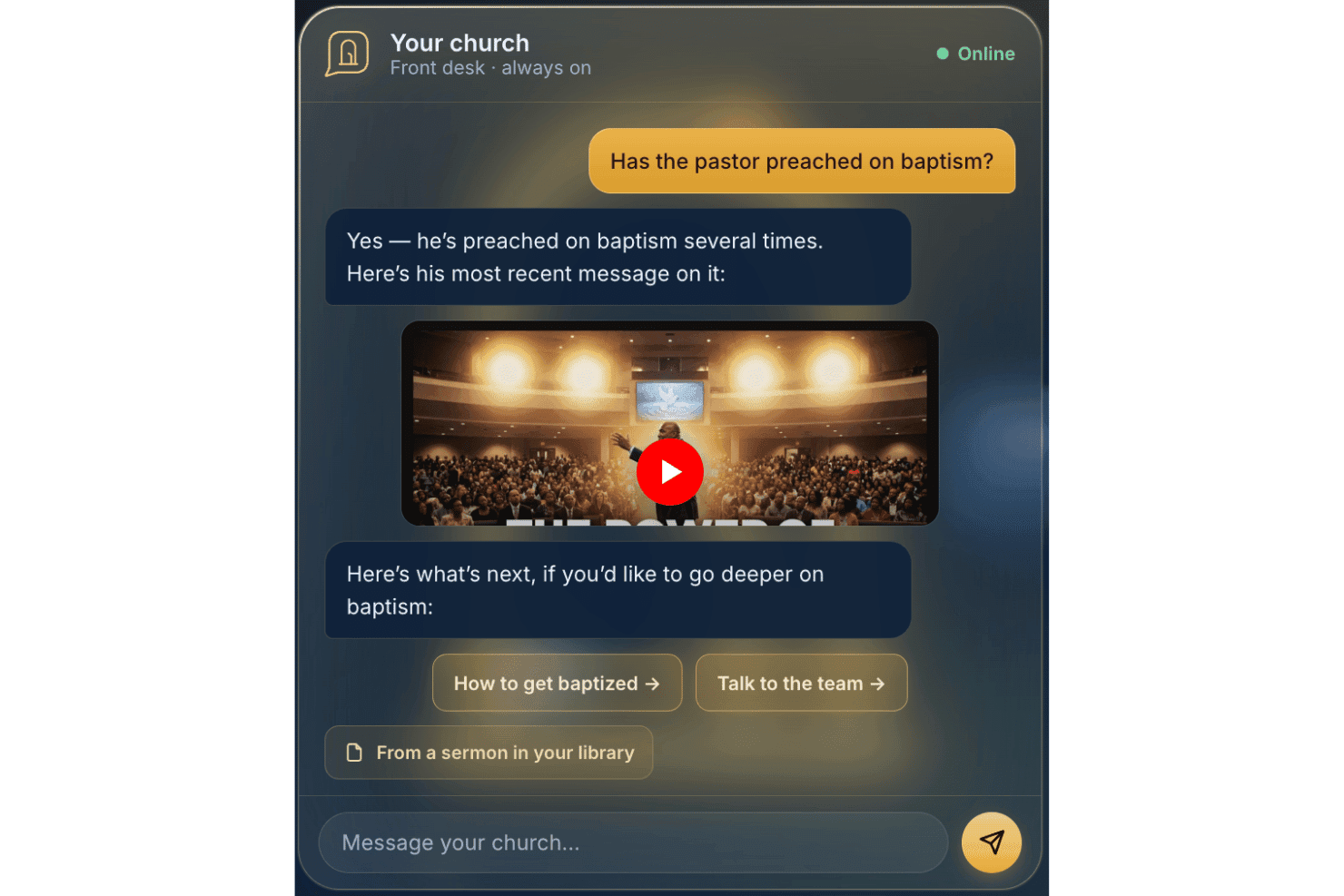
AskMyChurch ofrece un servicio de respuestas para iglesias impulsado por IA las 24 horas, los 7 días de la semana. AskMyChurch es un chatbot de IA para sitios web de iglesias que responde preguntas de miembros y visitantes utilizando el propio contenido publicado por la iglesia, sermones y videos, con enrutamiento de crisis incorporado y derivación para atención pastoral.
¿Para quién es mejor AskMyChurch?
Las iglesias con equipos administrativos reducidos que dedican mucho tiempo del personal a responder las mismas preguntas de visitantes y miembros por teléfono o correo electrónico son las que más se beneficiarán de AskMyChurch.
Por qué elegí AskMyChurch
AskMyChurch se gana su lugar en mi lista porque resuelve un verdadero desgaste diario para el personal de la iglesia: responder las mismas preguntas sobre horarios de servicio, estacionamiento y bautismos semana tras semana. Me encanta que sus respuestas estén fundamentadas exclusivamente en el sitio web y los sermones de la iglesia, mostrando una cita de la fuente cada vez, de modo que nunca inventa doctrina ni habla más allá de lo que la iglesia ha publicado. La función Crisis Gate también sobresale para mí: dirige los mensajes que señalan angustia a la línea de ayuda 988 y a tu equipo pastoral antes de que la IA responda.
Funciones clave de AskMyChurch
- Soporte multilingüe: El asistente puede responder preguntas tanto en inglés como en español.
- Anónimo por defecto: Los usuarios no necesitan crear cuentas ni proporcionar nombres para hacer preguntas.
- Bucle de aprendizaje: Cada semana se muestran ideas sobre temas comunes y vacíos para revisión del personal.
- Widget de sitio personalizado: Cada asistente se integra directamente en el sitio web de tu iglesia y coincide totalmente con tu marca.
Integraciones de AskMyChurch
Las integraciones nativas no están documentadas públicamente.
Pros and Cons
Pros:
- Solo responde preguntas con contenido propiedad de la iglesia
- Funciones integradas de escalada de crisis y oración
- Anónimo, no se requiere registro de usuario
Cons:
- No tiene herramientas de comunicación o mensajería saliente
- Carece de funciones de segmentación y seguimiento de miembros
Learn more about AskMyChurch: Ideal para traducción de sermones multilingües en vivo
- Prueba gratuita disponible
- Desde $150/mes

One Accord Translation ofrece traducción multilingüe en tiempo real para reuniones de iglesias, permitiendo interpretación en múltiples idiomas en vivo a través de una aplicación móvil. OneAccord es una plataforma de comunicación eclesiástica con IA que ofrece traducción de sermones en tiempo real, monitoreo de la calidad del audio y acceso de la congregación a través del navegador para servicios de adoración en vivo.
¿Para quién es mejor OneAccord?
Líderes de iglesias y equipos tecnológicos que necesitan herramientas impulsadas por IA para la comunicación multilingüe y la participación en servicios de adoración en vivo.
Por qué elegí OneAccord
Elegí OneAccord como uno de los mejores porque puedo ofrecer traducción de sermones multilingües en vivo directamente a los dispositivos de los congregantes. Mi equipo utiliza su traducción de audio y texto con IA para llegar a personas en varios idiomas al mismo tiempo. Me gusta que los oyentes puedan seguir el servicio en tiempo real, ya sea que estén en el santuario o participando remotamente.
Características clave de OneAccord
- Monitoreo de calidad de audio: Revisa y reporta continuamente la claridad del audio en vivo durante los servicios.
- Acceso de la congregación desde el navegador: Permite que los asistentes se unan y escuchen desde cualquier dispositivo con un navegador web.
- Identificación de oradores: Distingue entre varios oradores para una traducción y transcripción precisas.
- Grabación de sesiones: Captura y almacena sesiones de audio para revisarlas o compartirlas posteriormente.
Integraciones de OneAccord
Las integraciones nativas no están claramente documentadas. OneAccord ofrece una API para integraciones personalizadas.
Pros and Cons
Pros:
- Monitoreo de la calidad del audio en vivo durante los servicios
- Identificación de oradores para transcripciones precisas
- Grabación de sesiones para reproducción o compartir posteriormente
Cons:
- Información pública limitada sobre los niveles de precios
- La configuración de la API puede requerir conocimientos técnicos
Learn more about OneAccord: Mejor para planificación de comunicaciones basadas en campañas
- Prueba gratuita disponible
- Desde $32.50/mes

Communicate realiza el seguimiento de campañas de mensajes en un solo lugar central. Si buscas una forma de organizar y gestionar las comunicaciones de la iglesia a través de múltiples canales, Communicate ofrece una solución especializada. Esta plataforma está diseñada para equipos ministeriales que desean planificar, programar y hacer seguimiento de campañas de mensajes en un solo lugar. Es especialmente útil para iglesias que necesitan coordinar el alcance, los anuncios y la promoción de eventos con claridad y coherencia.
¿Para quién es mejor Communicate?
Communicate es ideal para directores de comunicación de iglesias y equipos ministeriales que deben coordinar campañas de mensajes en múltiples canales.
Por qué elegí Communicate
Lo que me llama la atención de Communicate es que está creado específicamente para la planificación de comunicaciones basadas en campañas. Elegí esta herramienta porque permite a los equipos de la iglesia diseñar estrategias de mensajes a través de correo electrónico, SMS y redes sociales, todo desde un panel de control unificado. Valoro el calendario de campañas y los flujos de aprobación, que ayudan a mantener a todos alineados y aseguran que los mensajes se envíen a tiempo. Estas funciones hacen de Communicate una excelente opción para iglesias que deben coordinar esfuerzos de alcance complejos y mantener coherencia en sus comunicaciones.
Características clave de Communicate
Otras funciones que me parecieron útiles para equipos de comunicación de iglesias incluyen:
- Sugerencias de contenido impulsadas por IA: La plataforma ofrece recomendaciones automáticas para el contenido de los mensajes según los objetivos de la campaña y la audiencia.
- Programación de mensajes multicanal: Programa comunicaciones para enviarlas a través de correo electrónico, SMS y redes sociales desde un solo lugar.
- Herramientas de segmentación de audiencia: Crea y administra grupos específicos para un alcance más personalizado.
- Analítica del rendimiento de mensajes: Supervisa tasas de apertura, interacción y métricas de entrega de cada campaña para fines de optimización.
Integraciones de Communicate
Actualmente no se listan integraciones nativas.
Pros and Cons
Pros:
- Calendario visual de campañas para la planificación de mensajes
- Flujos de aprobación para la colaboración en equipo
- Centraliza los mensajes entre canales
Cons:
- No cuenta con acceso directo a API pública
- No dispone de aplicación móvil nativa
Learn more about Communicate: Ideal para mensajería integrada de texto y correo electrónico
- Prueba gratuita de 30 días disponible
- Desde $72/mes
Visit WebsiteCustomer Rating:4.7/5
Tithely simplifica la comunicación de la iglesia para textos y correos electrónicos. Si buscas una forma de unificar la comunicación digital de tu iglesia, Tithely ofrece una plataforma diseñada para comunidades de fe. Esta herramienta está creada para iglesias que desean gestionar tanto el envío de mensajes de texto como de correos electrónicos desde un solo lugar. Ayuda a los equipos ministeriales a mantener informados, comprometidos y conectados a los miembros sin tener que manejar varios sistemas.
¿Para quién es mejor Tithely?
Tithely es ideal para iglesias y equipos ministeriales que quieren centralizar la comunicación por texto y correo electrónico con su congregación.
Por qué elegí Tithely
Lo que destaca de Tithely es cómo integra los mensajes de texto y de correo electrónico en una sola plataforma, algo poco común entre las herramientas de comunicación para iglesias. Lo elegí porque esta integración permite llegar a tu congregación a través del canal que prefieran, sin cambiar entre varios sistemas. Tithely te permite programar mensajes, segmentar tu audiencia y realizar un seguimiento de la entrega tanto de textos como de correos electrónicos desde un solo panel. Este enfoque unificado ayuda a las iglesias a mantener su comunicación organizada y coherente, especialmente al coordinar eventos, recordatorios o actualizaciones urgentes.
Funciones clave de Tithely
Otras funciones que hacen útil a Tithely para la comunicación en la iglesia incluyen:
- Plantillas de mensajes: Crea y reutiliza mensajes preescritos para actualizaciones o anuncios recurrentes.
- Mensajería bidireccional: Permite que los destinatarios respondan directamente a los textos o correos electrónicos para una comunicación más interactiva.
- Gestión de contactos: Organiza, importa y segmenta la información de contacto de tu congregación dentro de la plataforma.
- Mensajes automáticos de cumpleaños y aniversarios: Programa saludos personalizados para celebrar fechas importantes con los miembros.
Integraciones de Tithely
Entre las integraciones se incluyen QuickBooks Online, RockRMS, Engiven, Elvanto, Salesforce, MinistryPlatform, Shelby Systems, FellowshipOne y más.
Pros and Cons
Pros:
- Combina mensaje de texto y correo electrónico en un solo panel
- Incluye mensajería bidireccional para respuestas de miembros
- Proporciona mensajes automáticos de cumpleaños y aniversario
Cons:
- Carece de análisis avanzados de rendimiento
- No admite códigos cortos SMS
 Ideal para la conectividad de pequeños grupos
- Plan gratuito + prueba gratuita de 30 días disponible
- Desde $15/20 miembros/mes

Planning Center Groups gestiona la comunicación y los eventos de grupos. Si buscas una forma de organizar y apoyar los pequeños grupos de la iglesia, Planning Center Groups ofrece una solución especializada. Esta plataforma está diseñada para líderes de ministerio que desean gestionar la comunicación, los eventos y la participación de los miembros de los grupos en un solo lugar. Facilita que las iglesias mantengan la vida grupal conectada y organizada, especialmente a medida que los ministerios crecen o se diversifican.
¿Para quién es Planning Center?
Planning Center Groups es ideal para líderes de iglesias y equipos ministeriales que necesiten coordinar, comunicar y gestionar varios pequeños grupos dentro de su congregación.
Por qué elegí Planning Center
Lo que me atrajo de Planning Center Groups es cómo coloca la conectividad de los pequeños grupos en el centro de la comunicación de la iglesia. La plataforma te permite crear directorios de grupos, gestionar listas de miembros y enviar mensajes dirigidos a los participantes, todo desde un único panel. Valoro que permite programar eventos y llevar el registro de asistencia, lo que ayuda a los líderes a mantener la vida grupal organizada y activa. Estas funciones lo convierten en una excelente opción para las iglesias que desean fomentar relaciones más profundas y una comunicación constante en sus pequeños grupos.
Funciones clave de Planning Center
Otras funciones que hacen que Planning Center Groups sea útil para la comunicación en la iglesia incluyen:
- Formularios de inscripción personalizables: Crea y gestiona formularios de inscripción para facilitar que las personas se unan a los grupos.
- Compartir recursos: Sube y distribuye materiales de estudio, documentos o avisos directamente a los miembros del grupo.
- Recordatorios automáticos: Programa y envía recordatorios sobre próximas reuniones o eventos para mantener a todos informados.
- Acceso desde la app móvil: Permite a líderes y miembros gestionar grupos, comunicarse y acceder a recursos desde sus teléfonos.
Integraciones de Planning Center
Las integraciones incluyen BoxCast, Checkr, Mailchimp, PraiseCharts, RehearsalMix, SongSelect, Clearstream y más.
Pros and Cons
Pros:
- Admite mensajería grupal y anuncios
- Ofrece programación de eventos con seguimiento de RSVP
- Permite compartir recursos para materiales de estudio
Cons:
- Automatización limitada para el seguimiento de mensajes
- Carece de análisis avanzados para la participación de grupos
Learn more about Planning Center: Ideal para funciones de feed de noticias y chat
- Demo gratuita disponible
- Precio bajo consulta

Realm facilita la mensajería, actualizaciones y la participación de la comunidad. Realm es una plataforma de gestión de iglesias diseñada para congregaciones que buscan centralizar la comunicación y la interacción comunitaria. Si estás buscando una solución que combine mensajería grupal, coordinación de eventos y actualizaciones de miembros en un solo lugar, Realm es una opción a considerar. Es especialmente útil para iglesias que desean mantener a los miembros conectados e informados a través de canales digitales.
¿Para quién es mejor Realm?
Realm es ideal para líderes de iglesias y equipos de comunicación que desean fomentar la participación continua y la conversación dentro de sus congregaciones.
Por qué elegí Realm
Lo que más me llama la atención de Realm es cómo reúne funciones de feed de noticias y chat de una manera que resulta familiar para quienes usan redes sociales. La plataforma permite publicar anuncios, compartir actualizaciones y crear conversaciones en grupo, todo dentro de un entorno seguro para la iglesia. Me gusta que los miembros puedan comentar, reaccionar e interactuar directamente en las publicaciones, lo que ayuda a fomentar el sentido de comunidad y la participación continua. Estas características hacen que Realm sea especialmente útil para iglesias que quieren mantener a todos conectados e informados entre servicios y eventos.
Características clave de Realm
Además de sus capacidades de feed de noticias y chat, Realm ofrece varias otras funciones que apoyan la comunicación y la gestión en la iglesia:
- Herramientas de gestión de eventos: Programa eventos, gestiona confirmaciones de asistencia (RSVP) y comunica actualizaciones a los asistentes directamente desde la plataforma.
- Notificaciones push: Envía alertas en tiempo real a los dispositivos móviles de los miembros para anuncios urgentes o recordatorios.
- Compartir documentos: Sube y distribuye archivos, como boletines o actas de reuniones, a grupos específicos o a toda la congregación.
- Permisos basados en roles: Controla el acceso a las herramientas de comunicación e información sensible según los roles de usuario dentro de la iglesia.
Integraciones de Realm
Las integraciones incluyen Constant Contact, la app móvil Realm Connect y más.
Pros and Cons
Pros:
- El feed de noticias mantiene a los miembros actualizados en tiempo real
- Las confirmaciones de eventos (RSVP) se integran con las herramientas de comunicación
- Los permisos basados en roles protegen la información sensible
Cons:
- No dispone de flujos automáticos de seguimiento para invitados
- Integraciones limitadas con herramientas externas
Learn more about Realm: Mejor para generación automática de recursos de sermones
- Prueba gratuita disponible
- Desde $39/mes

Pulpit AI convierte sermones en guías de estudio, preguntas y publicaciones. Si buscas una forma de convertir sermones en una variedad de recursos ministeriales, Pulpit AI ofrece una solución especializada. Esta plataforma está diseñada para pastores y líderes de iglesias que desean reutilizar contenido de sermones para enseñanza, alcance y discipulado. Te ayuda a ahorrar tiempo al generar automáticamente guías de estudio bíblico, preguntas para discusión y publicaciones para redes sociales a partir de las transcripciones o audios de tus sermones.
¿Para quién es mejor Pulpit AI?
Pulpit AI es ideal para pastores y equipos ministeriales que desean crear rápidamente materiales de estudio, guías de discusión y contenido digital a partir de los sermones semanales.
Por qué elegí Pulpit AI
Lo que diferencia a Pulpit AI es su capacidad para generar automáticamente una amplia gama de recursos basados en sermones con un esfuerzo mínimo. Lo elegí porque toma la transcripción o el audio del sermón y crea guías de estudio, preguntas para grupos pequeños y contenido para redes sociales en solo unos clics. Esto es especialmente útil para pastores que desean ampliar el impacto de sus mensajes semanales sin pasar horas creando contenido de forma manual. El enfoque de la plataforma en la reutilización de sermones la convierte en una excelente opción para iglesias que buscan multiplicar sus esfuerzos de discipulado mediante el uso de IA.
Funciones clave de Pulpit AI
Otras funciones que hacen útil a Pulpit AI para la comunicación de la iglesia incluyen:
- Opciones de exportación en varios formatos: Descarga los recursos generados como documentos Word, PDFs o archivos de texto para facilitar el intercambio.
- Herramientas de edición de contenido: Realiza ajustes rápidos a los materiales generados por IA antes de distribuirlos.
- Biblioteca de recursos: Almacena y organiza todos los recursos de sermones anteriores en una ubicación fácil de buscar.
- Colaboración en equipo: Invita a empleados o voluntarios a revisar, editar y gestionar juntos los contenidos generados.
Integraciones de Pulpit AI
La integración incluye Subsplash.
Pros and Cons
Pros:
- Convierte sermones en múltiples formatos de recursos
- Ofrece herramientas de edición para el contenido generado por IA
- Almacena todos los recursos generados en una biblioteca sencilla de buscar
Cons:
- Integraciones nativas limitadas con plataformas para iglesias
- No incluye programación o calendario incorporado para sermones
Learn more about Pulpit AI: Lo mejor con herramientas de contenido de sermones impulsadas por IA
- Plan gratuito disponible
- From $65/month

Church.tech ayuda a los pastores a generar y compartir sermones más rápido con IA. Si buscas apoyo impulsado por IA para la preparación de sermones y la comunicación en la iglesia, Church.tech ofrece una solución especializada. Esta plataforma está diseñada para pastores y líderes ministeriales que desean generar, organizar y compartir contenido con menos esfuerzo manual que el que requeriría un simple mensaje en ChatGPT. Es especialmente útil para iglesias que buscan mantener una comunicación fresca y relevante, ahorrando tiempo en la creación semanal de contenido.
¿Para quién es mejor Church.tech?
Church.tech es ideal para pastores y equipos ministeriales en iglesias de cualquier tamaño que desean optimizar la creación de sermones y la comunicación digital.
Por qué elegí Church.tech
Elegí Church.tech porque sus herramientas de contenido para sermones, impulsadas por IA, responden a una necesidad real de los pastores que desean crear mensajes significativos sin comenzar de cero cada semana. La plataforma ofrece generación de ideas para sermones y creación automática de esquemas, lo que ayuda a los líderes a ahorrar tiempo y mantener la inspiración. Además, valoro que Church.tech incluya herramientas para adaptar una serie de sermones a boletines y publicaciones en redes sociales, facilitando mantener a la congregación comprometida en diversos canales. Estas funciones la convierten en una excelente opción para iglesias que buscan modernizar su comunicación con el apoyo de contenido basado en IA.
Características clave de Church.tech
Otras características que hacen útil a Church.tech para la comunicación en la iglesia incluyen:
- Gestión de peticiones de oración con IA: Organiza y clasifica automáticamente las peticiones de oración entrantes para facilitar su seguimiento y respuesta.
- Programación de contenido: Permite planificar y programar mensajes, devocionales y anuncios para enviarlos en momentos específicos.
- Herramientas de comunicación con voluntarios: Ofrece opciones de mensajes dirigidos para coordinar con equipos de voluntarios y grupos ministeriales.
- Biblioteca de recursos: Almacena y organiza sermones anteriores, plantillas y materiales multimedia para acceder rápidamente y reutilizar.
Integraciones de Church.tech
Actualmente no se listan integraciones nativas.
Pros and Cons
Pros:
- Automatiza la conversión de sermones a contenido devocional
- Genera clips para redes sociales en múltiples plataformas
- Produce traducciones nativas precisas
Cons:
- No tiene herramientas integradas para donaciones digitales
- Requiere servicios externos de alojamiento de video
Learn more about Church.tech: Mejor para la programación en redes sociales
- Prueba gratuita + demo gratis disponible
- Desde $15/mes

ChurchSocial simplifica la planificación y programación de publicaciones sociales de la iglesia. Si buscas una manera de gestionar y automatizar la presencia online de tu iglesia, ChurchSocial ofrece una solución especializada. Esta plataforma está diseñada para equipos ministeriales y encargados de comunicación que desean planificar, programar y coordinar publicaciones en múltiples canales. Es especialmente útil para iglesias que buscan mantener su mensaje coherente y oportuno sin añadir trabajo manual extra cada semana.
¿Para quién es mejor ChurchSocial?
ChurchSocial es ideal para equipos de comunicación de iglesias y coordinadores de redes sociales que necesitan planificar y automatizar publicaciones en varias plataformas.
Por qué elegí ChurchSocial
Elegí ChurchSocial porque sus herramientas de programación de publicaciones están diseñadas específicamente para las necesidades de comunicación de las iglesias. La plataforma te permite crear, programar y gestionar publicaciones en varios canales de redes sociales desde un solo panel, lo que es especialmente útil para mantener organizado y coherente el mensaje de tu iglesia. También valoro que ChurchSocial incluya un calendario de contenidos y flujos de aprobación, de modo que los equipos pueden planificar campañas y asegurarse de que las publicaciones estén alineadas con los objetivos del ministerio. Estas funciones la convierten en una opción sólida para iglesias que desean mantenerse activas en línea sin tener que usar varias herramientas o publicar manualmente.
Características clave de ChurchSocial
Otras funciones que hacen útil a ChurchSocial para la comunicación eclesiástica incluyen:
- Sugerencias de contenido potenciado por IA: La plataforma recomienda ideas de publicaciones y textos adaptados a eventos y temas de la iglesia.
- Biblioteca de imágenes y medios: Guarda, organiza y reutiliza gráficos, fotos y videos para futuras publicaciones.
- Herramientas de colaboración en equipo: Asigna roles, comparte borradores y comunícate dentro de la plataforma para coordinar los mensajes.
- Panel de análisis: Rastrea métricas de interacción y el desempeño de las publicaciones en todos los canales sociales conectados.
Integraciones de ChurchSocial
Las integraciones incluyen Pushpay, Planning Center, Tithely y más.
Pros and Cons
Pros:
- La IA sugiere ideas de contenido para publicaciones de la iglesia
- Calendario centralizado para todo el contenido programado
- La biblioteca multimedia almacena gráficos y videos reutilizables
Cons:
- No incluye mensajería interna por correo electrónico o SMS
- No tiene funciones para planificar sermones o cultos
Learn more about ChurchSocial: Mejor para generar mensajes alineados con la fe
- Plan gratuito disponible
- Desde $49/mes

ChurchCopy genera sermones, devocionales y anuncios. Si buscas redacción impulsada por IA adaptada a la comunicación eclesiástica, ChurchCopy está diseñado para ti. Esta herramienta ayuda a pastores, líderes de ministerios y personal de la iglesia a crear mensajes que reflejan valores y lenguaje basados en la fe. Está creada para apoyar a quienes desean generar sermones, devocionales, anuncios o contenido de alcance que conecte con una audiencia cristiana.
¿Para quién es mejor ChurchCopy?
ChurchCopy es ideal para pastores, equipos de ministerios y comunicadores de iglesias que desean generar contenido escrito centrado en la fe, de manera rápida y constante.
Por qué elegí ChurchCopy
Lo que me atrajo de ChurchCopy es su enfoque en generar mensajes alineados con los valores y lenguajes cristianos, algo que la mayoría de las herramientas genéricas de redacción con IA no pueden ofrecer. La elegí porque está diseñada específicamente para iglesias, con plantillas y sugerencias pensadas para sermones, devocionales y anuncios ministeriales. La IA de la plataforma está entrenada para comprender el contexto basado en la fe, por lo que obtienes contenido auténtico y apropiado para tu congregación. Esto la convierte en una opción sólida para líderes que desean mantener la integridad teológica mientras ahorran tiempo en tareas de comunicación.
Funciones clave de ChurchCopy
Otras características que hacen útil a ChurchCopy para la comunicación eclesiástica incluyen:
- Herramientas para reutilizar contenido: Transforma sermones o devocionales en publicaciones para redes, correos electrónicos o boletines con unos pocos clics.
- Ajuste de tono y estilo: Elige entre diferentes configuraciones de tono para adaptar el estilo de comunicación de tu iglesia o audiencia.
- Integración de Escrituras: Inserta automáticamente versículos bíblicos relevantes en el contenido generado.
- Generación masiva de contenido: Crea múltiples piezas de contenido al mismo tiempo para distintos canales o campañas.
Integraciones de ChurchCopy
Actualmente no se listan integraciones nativas.
Pros and Cons
Pros:
- Inserción automática de escrituras en el contenido generado
- Generación masiva de contenido para múltiples canales
- Herramientas para reutilizar contenido en boletines y publicaciones
Cons:
- Sin funciones integradas de eventos o calendario
- Sin aplicación móvil para edición en movimiento
Learn more about ChurchCopy:
Otros programas de software de comunicación eclesial con IA
Estas son algunas opciones adicionales de software de comunicación eclesial con IA que no han entrado en mi selección, pero que aún merece la pena consultar:
- 11ClearstreamIdeal para mensajes masivos en iglesias
- 12Church Central CloudIdeal para la gestión centralizada de la comunicación en la iglesia
- 13Doctrinally AIMejor para respuestas instantáneas con citas de fuente
- 14EZ TextingIdeal para flujos de trabajo de automatización SMS personalizados
- 15Text In ChurchIdeal para flujos de trabajo automatizados de seguimiento de invitados
Cómo Evalúo el Software de Comunicación para Iglesias con IA
Cada herramienta en esta lista necesita hacer más que solo agregar una etiqueta de IA a los envíos básicos de correos electrónicos; busco plataformas donde la IA realmente redacte resúmenes de sermones, segmente a la congregación y personalice seguimientos sin exigir más horas de trabajo al equipo. Divido mi evaluación en funcionalidad principal que todo software debe entregar y factores diferenciadores que separan las buenas opciones de las excelentes.
Funcionalidad Principal (Requisitos Básicos Para Esta Lista)
Al seleccionar las herramientas para mi lista, califico cada una en una escala del 0 (no ofrece la funcionalidad) al 5 (sobresale en este aspecto) para cada funcionalidad principal mencionada abajo. Luego, calculo la puntuación total de la herramienta en porcentaje. Cada herramienta debe lograr una puntuación total mínima del 55% para ser considerada.
- Generación de Contenido con IA: Verifico si la IA puede redactar contenido específico de iglesia, como resúmenes de sermones, boletines semanales y publicaciones sociales, y no solo texto publicitario genérico.
- Mensajería Multicanal: Cada herramienta debe unificar al menos tres canales (correo electrónico, SMS, redes sociales, notificaciones push o app) para que los equipos no tengan que cambiar de plataforma para comunicarse con los miembros.
- Segmentación de la Congregación: Busco agrupación asistida por IA según participación ministerial, patrones de asistencia o etapa de la vida, por ejemplo, identificar automáticamente a visitantes por primera vez para secuencias de bienvenida dirigidas.
- Personalización y Automatización: Los flujos de trabajo automatizados son clave aquí, como enviar un mensaje de seguimiento cuando un miembro falte varias semanas o enviar devocionales personalizados por grupo pequeño.
- Análisis de Participación: La plataforma debe ofrecer perspectivas impulsadas por IA sobre el rendimiento de los mensajes y señalar a los miembros en riesgo, no solo reportar tasas de apertura.
- Integración con Plataformas para Iglesias: Evalúo qué tan bien cada herramienta se sincroniza con los sistemas de gestión más populares de iglesias como Planning Center, Breeze o Rock RMS para contar con datos precisos de miembros.
Una vez tengo una lista de herramientas que cumplen estos criterios, considero qué distingue a cada plataforma.
Factores Diferenciadores (Lo que Distingue a los Proveedores)
Así es como comparo y contrasto diferentes proveedores:
Características Destacadas
La reutilización de sermones en contenido es fundamental: busco herramientas capaces de tomar una grabación de sermón y convertirla en blogs, clips para redes sociales y devocionales a mitad de semana sin edición manual. La configuración de marca y tono también es importante porque un tono genérico de IA resulta inapropiado en contextos ministeriales. Las mejores herramientas permiten enseñar a la IA el lenguaje teológico y estilo de comunicación de la iglesia. Para congregaciones multiculturales, evalúo la traducción multilingüe que adapte anuncios y acciones de alcance en múltiples idiomas.
Más Allá de las Características
La privacidad de datos es aún más relevante aquí: las peticiones de oración y conversaciones pastorales son sumamente sensibles, así que evalúo cómo maneja cada proveedor los datos de la congregación y si se usan para entrenar modelos de IA de terceros. El ajuste denominacional también importa. Una herramienta centrada en flujos de trabajo evangélicos puede resultar ajena para una iglesia litúrgica. Finalmente, considero el soporte en la capacitación para equipos compuestos mayormente por voluntarios, ya que la mayoría de los comunicadores de iglesia no son profesionales de marketing a tiempo completo y necesitan recursos de formación accesibles.
Cómo elegir un software de comunicación eclesial con IA
Es fácil perderse entre largas listas de funciones y estructuras de precios complejas. Para ayudarte a mantener la concentración mientras recorres tu proceso único de selección de software, por ejemplo, al valorar la relevancia de la IA para las iglesias, aquí tienes una lista de factores que debes tener en cuenta:
| Factor | Qué debes tener en cuenta |
|---|---|
| FactorEscalabilidad | Qué debes tener en cuenta¿Podrá el software gestionar el crecimiento de tu iglesia, los nuevos ministerios o varios campus sin grandes actualizaciones ni costes adicionales? |
| FactorIntegraciones | Qué debes tener en cuenta¿La herramienta se conecta de forma nativa con tus sistemas actuales de gestión eclesial, donaciones o calendarios, o necesitarás soluciones alternativas? |
| FactorPersonalización | Qué debes tener en cuenta¿Puedes adaptar las plantillas de comunicación, los roles de usuario y los flujos de trabajo para ajustarlos a la estructura y las necesidades ministeriales específicas de tu iglesia? |
| FactorFacilidad de uso | Qué debes tener en cuenta¿Podrán el personal y los voluntarios con distintos niveles de familiaridad tecnológica aprender a utilizar el sistema rápidamente, o necesitarán ayuda continua? |
| FactorImplementación e incorporación | Qué debes tener en cuenta¿Cuánto tiempo se tardará en ponerlo en marcha y qué asistencia o recursos proporciona el proveedor para la migración de datos y la formación? |
| FactorCoste | Qué debes tener en cuenta¿Hay tarifas ocultas, límites de usuarios o complementos obligatorios que puedan afectar a tu presupuesto a medida que tus necesidades cambien con el tiempo? |
| FactorMedidas de seguridad | Qué debes tener en cuenta¿Ofrece el software una protección de datos adecuada, controles de acceso de usuarios y cumplimiento de las normas de privacidad pertinentes para tu ministerio? |
| FactorDisponibilidad de asistencia | Qué debes tener en cuenta¿Qué canales de asistencia se ofrecen (chat, teléfono, correo electrónico) y están disponibles durante los momentos de mayor actividad de tu iglesia o solo en el horario estándar? |
¿Qué es el software de comunicación eclesial con IA?
El software de comunicación eclesial con IA es una plataforma digital que utiliza inteligencia artificial para ayudar a las iglesias a gestionar, automatizar y personalizar sus comunicaciones con miembros y visitantes. Estas herramientas permiten realizar tareas como enviar mensajes grupales, programar anuncios y analizar la participación, lo que permite a los líderes de la iglesia llegar a su congregación de forma más eficiente y relevante.
Características del software de comunicación eclesial con IA
Al seleccionar un software de comunicación eclesial con IA, presta atención a las siguientes características clave:
- Mensajería automatizada: Envía automáticamente correos electrónicos, mensajes de texto o notificaciones de la aplicación a grupos o personas según horarios, activadores o acciones de los miembros.
- Sugerencias de contenido basadas en IA: Genera borradores de mensajes, anuncios o recordatorios de eventos mediante inteligencia artificial para ahorrar tiempo y mejorar la calidad de la comunicación.
- Programación de eventos y recordatorios: Crea, gestiona y promociona eventos de la iglesia mientras envías recordatorios automatizados a los asistentes.
- Gestión del directorio de miembros: Almacena, organiza y actualiza la información de contacto, las pertenencias a grupos y las preferencias de comunicación de todos los miembros.
- Análisis y seguimiento de la participación: Supervisa las tasas de apertura de mensajes, las tasas de respuesta y la participación general para ayudar a perfeccionar las estrategias de comunicación.
- Controles de acceso basados en roles: Asigna permisos al personal y a los voluntarios, garantizando que las personas adecuadas tengan acceso a las herramientas y los datos de comunicación adecuados.
- Plantillas personalizables: Utiliza y adapta plantillas prediseñadas para mensajes habituales, boletines o invitaciones a eventos con el fin de mantener la coherencia y ahorrar tiempo.
- Comunicación multicanal: Llega a tu congregación por correo electrónico, SMS, notificaciones push o mensajes dentro de la aplicación desde una única plataforma.
- Integración con sistemas de gestión eclesial: Conecta las herramientas de comunicación con la base de datos, el calendario o la plataforma de donaciones existente de tu iglesia para lograr un flujo de datos fluido.
- Seguimiento automatizado de visitantes: Activa mensajes de seguimiento personalizados para visitantes o nuevos miembros en función de sus interacciones o asistencia.
Beneficios del software de comunicación eclesial con IA
Implementar un software de comunicación eclesial con IA ofrece varios beneficios para tu equipo y tu organización. Estos son algunos de los que puedes esperar:
- Gestión centralizada de la comunicación: Mantén todos los mensajes, anuncios y recordatorios organizados en un solo lugar, reduciendo la confusión y las actualizaciones que se pasan por alto.
- Ahorro de tiempo: Automatiza los mensajes y seguimientos rutinarios, reduciendo el tiempo que el personal y los voluntarios deben dedicar a estas tareas.
- Comunicación personalizada: Utiliza sugerencias de contenido basadas en IA y el seguimiento automatizado de visitantes para adaptar los mensajes a cada miembro y visitante.
- Mejor seguimiento de la participación: Supervisa las tasas de apertura, las respuestas y la participación para comprender mejor qué resulta más atractivo para tu congregación.
- Mensajes coherentes: Aprovecha las plantillas personalizables y las herramientas de programación para garantizar que cada comunicación esté alineada con la voz y los horarios de tu iglesia.
- Mayor precisión de los datos: Integra el sistema de gestión de tu iglesia para mantener actualizada la información de los miembros y reducir los errores de introducción manual.
- Escalable para el crecimiento: Adáptate fácilmente a medida que tu iglesia crece, añadiendo nuevos grupos, sedes o ministerios sin tener que revisar por completo tu proceso de comunicación.
Costes y precios del software de comunicación eclesial con IA
Seleccionar un software de comunicación eclesial con IA requiere comprender los distintos modelos de precios y planes disponibles. Los costes varían en función de las características, el tamaño del equipo, los complementos y otros factores. La siguiente tabla resume los planes habituales, sus precios medios y las características que suelen incluir las soluciones de software de comunicación eclesial con IA:
Tabla comparativa de planes de software de comunicación eclesial con IA
| Tipo de plan | Precio medio | Características habituales |
|---|---|---|
| Tipo de planPlan gratuito | Precio medio$0 | Características habitualesMensajería grupal básica, contactos limitados, programación sencilla de eventos y análisis básicos. |
| Tipo de planPlan personal | Precio medio$5-$25/usuario/mes | Características habitualesLímites de mensajería ampliados, gestión del directorio de miembros, plantillas personalizables y asistencia por correo electrónico. |
| Tipo de planPlan empresarial | Precio medio$30-$75/usuario/mes | Características habitualesMensajería multicanal, sugerencias de contenido basadas en IA, opciones de integración y análisis avanzados. |
| Tipo de planPlan corporativo | Precio medio$100-$250+/mes | Características habitualesUsuarios ilimitados, compatibilidad con varios campus, incorporación personalizada, seguridad avanzada y asistencia prioritaria. |
Preguntas frecuentes sobre el software de comunicación eclesial con IA
A continuación, encontrarás respuestas a algunas preguntas frecuentes sobre el software de comunicación eclesial con IA:
¿Cómo mejora la IA la comunicación de la iglesia?
La IA mejora la comunicación de la iglesia al automatizar tareas rutinarias, sugerir contenido personalizado y analizar los datos de interacción. Esto ayuda a los líderes a enviar mensajes oportunos y relevantes, y reduce el esfuerzo manual necesario para mantener a los miembros informados y conectados.
¿Puede el software de comunicación eclesial con IA integrarse con nuestro sistema de gestión eclesial actual?
Sí, la mayoría de los programas de comunicación eclesial con IA pueden integrarse con los sistemas de gestión eclesial más populares. La integración permite sincronizar los datos de los miembros, automatizar las actualizaciones y optimizar los flujos de trabajo, pero confirma siempre la compatibilidad con tus herramientas actuales antes de realizar la compra.
¿Es difícil formar al personal y a los voluntarios para utilizar un software de comunicación eclesial con IA?
No, la mayoría de las plataformas están diseñadas con interfaces fáciles de usar y ofrecen recursos de incorporación, como tutoriales, plantillas y asistencia. Sin embargo, algunos usuarios pueden necesitar más tiempo o formación, especialmente si no se sienten cómodos con la tecnología.
¿Qué medidas de seguridad debo buscar en un software de comunicación eclesial con IA?
Busca funciones como el cifrado de datos, los controles de acceso de los usuarios y el cumplimiento de las normas de privacidad. Estas medidas de protección ayudan a proteger la información confidencial de los miembros y garantizan que tu iglesia cumpla con sus responsabilidades legales y éticas.
¿Cómo sé si mi iglesia necesita herramientas de comunicación basadas en IA?
Si tu equipo dedica mucho tiempo a la mensajería manual, tiene dificultades para mantener la participación de los miembros o quiere personalizar la comunicación a gran escala, las herramientas basadas en IA pueden ayudar. Ten en cuenta el tamaño de tu iglesia, el volumen de comunicaciones y tus planes de crecimiento al tomar una decisión.